findgroups
Find groups and return group numbers
Syntax
Description
To split data into groups and apply a function to the groups, use the
findgroups and splitapply functions
together. For more information about calculations on groups of data, see Calculations on Groups of Data.
G = findgroups(A)G, a vector of group numbers created from the grouping
variable A. The output argument G contains
integer values from 1 to N, indicating N
distinct groups for the N unique values in
A. For example, if A is ["b"
"a" "a" "b"], then findgroups returns
G as [2 1 1 2]. In other words, the
group numbers in G correspond to the sorted unique values in
A.
To use G to split groups of data out of other variables,
pass it as an input argument to the splitapply function.
The findgroups function treats missing strings, empty character vectors,
NaN, NaT, and undefined categorical
values in A as missing values and returns
NaN as the corresponding elements of
G.
G = findgroups(A1,...,AN)A1,...,AN. The
findgroups function defines groups as the unique
combinations of values across A1,...,AN. For example, if
A1 is ["a" "a" "b" "b"] and
A2 is [0 1 0 0], then
findgroups(A1,A2) returns G as
[1 2 3 3], because the combination "b"
0 occurs twice.
[
also returns the sorted unique values for each group across
G,ID1,...,IDN] = findgroups(A1,...,AN)ID1,...,IDN. The values across
ID1,...,IDN define the groups. For example, if
A1 is ["a" "a" "b" "b"] and
A2 is [0 1 0 0], then
findgroups(A1,A2) returns G as
[1 2 3 3], and ID1 and
ID2 as ["a" "a" "b"] and [0 1
0].
Examples
Input Arguments
Output Arguments
More About
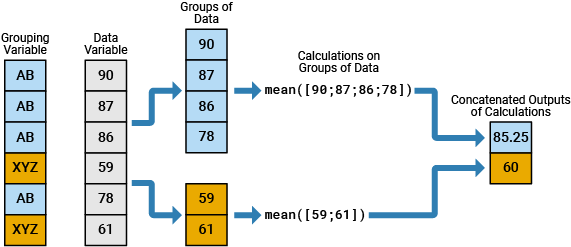
In data analysis, you commonly perform calculations on groups of data. For such calculations, you split one or more data variables into groups of data, perform a calculation on each group, and combine the results into one or more output variables. You can specify the groups using one or more grouping variables. The unique values in the grouping variables define the groups that the corresponding values of the data variables belong to.
For example, the diagram shows a simple grouped calculation that splits a
6-by-1 numeric vector into two groups of data, calculates the mean of each
group, and then combines the outputs into a 2-by-1 numeric vector. The
6-by-1 grouping variable has two unique values, AB and
XYZ.
You can specify grouping variables that have numbers, text, dates and times, categories, or bins.
Extended Capabilities
Version History
Introduced in R2015bSee Also
splitapply | pivot | unique | ismember | rowfun | varfun | arrayfun | groupsummary | discretize | histcounts | accumarray | convertvars | vartype

