bounds
R2026bSyntax
Description
Examples
Suppose you log a signal generated from a Random
Number block to the Simulation Data Inspector. You can get descriptive statics
about the logged signal using the Simulink.sdi.Signal object.
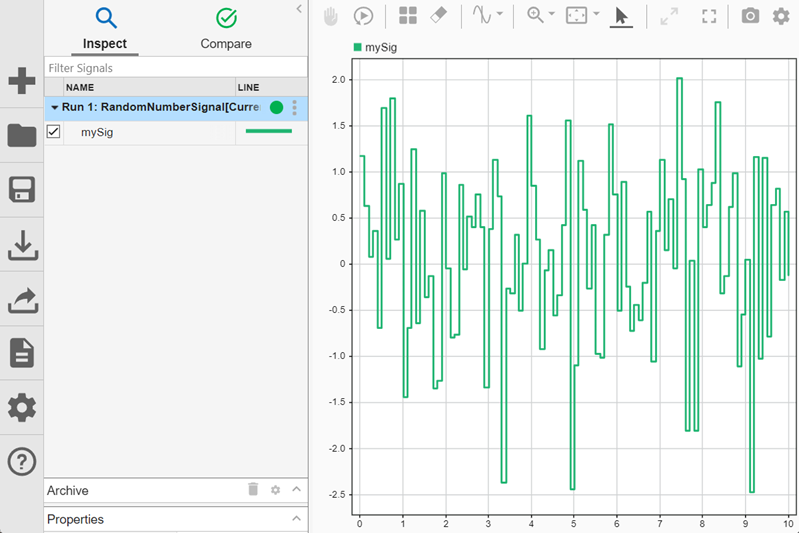
Access the Simulink.sdi.Signal object for the signal named
mySig.
runObj = Simulink.sdi.Run.getLatest;
sigObj = getSignalsByName(runObj,"mySig");
Find the minimum and maximum sample values using the bounds
function.
[minVal,maxVal] = bounds(sigObj)
minVal =

   -2.4828


maxVal =

    2.0185
To find the minimum and maximum sample values near the end of the simulation,
specify the starting time. For example, to find the minimum and maximum values in the
last two seconds of the simulation, specify startTime as
8.
[minValEnd,maxValEnd] = bounds(sigObj,8)
minValEnd =

   -2.4828


maxValEnd =

    1.7524
To find the minimum and maximum sample values in a specific interval, specify the start and end time to search in. For example, find the minimum and maximum sample values between 2 seconds and 4 seconds.
[minValInterval,maxValInterval] = bounds(sigObj,2,4)
minValInterval =

   -2.3775


maxValInterval =

    1.6065
Input Arguments
Output Arguments
Version History
Introduced in R2026a

