Adaptive Notch Filter
Automatically adjust notch filter parameters based on detected resonance
Since R2026a
Libraries:
Simulink Control Design /
Adaptive Control
Description
The Adaptive Notch Filter block automatically adjusts the notch frequency, depth, and width to filter resonances as well as any other frequency of interest such as harmonics or sideband frequencies. To perform adaptive notch filtering, the block provides two methods:
| Method | When to Use | Adaptation Summary |
|---|---|---|
| Identify and remove system resonances | You want to identify the slowly varying resonant frequency using frequency‑response estimation, and suppress it with the adaptive notch filter. |
|
| Remove content at single frequency | You want to continuously apply adaptive notch filtering to a specified frequency or to the highest peak in the input spectrum. You can also use this configuration for resonances, but is more general purpose and is mostly helpful for power systems or electrical applications to just remove a single arbitrary frequency |
|
The algorithms used are summarized as follows:
Frequency Response Estimation — The algorithm simultaneously injects perturbation signals into the plant at the nominal operating point, collects response data from the plant output, and computes the estimated frequency response. For more information, see Frequency Response Estimator.
Peak Detection — The peak detection algorithm scans the magnitude spectrum using a sliding window and identifies local maxima based on absolute and relative thresholds. It checks whether the center point in the window is larger than the points on either side and satisfies threshold conditions. The algorithm stores valid peaks and selects the highest one as the resonant frequency.
Goertzel Algorithm — The Goertzel algorithm computes the DFT at a single frequency bin by running a simple recursive filter over a block of N input samples. It tracks the signal energy at the chosen frequency and outputs the real and imaginary components needed to compute magnitude and phase. The algorithm updates this estimate each sliding window and uses a moving average to smooth noise in the magnitude output.
Adaptation Algorithm — ESC adjusts the notch filter width and depth in real time to reduce the controller input error. It uses the mean-squared error (MSE), which measures the squared error entering the PID controller and highlights energy at the resonant frequency. ESC processes this MSE through an objective function and updates the notch filter so the error moves toward zero. So, MSE identifies the unwanted resonance, and ESC continuously adapts the filter to suppress it.
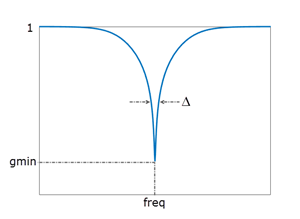
For the computed parameters, the block uses a Tustin discretization of the instantaneous transfer function of the filter is given by:
where gmin, damp, and freq are the values obtained by adapting the notch parameters. These parameters control the notch depth and frequency as shown in the following illustration. The damping ratio damp controls the notch width Δ; larger damp means larger Δ.
Examples
This example shows how to configure the Adaptive Notch Filter (ANF) block to perform filtering based on the frequency response estimation (FRE) of the plant. In this mode, the block first estimates the frequency response of the plant and identifies the peak location. Then, enables the adaptation algorithm for identifying the notch width and depth parameters. This is helpful when you have slowly-varying resonances. Once the block identifies a peak, the location of the notch does not change. If your resonance location changes, you must trigger FRE again to find the new peak.
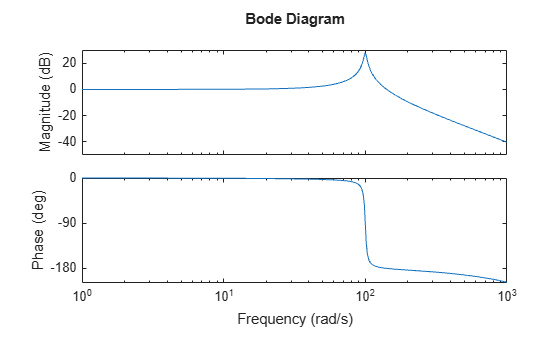
The Simulink® model anfFRE.slx, provided with this example, shows the simplest way you can use the ANF block to filter based on the identified resonance from the estimated frequency response. For this example, use transfer function of a plant with resonance at 100 rad/s.
H = tf(10000,[1 4 10000]);
H = c2d(H,0.001,"matched");
bode(H,{1 1e3})
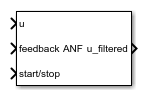
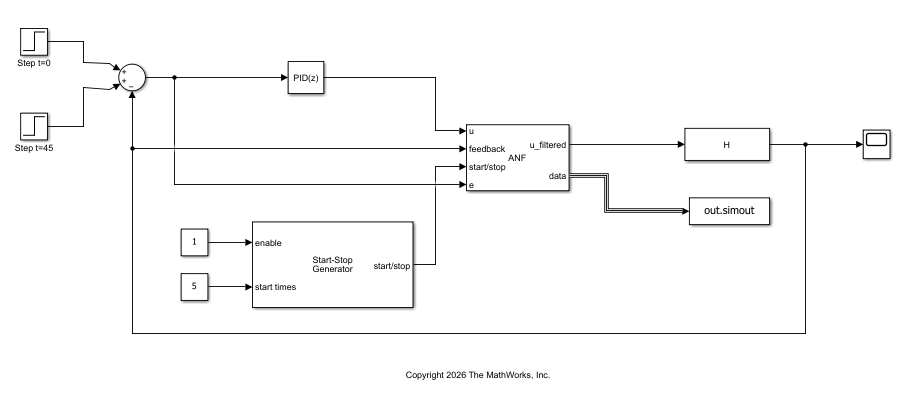
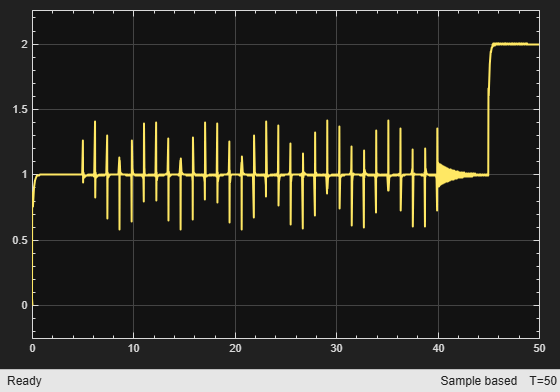
[C,info] = pidtune(H,"PID",30);The model is configured to simulate a step response at 0 s to bring the closed loop-system to a nominal operating. Between 5 and 40 seconds, the ANF block performs frequency response estimation of the plant by injecting perturbation signals. After the FRE converges and block identifies the resonance location, it starts the adaptation algorithm. The second step occurs at 45 seconds, which is the filtered output. In this configuration, the input u of the ANF block is connected to the input to the plant (controller output), feedback to the plant output , and start/stop signal enables and disables the FRE experiment. Open the model.
mdl = "anfFRE";
open_system(mdl)
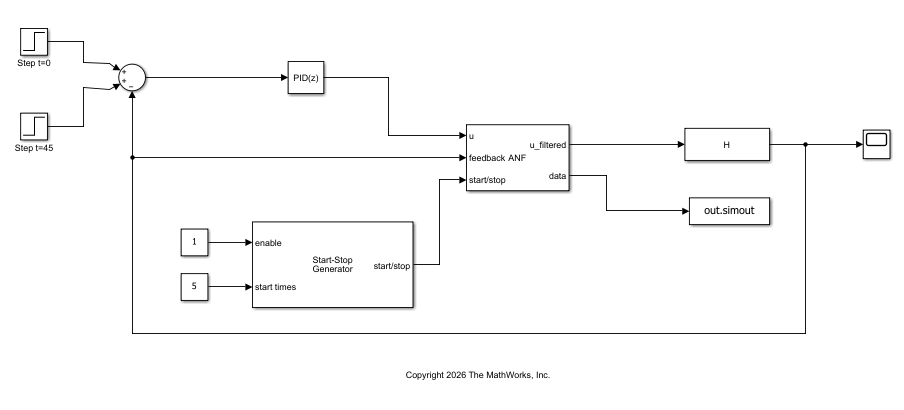
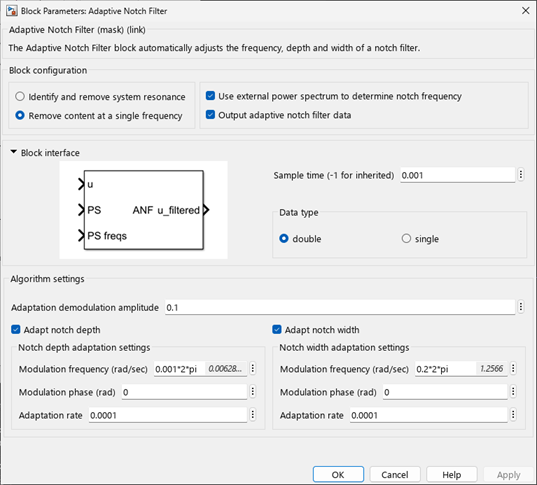
The block in this model adapts both the notch depth and width based on the identified resonance. The following image shows how the block is configured.
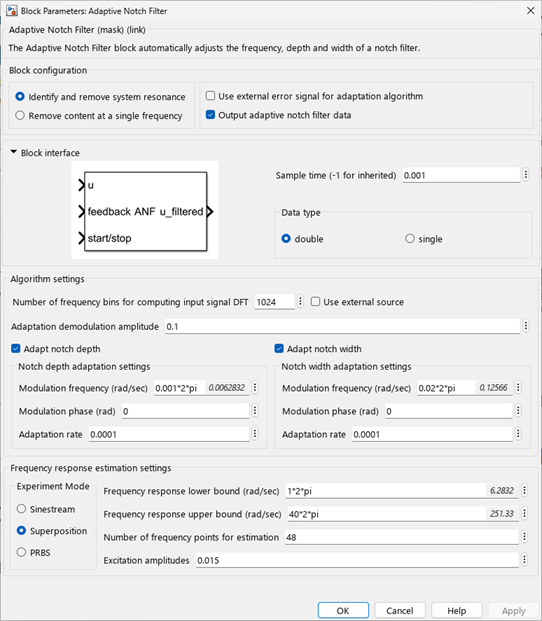
Simulate the model.
out = sim(mdl);
Warning: Log of zero in '<a href="matlab:open_and_hilite_hyperlink ('anfFRE/Adaptive Notch Filter/Log10','error')">anfFRE/Adaptive Notch Filter/Log10</a>'
open_system(mdl+"/Scope")
In the initial value the signals do not differ as the entire power spectrum is not estimated yet. After the step occurs at 15 seconds, the ANF block successfully attenuates the resonant peak and the filtered response does not exhibits large oscillations.
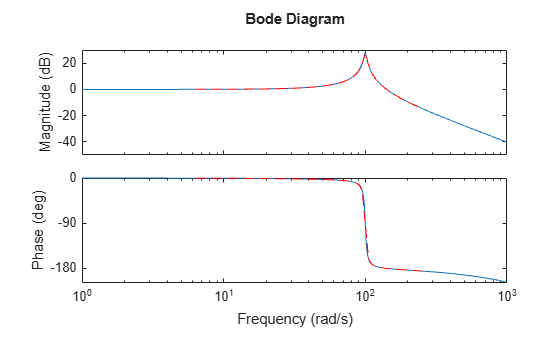
The ANF block data port outputs the notch parameters over each time step. For example, verify the accuracy of estimated frequency response. The estimated frequency response and the identified peak closely matches the original response.
wr = out.simout.notchFreq.Data(end) % Peakwr = 100.0053
resp = out.simout.freFRD.Data;
fsys = frd(squeeze(resp(end,:)),linspace(1*2*pi,40*2*pi,48),0.001);
bode(H,fsys,"r--",{1 1e3})
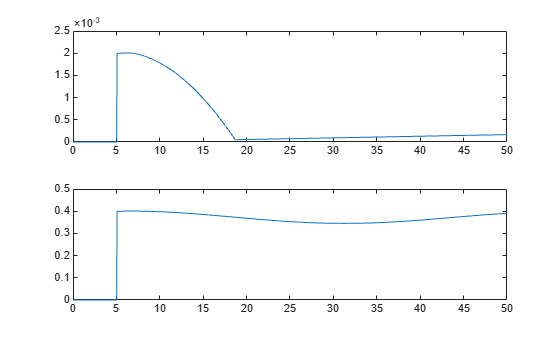
Use the logged data to check the convergence of the notch filter parameters.
figure
tiledlayout("flow")
nexttile
plot(out.simout.notchDepth.Time,squeeze(out.simout.notchDepth.Data))
nexttile
plot(out.simout.notchWidth.Time,squeeze(out.simout.notchWidth.Data))
You can also use the values to create an LTI model of the notch filter and validate results for the converged values. Since the model H, is in discrete time, convert the notch filter to match the time domain.
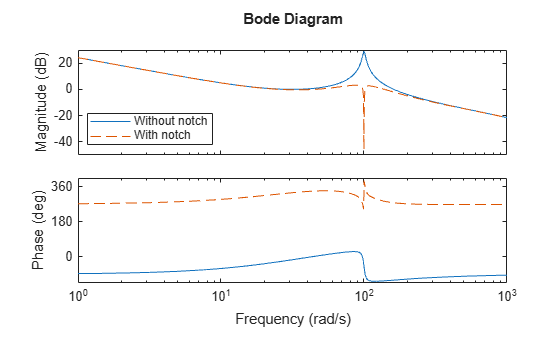
gmin = out.simout.notchDepth.Data(end); % Depth damp = out.simout.notchWidth.Data(end); % Width H_notch = tf([1 (2*gmin*damp*wr) (wr^2)], [1 (2*damp*wr) (wr^2)]); H_notch = c2d(H_notch,0.001,"tustin"); figure bode(C*H,C*H_notch*H,"--",{1 1e3}) legend("Without notch","With notch",Location="best")

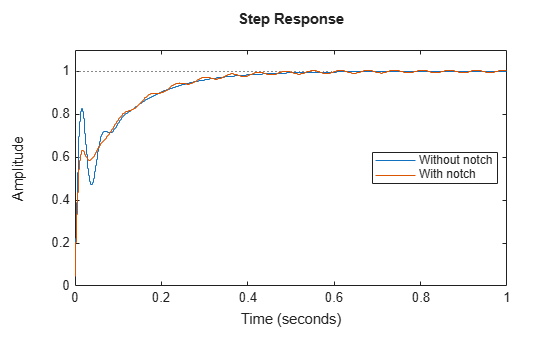
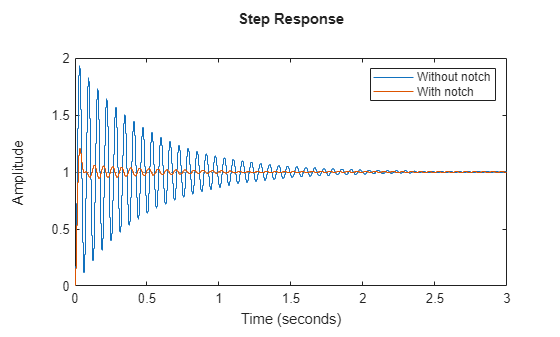
figure step(feedback(C*H,1),feedback(C*H*H_notch,1),1); legend("Without notch","With notch",Location="best")

In this configuration, you can also supply the error signal from an upstream controller (such as PID) directly at the block input e. This is helpful when you have more complex control structures and want to use external error for adaptation.

This example shows how to configure the Adaptive Notch Filter (ANF) block to perform filtering at a known single frequency. In this mode, the block continuously adapts the notch width and depth parameters at the single given frequency. This is helpful when you want to filter a fixed frequency.
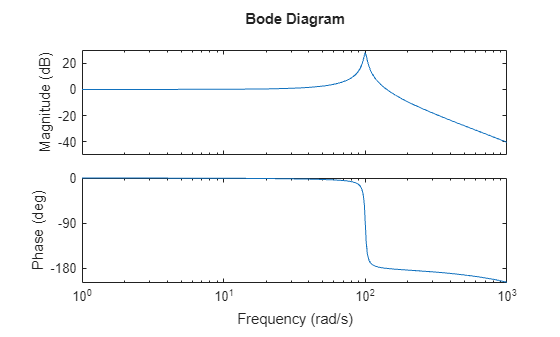
The Simulink® model anfSingleFrequency.slx, provided with this example, shows the simplest way you can use the ANF block to filter a single frequency. For this example, use transfer function of a plant with resonance at 100 rad/s. The example shows how to filter a resonance at this given frequency, but this configuration is more general purpose and is mostly meant for power systems or electrical applications to just remove a single arbitrary frequency.
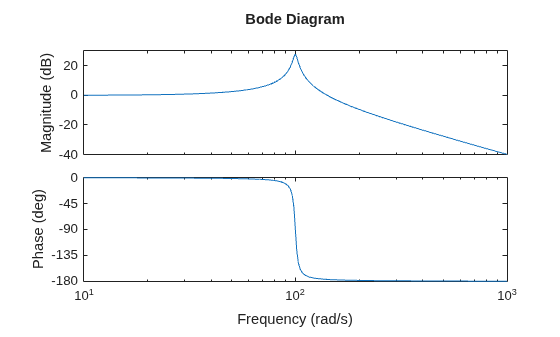
H = tf(10000,[1 4 10000]); bode(H)

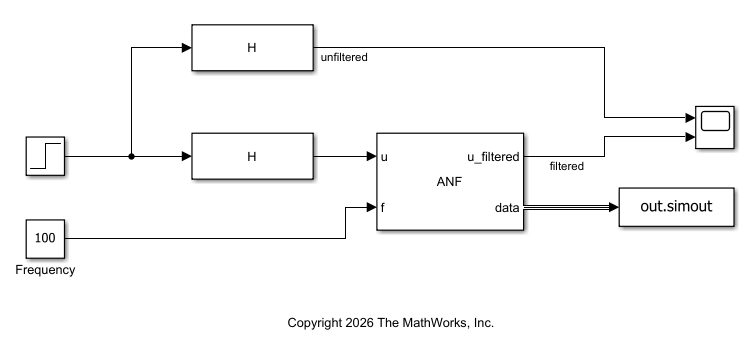
The model is configured to simulate a step response of the filtered and unfiltered plant output. In this configuration, the input u of the ANF block is connected to the signal you want to filter and f is connected to the frequency at which the resonance occurs. Open the model.
mdl = "anfSingleFrequency";
open_system(mdl)
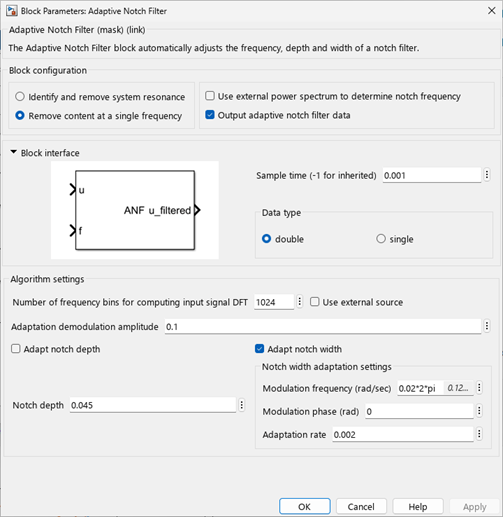
The Adaptive Notch Filter takes the input signal to filter and adapts notch width and depth value based on the characteristics of the frequency. The block in this model uses a fixed depth value and adapts the notch width.

Simulate the model and display the unfiltered and filtered step response of the transfer function.
out = sim(mdl);
open_system(mdl+"/Scope")
The ANF block successfully attenuates the resonant peak and the filtered response does not exhibits large oscillations.
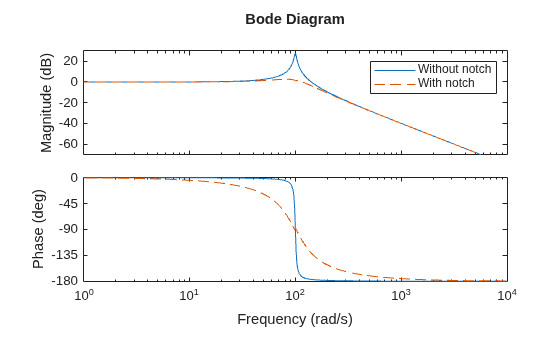
The ANF block data port outputs the notch parameters over each time step. For example, you can use the values to create an LTI model of the notch filter and validate results for the converged values.
gmin = out.simout.notchDepth.Data(end); % Depth damp = out.simout.notchWidth.Data(end); % Width wr = out.simout.notchFreq.Data(end); % Frequency H_notch = tf([1 (2*gmin*damp*wr) (wr^2)], [1 (2*damp*wr) (wr^2)]); bode(H,H*H_notch,"--") legend("Without notch","With notch")

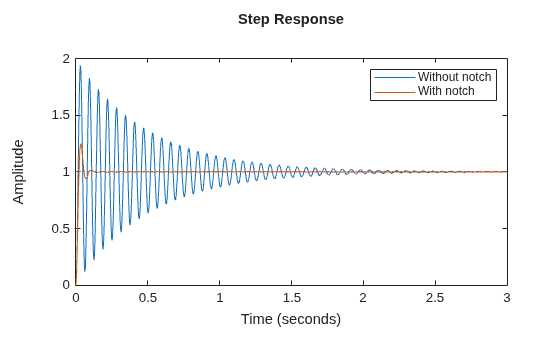
step(H,H*H_notch,3); legend("Without notch","With notch")

Copyright 2025 The MathWorks, Inc
This example shows how to configure the Adaptive Notch Filter (ANF) block to perform filtering based on a power spectrum of the signal to filter. In this mode, the block continuously adapts the notch width and depth parameters based on the power spectrum of the signal. This is helpful when you have a power spectrum from an external source, such as a Spectrum Estimator block, and want to continuously perform filtering.
The Simulink® model anfPowerSpectrum.slx, provided with this example, shows the simplest way you can use the ANF block to filter based on the power spectrum input. For this example, use transfer function of a plant with resonance at 100 rad/s.
H = tf(10000,[1 4 10000]);
H = c2d(H,0.001,"matched");
bode(H,{1 1e3})
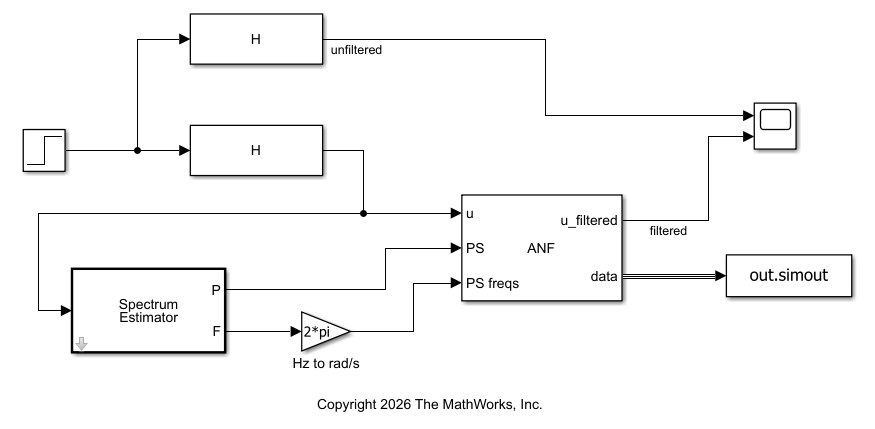
The model is configured to simulate a step response of the filtered and unfiltered plant output. The initial value of the Step block is set to 1 and the step occurs at 15 seconds. In this configuration, the input u of the ANF block is connected to the signal you want to filter, and PS and PS freqs are connected to the power spectrum and corresponding frequencies (in rad/s), obtained using the Spectrum Estimator block. Open the model.
mdl = "anfPowerSpectrum";
open_system(mdl)
The Adaptive Notch Filter takes the input signal to filter and adapts notch width and depth value based on the resonant peak magnitude and location determined from the power spectrum. The block in this model adapts both the notch depth and width.

Simulate the model and display the unfiltered and filtered step response of the transfer function.
out = sim(mdl);
open_system(mdl+"/Scope")
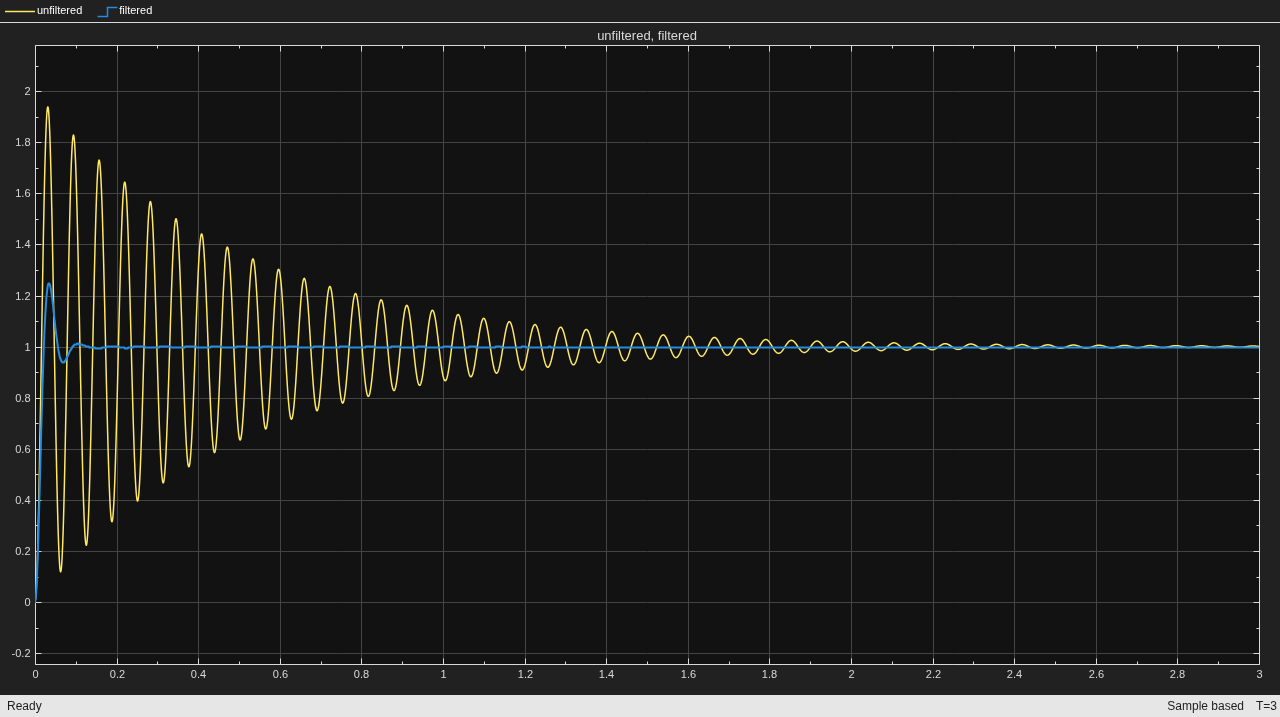
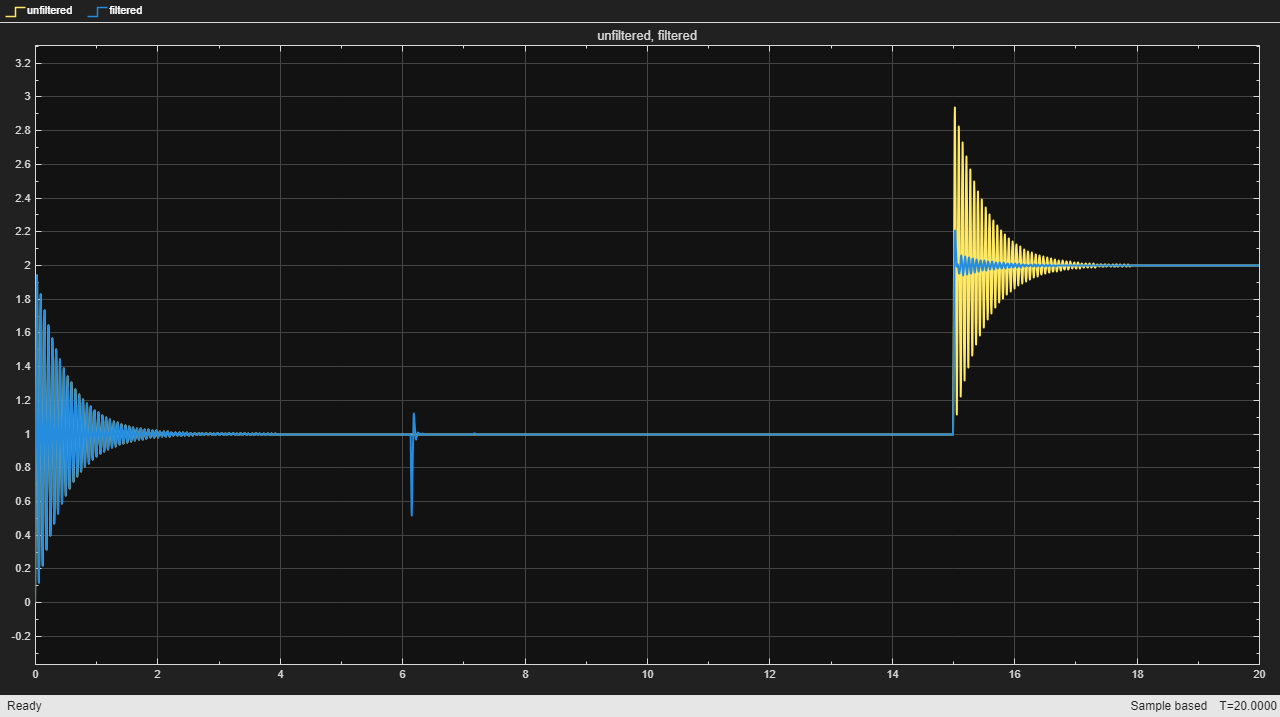
In the initial value the signals do not differ as the entire power spectrum is not estimated yet. After the step occurs at 15 seconds, the ANF block successfully attenuates the resonant peak and the filtered response does not exhibits large oscillations.
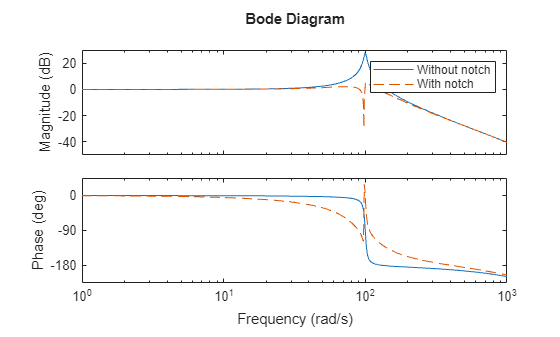
The ANF block data port outputs the notch parameters over each time step. For example, you can use the values to create an LTI model of the notch filter and validate results for the converged values. Since the model H, is in discrete time, convert the notch filter to match the time domain.
gmin = out.simout.notchDepth.Data(end); % Depth damp = out.simout.notchWidth.Data(end); % Width wr = out.simout.notchFreq.Data(end); % Frequency H_notch = tf([1 (2*gmin*damp*wr) (wr^2)], [1 (2*damp*wr) (wr^2)]); H_notch = c2d(H_notch,0.001,"tustin"); bode(H,H*H_notch,"--",{1 1e3}) legend("Without notch","With notch")

step(H,H*H_notch,3); legend("Without notch","With notch")
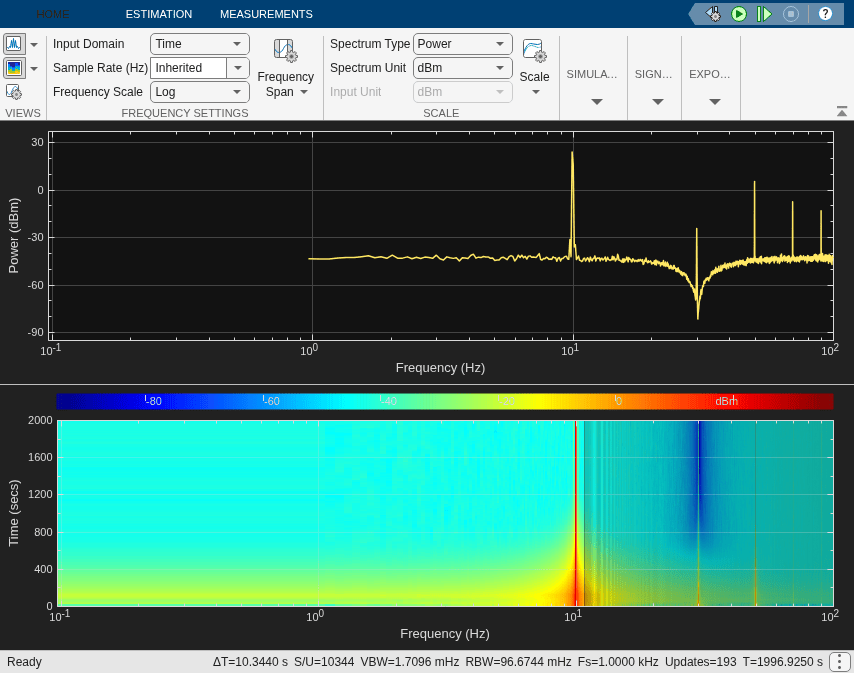
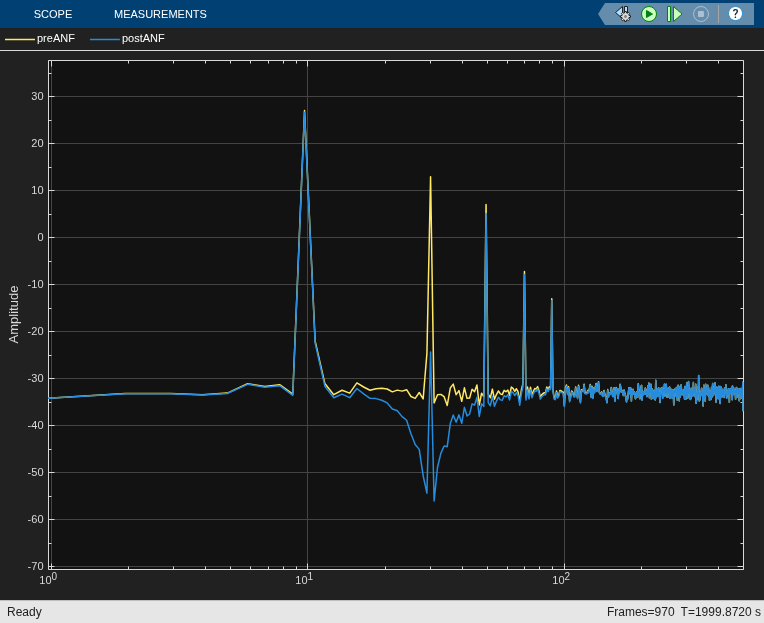
This example shows how to filter a harmonic using the Adaptive Notch Filter (ANF) block based on a power spectrum of the signal to filter. The Simulink® model anfHarmonics.slx, provided with this example, shows the simplest way you can use the ANF block to filter harmonics based on the power spectrum input. The generates harmonics applied to a fundamental frequency and filters out the third harmonic.
Open the model.
mdl = "anfHarmonics";
open_system(mdl)
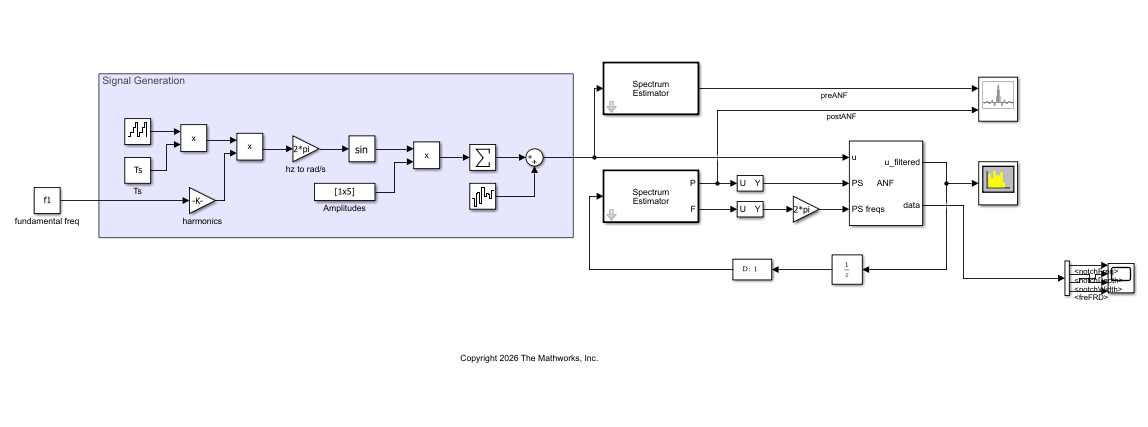
The model is configured to select the third harmonic based on the estimated power spectrum of the signal, and filter it out. The ANF block adapts the notch based on the detected magnitude from the spectrum.
Simulate the model.
sim(mdl);
Extended Examples
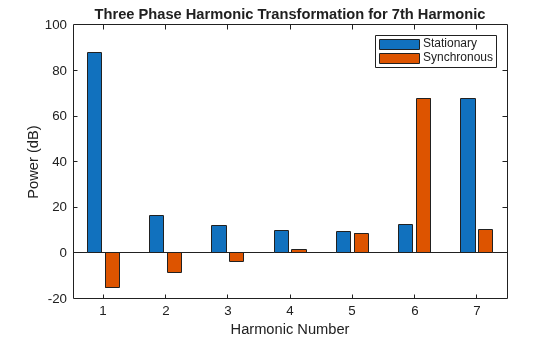
Suppress PMSM Harmonics Using Adaptive Notch Filter
Reduce harmonic distortion in a PMSM using an extremum seeking control based adaptive notch filter.
- Since R2025a
- Open Live Script
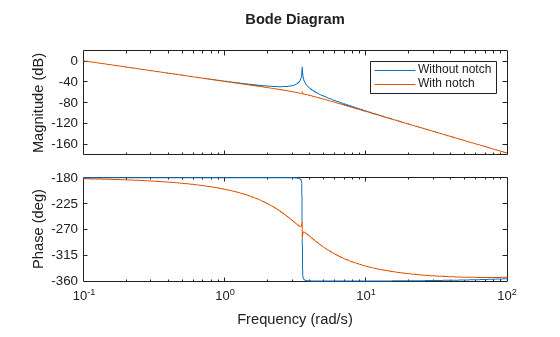
Suppress Resonances Using Adaptive Notch Filter
Suppress resonances in a coupled inertia system using an adaptive notch filter implement using extremum seeking control and frequency response estimator.
- Since R2025a
- Open Live Script
Ports
Input
Connect the signal you want to filter.
Data Types: single | double
Specify the plant feedback signal. The block uses this signal to estimate the frequency response and determine the resonant frequency. This signal is typically the plant output y.
Dependencies
To enable this port, select Identify and remove system resonance.
Data Types: single | double
To start and stop the frequency response estimation process, provide a signal at the start/stop port. When the value of the signal changes from:
Negative or zero to positive, the estimation starts
Positive to negative or zero, the estimation stops
Typically, you can use a signal that changes from 0 to 1 to start the experiment, and from 1 to 0 to stop it. You can generate such a using the Start-Stop Generator block.
Start the experiment when the plant is at the desired equilibrium operating point. In a closed-loop configuration, use the controller to drive the plant to the operating point. Let the experiment run long enough for the algorithm to collect sufficient data for a good estimate at all frequencies it probes. Avoid any load disturbance to the plant during the experiment. Load disturbance can distort the plant output and reduce the accuracy of the frequency-response estimation.
For more information about the required length of estimation, see Frequency Response Estimator.
Dependencies
To enable this port, select Identify and remove system resonance.
Data Types: single | double
Specify the number of frequency bins (DFT length) used by the Goertzel algorithm to compute the magnitude at the frequency of interest. The algorithm analyzes the input signal of interest over N samples and outputs the DFT value for a single frequency (bin). Choose a value of N large enough to provide the desired frequency resolution, since N determines how closely the desired frequency matches with the frequency bin of interest. You can typically set N to a power of 2.
Dependencies
To enable this port, select Use external source for the Number of frequency bins for computing input signal DFT parameter.
Data Types: single | double
Connect this port to the error signal input to the upstream controller such as a PID controller. The block uses this error value in the adaptation algorithm.
Dependencies
To enable this port, set the block configuration to Identify and remove system resonance and enable Use external error signal for adaptation algorithm.
Data Types: single | double
Specify a scalar frequency value. The block applies adaptive notch filtering to a frequency given at this port.
Dependencies
To enable this port, set the block configuration to Remove content at a single frequency.
Data Types: single | double
Specify the power spectrum of the signal of interest. You can obtain a power spectrum for a signal externally from a source such as the Spectrum Estimator (DSP System Toolbox) block. Based on the provided power spectrum and the corresponding frequency range, the block identifies the maximum peak in the range. Since the block places the notch at the largest peak of the power spectrum, it is recommended to window the signal first.
Dependencies
To enable this port, set the block configuration to Remove content at a single frequency and enable Use external power spectrum to determine notch frequency.
Data Types: single | double
Specify the frequency vector corresponding to power spectrum in rad/s.
If you are using Spectrum Estimator (DSP System Toolbox) to obtain the power spectrum and corresponding frequencies, the block returns th frequency vector output in Hz, so you must first convert it to rad/s before using it with this block.
Dependencies
To enable this port, set the block configuration to Remove content at a single frequency and enable Use external power spectrum to determine notch frequency.
Data Types: single | double
Output
Adaptive notch filter output.
Data Types: single | double
Data bus containing notch filter data. The bus includes these signals.
notchFreq— Notch filter frequency at the each time step.notchDepth— Notch filter depth at the each time step.notchWidth— Notch filter width at the each time step.freFRD— Identified frequency response at specified frequency points for each time step.freConvergence— Convergence information of the frequency response estimation experiment.
Since the block uses a Discrete Varying Notch block
that implements a Tustin discretization of a continuous-time notch
filter with varying coefficients, the notchFreq,
notchDepth, and notchWidth
values correspond to the continuous-time values. If you are creating an
LTI model using these values, first create a continuous-time LTI model,
and then discretize it using the c2d
function.
When the configuration is set to Remove content at a single
frequency, the block returns zero-valued signal data for
the freFRD and freConvergence
signals.
There are two ways to access the notch filter data.
Use a To Workspace block to write the data to the MATLAB® workspace as a structure containing timeseries data. The Save format parameter of the To Workspace block must be
Timeseries.Use Simulink® data logging to write the data to the workspace as a
Simulink.SimulationData.Datasetobject. In this case, the structure containing the four timeseries signals is stored in theValuesfield of the resulting dataset. For instance, suppose that the model is configured to save the logged data to a variablelogsout, and data is the only logged port. In that case, the structure is contained inlogsout{1}.Values.
Dependencies
To enable this port, select Output adaptive notch filter data.
Data Types: single | double
Parameters
To edit block parameters interactively, use the Property Inspector. From the Simulink Toolstrip, on the Simulation tab, in the Prepare gallery, select Property Inspector.
Block Configuration
Specify the block configuration.
Identify and remove system resonance — In this mode, the block uses frequency response estimation to obtain the frequency content using the plant input and output data. At the end of estimation, the block identifies system resonance frequency and applies adaptive notch filtering. The block does not change the notch location unless you trigger FRE again using the start/stop signal. Once FRE is active, the block disables the notch filter until the new estimate is complete.
Remove content at a single frequency — Use this mode when you want to apply adaptive notch filtering to any given arbitrary frequency. You can either:
Specify an explicit value for this frequency.
Provide a power spectrum and the corresponding frequency range. For this option, the block identifies the maximum peak in the range based on its power spectrum.
Programmatic Use
To set the block parameter value programmatically, use
the set_param function.
| Parameter: | BlockConfiguration |
| Values: | "Identify and remove system
resonance" (default) | "Remove content at a single
frequency" |
Example: set_param(gcb,"BlockConfiguration","Remove
content at a single frequency")
Enable this option to specify error used in adaptation algorithm is an external input to the block using the port e. This is the error signal used in the upstream controller (such as PID).
Dependencies
To enable this port, select Identify and remove system resonance.
Programmatic Use
To set the block parameter value programmatically, use
the set_param function.
| Parameter: | UseExternalErrorSignal |
| Values: | "off" (default) | "on" |
Example: set_param(gcb,"UseExternalErrorSignal","on")
Enable this option to specify a power spectrum and the corresponding frequencies at the block inputs PS and PS freqs. The block determines the frequency placement of the notch and its magnitude in the corresponding frequency range based on this power spectrum.
Dependencies
To enable this port, set the block configuration to Remove content at a single frequency.
Programmatic Use
To set the block parameter value programmatically, use
the set_param function.
| Parameter: | UseExternalPowerSpectrum |
| Values: | "off" (default) | "on" |
Example: set_param(gcb,"UseExternalPowerSpectrum","on")
Select this option to output adaptive notch filter data bus at the data port. For more information about the data output, see the data port description.
Programmatic Use
To set the block parameter value programmatically, use
the set_param function.
| Parameter: | UseOutputDataPort |
| Values: | "off" (default) | "on" |
Example: set_param(gcb,"UseOutputDataPort","on")
Specify the block sample time Ts in seconds.
For the block configuration Identify and remove system resonance, the largest frequency that you can estimate is the Nyquist frequency π/Ts rad/s. Best practice is to use a sample time at least five times faster than the Nyquist frequency.
Programmatic Use
To set the block parameter value programmatically, use
the set_param function.
| Parameter: | Ts |
| Values: | "0.01" (default) | "-1" | positive scalar in quotes |
Example: set_param(gcb,"Ts","0.05")
Specify the floating-point precision based on simulation environment or hardware requirements.
Programmatic Use
To set the block parameter value programmatically, use
the set_param function.
| Parameter: | BlockDataType |
| Values: | "double" (default) | "single" |
Example: set_param(gcb,"BlockDataType","single")
Algorithm Settings
Specify the number of frequency bins (DFT length) used by the Goertzel algorithm to compute the magnitude at the frequency of interest. The algorithm analyzes the input signal of interest over N samples and outputs the DFT value for a single frequency (bin). Choose a value of N large enough to provide the desired frequency resolution, since N determines how closely the desired frequency matches with the frequency bin of interest. You can typically set N to a power of 2.
Programmatic Use
To set the block parameter value programmatically, use
the set_param function.
| Parameter: | NumFreqPointsForDFT |
| Values: | "1024" (default) | positive integer in quotes |
Example: set_param(gcb,"NumFreqPointsForDFT","512")
Enable this option to specify the number of frequency bins for computing input signal DFT using the block input N.
Programmatic Use
To set the block parameter value programmatically, use
the set_param function.
| Parameter: | UseExternalN |
| Values: | "off" (default) | "on" |
Example: set_param(gcb,"UseExternalN","on")
Demodulation amplitude for the ESC-based adaptation algorithm. This is the amplitude of the signal used to demodulate the objective function. This amplitude, along with the adaptation rates, controls the convergence speed of the adaptation algorithm. A larger value speeds up adaptation but increases noise and can cause oscillations. If the adaptation responds slowly, then you can try increasing this value.
Programmatic Use
To set the block parameter value programmatically, use
the set_param function.
| Parameter: | DemodulationAmp |
| Values: | "1" (default) | positive scalar in quotes |
Example: set_param(gcb,"DemodulationAmp","2")
Notch Depth Adaptation Settings
Enable this option to adapt notch depth.
When disabled, the block does not adapt a value for the required notch depth and lets you specify a fixed value using the Notch depth parameter.
Programmatic Use
To set the block parameter value programmatically, use
the set_param function.
| Parameter: | IsAdaptNotchDepth |
| Values: | "on" (default) | "off" |
Example: set_param(gcb,"IsAdaptNotchDepth","off")
Specify the frequency of the modulation signals in rad/s. For a given parameter tuning loop, specify a forcing frequency that is lower than the frequencies of important system dynamics.
Dependencies
To enable this parameter, select Adapt notch depth.
Programmatic Use
To set the block parameter value programmatically, use
the set_param function.
| Parameter: | DepthWf |
| Values: | "0.1*2*pi" (default) | positive scalar in quotes |
Example: set_param(gcb,"DepthWf","0.2*2*pi")
Phase of the perturbation signal added to the estimated parameters, specified in radians.
Dependencies
To enable this parameter, select Adapt notch depth.
Programmatic Use
To set the block parameter value programmatically, use
the set_param function.
| Parameter: | DepthPhi |
| Values: | "0" (default) | positive scalar in quotes |
Example: set_param(gcb,"DepthPhi","0.01*pi")
The adaptation rate is a gain factor that controls the rate at which the block updates a parameter. Increase this value for faster parameter updates. Decrease this value if the adaptation becomes noisy.
Dependencies
To enable this parameter, select Adapt notch depth.
Programmatic Use
To set the block parameter value programmatically, use
the set_param function.
| Parameter: | DepthK |
| Values: | "0.1" (default) | positive scalar in quotes |
Example: set_param(gcb,"DepthK","0.2")
Continuous-time value of the gain at notch frequency, in absolute units. When you know the required notch depth is fixed, you can disable Adapt notch depth and use this parameter to specify an explicit value of the notch depth.
Dependencies
To enable this parameter, disable Adapt notch depth.
Programmatic Use
To set the block parameter value programmatically, use
the set_param function.
| Parameter: | NotchFilterDepth |
| Values: | "0.3" (default) | positive scalar in quotes |
Example: set_param(gcb,"NotchFilterDepth","0.3")
Notch Width Adaptation Settings
Enable this option to adapt notch width.
When disabled, the block does not adapt a value for the required notch width and lets you specify a fixed value using the Notch width parameter.
Programmatic Use
To set the block parameter value programmatically, use
the set_param function.
| Parameter: | IsAdaptNotchWidth |
| Values: | "on" (default) | "off" |
Example: set_param(gcb,"IsAdaptNotchWidth","off")
Specify the frequency of the modulation signals in rad/s. For a given parameter tuning loop, specify a forcing frequency that is lower than the frequencies of important system dynamics and higher than the high-pass and low-pass filter cutoff frequencies.
Dependencies
To enable this parameter, select Adapt notch width.
Programmatic Use
To set the block parameter value programmatically, use
the set_param function.
| Parameter: | WidthWf |
| Values: | "0.2*2*pi" (default) | positive scalar in quotes |
Example: set_param(gcb,"WidthWf","0.2*2*pi")
Phase ϕ2 of the perturbation signal added to the estimated parameters, specified in radians.
Dependencies
To enable this parameter, select Adapt notch depth.
Programmatic Use
To set the block parameter value programmatically, use
the set_param function.
| Parameter: | WidthPhi |
| Values: | "0" (default) | positive scalar in quotes |
Example: set_param(gcb,"WidthPhi","0.02*pi")
The learning rate is a gain factor that controls the rate at which the block updates a parameter. Increase this value for faster parameter updates. Decrease this value if the adaptation becomes noisy.
Dependencies
To enable this parameter, select Adapt notch depth.
Programmatic Use
To set the block parameter value programmatically, use
the set_param function.
| Parameter: | WidthK |
| Values: | "0.2" (default) | positive scalar in quotes |
Example: set_param(gcb,"WidthK","0.3")
Continuous-time value of the damping ratio, specified as a positive scalar value. The damping ratio controls the notch width; the closer to 0, the steeper the notch. When you know the required notch width is fixed, you can disable Adapt notch width and use this parameter to specify an explicit value of the notch width.
Dependencies
To enable this port, disable Adapt notch depth.
Programmatic Use
To set the block parameter value programmatically, use
the set_param function.
| Parameter: | NotchFilterWidth |
| Values: | "0.1" (default) | positive scalar in quotes |
Example: set_param(gcb,"NotchFilterWidth","0.2")
Frequency Response Estimation Settings
Specify whether the perturbation at each frequency is applied as sequential sinusoidal (Sinestream), simultaneous sinusoidal (Superposition), or pseudorandom binary sequence (PRBS).
Sinestream — In this mode, a perturbation is applied at each frequency separately. For more information about sinestream signals for estimation, see Sinestream Input Signals.
Superposition — In this mode, the perturbation signal includes all specified frequencies at once. For frequency response estimation at a vector of frequencies ω = [ω1, … , ωN] at amplitudes A = [A1, … , AN], the perturbation signal is:
Best practice is to use no more than about 50 frequencies in a superposition signal.
PRBS — A deterministic pseudorandom binary sequence that shifts between two values and has white-noise-like properties. PRBS signals reduce total estimation time compared to using sinestream input signals, while producing comparable estimation results. PRBS signals are useful for estimating frequency responses for communications and power electronics systems. For more information, see PRBS Input Signals.
Sinestream mode can be more accurate and can accommodate a wider range of frequencies than Superposition mode (see the Frequencies parameter). Sinestream mode can also be less intrusive, because the total size of the perturbation is never bigger than the values specified by the Amplitudes parameter. However, due to the sequential nature of the sinestream perturbation, each frequency point you add increases the recommended experiment time (see the start/stop input port for details). Thus, the estimation experiment is typically much faster in Superposition mode as compared to Sinestream mode, with satisfactory results.
PRBS mode can include many more frequency points than the other two modes because the PRBS input signal is a wideband signal. To cover a similar frequency range, the experiment length is typically much shorter than the other two modes.
Dependencies
To enable this port, set the block configuration to Identify and remove system resonance.
Programmatic Use
To set the block parameter value programmatically, use
the set_param function.
| Parameter: | ExperimentMode |
| Values: | "PRBS" (default) | "Sinestream" | "Superposition" |
Example: set_param(gcb,"ExperimentMode","Sinestream")
Lower frequency bound for plant frequency response estimation in rad/s.
Dependencies
To enable this port, set the block configuration to Identify and remove system resonance.
Programmatic Use
To set the block parameter value programmatically, use
the set_param function.
| Parameter: | StartFreqFRE |
| Values: | "0.1*2*pi" (default) | positive scalar in quotes |
Example: set_param(gcb,"StartFreqFRE","1*2*pi")
Upper frequency bound for plant frequency response estimation in rad/s. The largest frequency that you can estimate is the Nyquist frequency π/Ts rad/s.
Dependencies
To enable this port, set the block configuration to Identify and remove system resonance.
Programmatic Use
To set the block parameter value programmatically, use
the set_param function.
| Parameter: | EndFreqFRE |
| Values: | "10*2*pi" (default) | positive scalar in quotes |
Example: set_param(gcb,"EndFreqFRE","10*2*pi")
Specify the number of frequency points for estimation. The block estimates the plant frequency response at each of these points between the lower and upper frequency bounds, both inclusive.
When the Experiment Mode is Superposition:
To maintain reasonable convergence speed and estimation accuracy, it is typical to use about 20–30 frequencies for estimation. The best practice is to specify no more than about 50 frequencies.
The best practice is to limit the range between the lowest and highest frequency to no more than about two decades. This limit reduces the chance that the responses of some frequencies are so dominant that they hurt the estimation of responses at other frequencies.
Attempting to linearize a model containing a Frequency Response Estimator block using superposition mode and more than 50 frequencies can generate an error. The error states "The model contains too many elements for linearization. Please reduce the model size." To complete linearization, you must either comment out the frequency-response estimator block or reduce the number of frequencies.
When Experiment mode is Sinestream, there is no recommended limit on the number or range of frequencies. However, due to the sequential nature of the sinestream perturbation, each frequency point you add increases the required experiment time. Further, a too-wide range of frequencies requires you to use a fast sample time for high frequencies that is inefficient for the lower frequencies.
When Experiment mode is PRBS, the range of frequencies affect the experiment length. The lowest frequency value determines the minimum signal order that can cover the specified frequency. Decreasing the lowest frequency range increases the minimum signal order required, therefore increasing the experiment length. However, due to wideband properties of the PRBS input signals, adding more frequency points does not increase the required experiment length.
Dependencies
To enable this port, set the block configuration to Identify and remove system resonance.
Programmatic Use
To set the block parameter value programmatically, use
the set_param function.
| Parameter: | NumFREFreqPoints |
| Values: | "1024" (default) | positive integer in quotes |
Example: set_param(gcb,"NumFREFreqPoints","2048")
Specify the amplitudes of the perturbation signals injected into the plant. To use the same amplitude for all frequencies, specify a scalar value. If you know that the response changes significantly over range of frequencies to estimate, then you can use a vector to specify a different amplitude for each frequency. For instance, you can use a smaller value around known resonant frequencies and a larger value above the rolloff frequency. The vector must be the same length as the vector you provide for Number of frequency points for estimation.
The amplitudes must be:
Large enough that the perturbation overcomes any deadband in the plant actuator and generates a response above the noise level
Small enough to keep the plant running within the approximately linear region near the nominal operating point, and to avoid saturating the plant input or output
When Experiment mode is Superposition, the sinusoidal signals are superimposed with no phase shift. Thus, the maximum perturbation can exceed the amplitude of any individual component, up to the sum of all amplitudes. Make sure that the largest possible perturbation is within the range of your plant actuator. Saturating the actuator can introduce errors into the estimated frequency response.
Dependencies
To enable this port, set the block configuration to Identify and remove system resonance.
Programmatic Use
To set the block parameter value programmatically, use
the set_param function.
| Parameter: | SignalAmplitudesFRE |
| Values: | "1" (default) | positive scalar in quotes | vector in quotes |
Example: set_param(gcb,"SignalAmplitudesFRE","2")
Extended Capabilities
C/C++ Code Generation
Generate C and C++ code using Simulink® Coder™.
Version History
Introduced in R2026a
MATLAB Command
You clicked a link that corresponds to this MATLAB command:
Run the command by entering it in the MATLAB Command Window. Web browsers do not support MATLAB commands.
选择网站
选择网站以获取翻译的可用内容,以及查看当地活动和优惠。根据您的位置,我们建议您选择:。
您也可以从以下列表中选择网站:
如何获得最佳网站性能
选择中国网站(中文或英文)以获得最佳网站性能。其他 MathWorks 国家/地区网站并未针对您所在位置的访问进行优化。
美洲
- América Latina (Español)
- Canada (English)
- United States (English)
欧洲
- Belgium (English)
- Denmark (English)
- Deutschland (Deutsch)
- España (Español)
- Finland (English)
- France (Français)
- Ireland (English)
- Italia (Italiano)
- Luxembourg (English)
- Netherlands (English)
- Norway (English)
- Österreich (Deutsch)
- Portugal (English)
- Sweden (English)
- Switzerland
- United Kingdom (English)