Use FPGA I/O to Rapidly Prototype HDL IP Core
R2026bRapidly prototype the HDL IP core by interfacing with your target board over Ethernet or JTAG. Use an Ethernet connection for boards that have an ARM® processor. Use a JTAG connection for boards that do not have an ARM processor.
To use an Ethernet-based or JTAG-based connection to your target hardware boards, you can either generate a host interface script or create a custom software script.
Prerequisites
A target platform, such as ZedBoard™, where you deploy your software interface model
The latest version of the third-party synthesis tool, such as Xilinx® Vivado®. See HDL Language Support and Supported Third-Party Tools and Hardware. In your MATLAB® session, set the path to that installed synthesis tool by using the
hdlsetuptoolpathfunction.Before setting up the Ethernet-based interface, set up the board’s SD card with the MathWorks® firmware image. To set up the firmware image for your target board:
For Intel® related boards, see Set Up Intel Hardware Boards
For Xilinx related boards, see Set Up AMD FPGA and SoC Devices (SoC Blockset).
Host Interface Script
To generate a host interface script, in the HDL Workflow Advisor, open the
Generate Software Interface task. Set the Host target
interface parameter to Ethernet or
JTAG AXI Manager and select the Generate host
interface script check box. Then, run the Generate Software
Interface task.
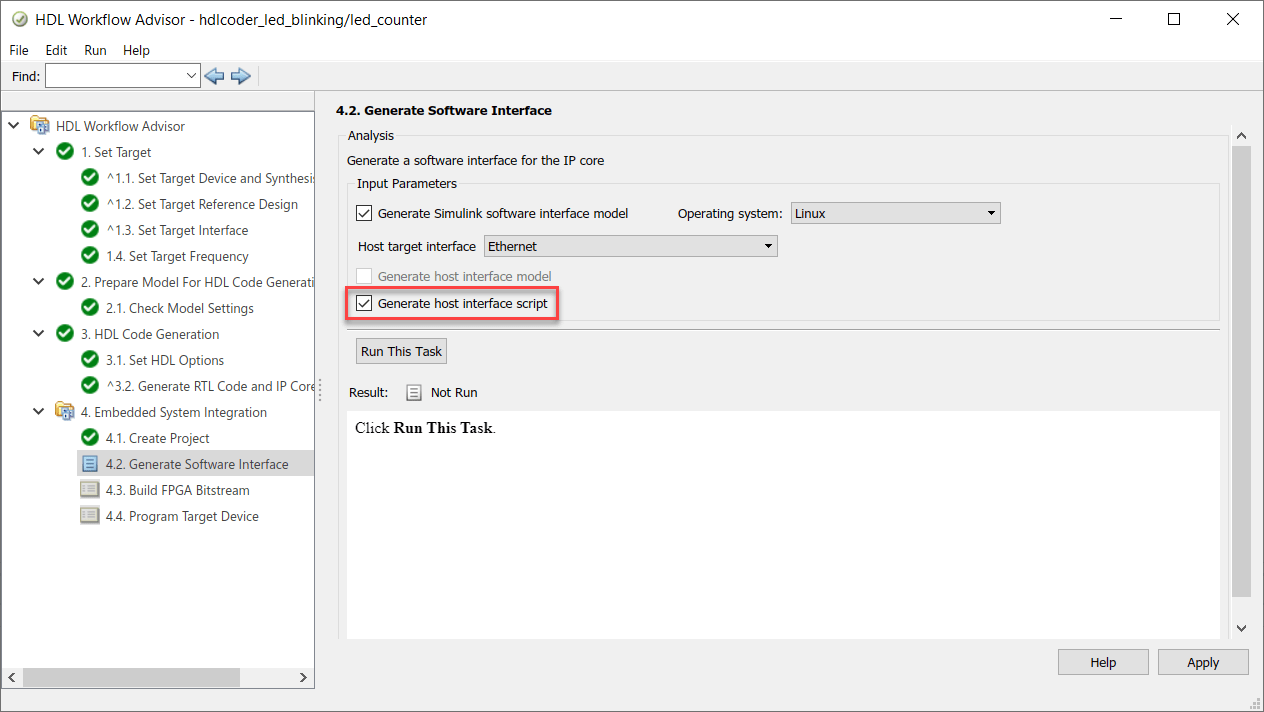
The generated MATLAB files are:
gs_modelName_setup.m, which is a setup script that adds the register and AXI4-Stream interfaces. The script also contains DUT port objects that have the port name, direction, data type, and interface mapping information. The script then maps the DUT ports to the corresponding interfaces.gs_modelName_interface.m, which creates a target object, instantiates the setup scriptgs_modelName_setup.m, and then connects to the target hardware. The script then sends read and write commands to the generated HDL IP core.
Customize the Host Interface Script
For rapid prototyping, customize the host interface script or create your own script based on how you modify your original design. Customize the script to specify:
A target object for a different FPGA vendor.
Additional interfaces or configure existing interfaces based on modifications to your original design. HDL Coder™ uses this information to create the IIO drivers to access the HDL IP core.
Additional DUT port objects or remove existing objects based on how you modify your design, and then change the mapping information accordingly.
Input data to write to the DUT ports and output data to read from the ports.
Develop Host Interface Script for Ethernet-Based Interface
You can customize the generated host interface script or create your own host interface script. To create a custom host interface script:
Create an
fpgaobject for the target device and store inhFPGA.hFPGA = fpga("Xilinx")hFPGA = fpga with properties: Vendor: "Xilinx" Interfaces: [0×0 fpgaio.interface.InterfaceBase]To use an Intel target:
hFPGA = fpga("Intel")hFPGA = fpga with properties: Vendor: "Intel" Interfaces: [0×0 fpgaio.interface.InterfaceBase]Configure the AXI interfaces to map the DUT ports in the generated HDL IP core. You can add register and AXI4-Stream interfaces. To add AXI4 subordinate interfaces, use the
addRegisterInterfacefunction.addRegisterInterface(hFPGA, ... ... % Interface properties "InterfaceID", "AXI4-Lite", ... "BaseAddress", 0xA0000000, ... "AddressRange", 0x10000, ... ... % Driver properties "WriteDeviceName", "mwipcore0:mmwr0", ... "ReadDeviceName", "mwipcore0:mmrd0");
To add AXI4-Stream interfaces, use the
addAXI4StreamInterfacefunction.addAXI4StreamInterface(hFPGA, ... ... % Interface properties "InterfaceID", "AXI4-Stream", ... "WriteEnable", true, ... "ReadEnable", true, ... "WriteFrameLength", 1024, ... "ReadFrameLength", 1024, ... ... % Driver properties "WriteDeviceName", "mwipcore0:mm2s0", ... "ReadDeviceName", "mwipcore0:s2mm0");
The interface mapping information that you specified is saved as a property on the
fpgaobject,hFPGA.hFPGA
hFPGA =

   fpga with properties:

         Vendor: "Xilinx"
     Interfaces: [1×2 fpgaio.interface.InterfaceBase]
Specify information about the DUT ports in the generated HDL IP core as a port object array by using the
hdlcoder.DUTPortobject. The object represents the ports of your DUT on the target hardware.hPort_h_in1 = hdlcoder.DUTPort("h_in1", ... "Direction", "IN", ... "DataType", numerictype(1,16,10), ... "Dimension", [1 1], ... "IOInterface", "AXI4-Lite", ... "IOInterfaceMapping", "0x100")
hPort_h_in1 =

   DUTPort with properties:

                   Name: "h_in1"
              Direction: IN
               DataType: [1×1 embedded.numerictype]
              Dimension: [1 1]
            IOInterface: "AXI4-Lite"
     IOInterfaceMapping: "0x100"
To write to or read from the DUT ports in the generated HDL IP core, map the ports to the AXI interface by using the
mapPortfunction. After you map the ports to the interfaces, this information is saved on thefpgaobject as theInterfacesproperty.mapPort(hFPGA, hPort_h_in1); hFPGA.Interfaces
ans =

  Register with properties:

      InterfaceID: "AXI4-Lite"
      BaseAddress: "0xA0000000"
     AddressRange: "0x10000"
      WriteDriver: [1×1 fpgaio.driver.AXIMemoryMappedIIOWrite]
       ReadDriver: [1×1 fpgaio.driver.AXIMemoryMappedIIORead]
       InputPorts: "h_in1"
      OutputPorts: [0×0 string]
You can also specify this information for ports mapped to AXI4-Stream interfaces.
hPort_x_in_data = hdlcoder.DUTPort("x_in_data", ...
	"Direction", "IN", ...
	"DataType", numerictype(1,16,10), ...
	"Dimension", [1 1], ...
	"IOInterface", "AXI4-Stream");

hPort_y_out_data = hdlcoder.DUTPort("y_out_data", ...
	"Direction", "OUT", ...
	"DataType", numerictype(1,32,20), ...
	"Dimension", [1 1], ...
	"IOInterface", "AXI4-Stream");
To write to or read from the DUT ports in the generated HDL IP core, map the ports to the AXI interface by using the
mapPortfunction.After you map the ports to the interfaces, this information is saved on themapPort(hFPGA, [hPort_x_in_data, hPort_y_out_data]);
fpgaobject as theInterfacesproperty.hFPGA
hFPGA =

   fpga with properties:

         Vendor: "Xilinx"
     Interfaces: [1×2 fpgaio.interface.InterfaceBase]
hFPGA.Interfaces
ans =

   Register with properties:

      InterfaceID: "AXI4-Lite"
      BaseAddress: "0xA0000000"
     AddressRange: "0x10000"
      WriteDriver: [1×1 fpgaio.driver.AXIMemoryMappedIIOWrite]
       ReadDriver: [1×1 fpgaio.driver.AXIMemoryMappedIIORead]
       InputPorts: "h_in1"
      OutputPorts: [0×0 string]

   AXI4Stream with properties:

          InterfaceID: "AXI4-Stream"
          WriteEnable: 1
           ReadEnable: 1
     WriteFrameLength: 1024
      ReadFrameLength: 1024
          WriteDriver: [1×1 fpgaio.driver.AXIStreamIIOWrite]
           ReadDriver: [1×1 fpgaio.driver.AXIStreamIIORead]
           InputPorts: "x_in_data"
          OutputPorts: "y_out_data"
To test the HDL IP core functionality, use the
readPortandwritePortfunctions to write data to or read data from these ports.writePort(hFPGA, "h_in1", 5); writePort(hFPGA, "x_in", sin(linspace(0, 2*pi, 1024))); data = readPort(hFPGA, "y_out");
After you have tested the HDL IP core, you can release the hardware resource associated with the
fpgaobject by using thereleasefunction.release(hFPGA)
For an example on creating a custom interface script and prototyping your design on a target FPGA board over an Ethernet connection, see Prototype Generated IP Core on Hardware using FPGA I/O.
Develop Host Interface Script for JTAG-Based Interface
You can customize the generated host interface script or create your own host interface script. To create a custom host interface script:
Create a
jtagchainobject for the target device and store injtagObj.jtagObj = jtagchain("AMD");Create an
fpgaobject and store inhFPGA.hFPGA = fpga(jtagObj);
Configure the AXI interfaces to map the DUT ports in the generated HDL IP core. You can add register and AXI4-Stream interfaces. To add AXI4 subordinate interfaces, use the
addRegisterInterfacefunction.addRegisterInterface(hFPGA, ... "InterfaceID", "AXI4-Lite", ... "BaseAddress", 0xA0000000, ... "AddressRange", 0x10000, ... "DriverAddressMode", "Full");
The interface mapping information that you specified is saved as a property on the
fpgaobject,hFPGA.hFPGA
hFPGA =

   fpga with properties:

         Vendor: "AMD"
     Interfaces: [1×2 fpgaio.interface.InterfaceBase]
Specify information about the DUT ports in the generated HDL IP core as a port object array by using the
hdlcoder.DUTPortobject. The object represents the ports of your DUT on the target hardware.hPort_h_in1 = hdlcoder.DUTPort("h_in1", ... "Direction", "IN", ... "DataType", numerictype(1,16,10), ... "Dimension", [1 1], ... "IOInterface", "AXI4-Lite", ... "IOInterfaceMapping", "0x100")
hPort_h_in1 =

   DUTPort with properties:

                   Name: "h_in1"
              Direction: IN
               DataType: [1×1 embedded.numerictype]
              Dimension: [1 1]
            IOInterface: "AXI4-Lite"
     IOInterfaceMapping: "0x100"
To write to or read from the DUT ports in the generated HDL IP core, map the ports to the AXI interface by using the
mapPortfunction. After you map the ports to the interfaces, this information is saved on thefpgaobject as theInterfacesproperty.mapPort(hFPGA, hPort_h_in1); hFPGA.Interfaces
ans =

  Register with properties:

      InterfaceID: "AXI4-Lite"
      BaseAddress: "0xA0000000"
     AddressRange: "0x10000"
      WriteDriver: [1×1 fpgaio.driver.AXIMemoryMappedIIOWrite]
       ReadDriver: [1×1 fpgaio.driver.AXIMemoryMappedIIORead]
       InputPorts: "h_in1"
      OutputPorts: [0×0 string]
To test the HDL IP core functionality, use the
readPortandwritePortfunctions to write data to or read data from these ports.writePort(hFPGA, "h_in1", 5); writePort(hFPGA, "x_in", sin(linspace(0, 2*pi, 1024))); data = readPort(hFPGA, "y_out");
After you have tested the HDL IP core, you can release the hardware resource associated with the
fpgaobject by using thereleasefunction.release(hFPGA)

