主要内容

lensDistortion

Compute geometric lens distortion for optical system

Since R2026a

Description

Add-On Required: This feature requires the Optical Design and Simulation Library for Image Processing Toolbox add-on.

ld = lensDistortion(opsys) computes the geometric lens distortion for the optical system opsys using the Ftan(θ) lens distortion model.

Note

This functionality requires Optical Design and Simulation Library for Image Processing Toolbox™. You can install the Optical Design and Simulation Library for Image Processing Toolbox from Add-On Explorer. For more information about installing add-ons, see Get and Manage Add-Ons.

example

ld = lensDistortion(opsys,Name=Value) specifies options for computing the lens distortion using one or more name-value arguments. For example, NumSamples=200 specifies to compute the lens distortion at 200 evenly spaced coordinate points.

Examples

collapse all

Create an optical system containing a camera lens by using the createDoubleGauss helper function, attached to this example as a supporting file.

opsys = createDoubleGauss;

Specify the position of the light source located at infinity in the *yz-*plane at 15 degrees below the optical axis using the FieldPoints property of the opticalSystem object.

opsys.FieldPoints = fieldPoint(Angles=[15 0]);

Compute the lens distortion of the optical system using the lensDistortion object function. Display the lens distortion chart using the show object function.

ld = lensDistortion(opsys);
plot_ld = show(ld)
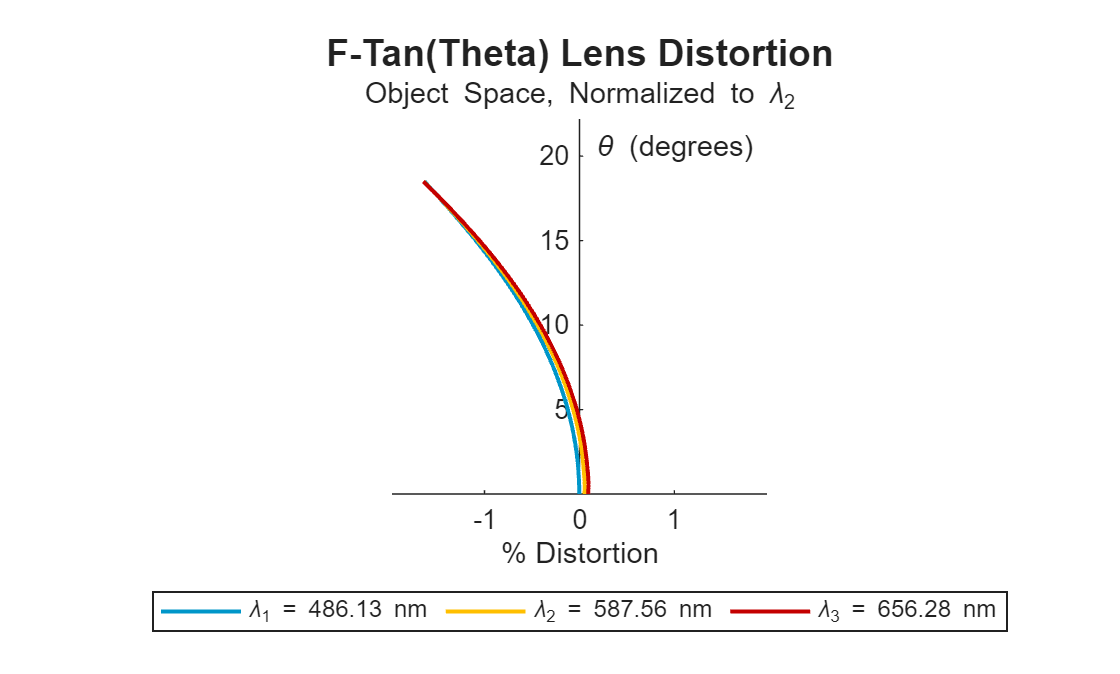
Figure contains an object of type optics.chart.lensdistortionchart. The chart of type optics.chart.lensdistortionchart has title F-Tan(Theta) Lens Distortion.

plot_ld = 
  LensDistortionChart with properties:

    LensDistortion: [1×1 optics.result.LensDistortion]
             Color: [3×3 double]
             Title: "F-Tan(Theta) Lens Distortion"
          Subtitle: "Object Space, Normalized to \lambda_2"
            Legend: on
              Grid: "off"
            Parent: [1×1 Figure]

  Show all properties

Input Arguments

collapse all

Optical system for which to compute the lens distortion, specified as an opticalSystem object.

Name-Value Arguments

collapse all

Specify optional pairs of arguments as Name1=Value1,...,NameN=ValueN, where Name is the argument name and Value is the corresponding value. Name-value arguments must appear after other arguments, but the order of the pairs does not matter.

Example: lensDistortion(NumSamples=200) specifies to compute the lens distortion at 200 evenly spaced coordinate points.

Type of lens distortion to compute, specified as one of these options.

  • "FTanTheta" — The image height is proportional to the tangent of the angle of the incoming light ray with respect to the optical axis. Use this model to approximate the lens distortion of real lenses, especially wide-angle lenses, when projecting images. The radial distance r from the image center is given by

    r=f·tan(θ)

    where f is the focal length and θ is the angle of the incoming light ray with respect to the optical axis.

  • "FTheta" — The image height is directly proportional to the angle from the optical axis. Use this model to compute the lens distortion for fisheye lenses, to capture a wide field of view with a characteristic distortion pattern. The radial distance r from the image center is given by

    r=f·θ

    The linear relationship between the angle and the radial distance leads to the distinctive fisheye effect.

Wavelengths for which to compute the lens distortion, specified as an M-element numeric vector. M is the number of wavelengths, and each element of the vector represents a wavelength, in nanometers. By default, the lens distortion is computed at the wavelengths specified by the Wavelengths property of the opticalSystem object opsys.

Option to use a uniform paraxial scale across all wavelengths, specified as a logical 1 (true) or 0 (false).

  • 1 (true) — Compute the paraxial scale for the reference wavelength, and use it to compute lens distortion for each wavelength.

  • 0 (false) — Compute the paraxial scale, and therefore lens distortion, separately for each wavelength.

The paraxial scale is the scale factor that relates the size of the image in the paraxial approximation, or the ideal image, to the size of the actual image formed by the optical system.

Index of the reference wavelength, specified as a positive integer. The reference wavelength is the wavelength at which to compute the paraxial scale used to compute lens distortion at all wavelengths when SameScaleForAllWavelengths is true.

If you specify the Wavelengths name-value argument, the default index of the reference wavelength is M/2, rounded up to the nearest integer. M is the number of wavelengths in Wavelengths. If you do not specify the Wavelengths name-value argument, the default reference wavelength is the primary wavelength specified by the PrimaryWavelengthIndex property of the opticalSystem object opsys.

Maximum field angle, or angle from the optical axis, at which to compute the lens distortion, specified as a numeric scalar in the range [0, 180]. By default, MaxFieldAngle value is 0.9 times the value of the half-angle of the optical system opsys. To compute the half field of view, or half-angle, use the halfFieldOfView function.

Decrease the field angle to minimize discontinuities at the possible expense of missing important performance information at larger field angles, such as vignetting.

Space in which to compute lens distortion, specified as one of these options.

  • "ObjectSpace" — Compute lens distortion effects from the perspective of the object being imaged. Use this option to examine how the optical system alters the perceived geometry and position of objects in the scene.

  • "ImageSpace" — Compute lens distortion effects observed in the image plane, where the sensor or film captures the image. Use this option to analyze the effect of distortion on how the final image appears.

Number of evenly sampled points at which to compute lens distortion, specified as a positive integer. To produce a smoother curve, increase the number of sampled points at the expense of increased computation time.

Distance between the object and the first surface in the optical system, specified as a positive numeric scalar. By default, the object is located at an infinite distance from the first surface in the optical system opsys.

Output Arguments

collapse all

Lens distortion, returned as a LensDistortion object.

More About

collapse all

Algorithms

collapse all

Version History

Introduced in R2026a