paraxialInfo
R2026bCompute paraxial information, including cardinal points, for optical system
Since R2026a
Description
Add-On Required: This feature requires the Optical Design and Simulation Library for Image Processing Toolbox add-on.
Examples
Load a photographic lens from a ZMX file into the workspace.
opsys = zmximport("PhotographicLens.zmx");Compute the paraxial information, including the cardinal points, for the optical system using the paraxialInfo object function.
info = paraxialInfo(opsys)
info =
  Paraxial with properties:

               Wavelength: 558
                  FNumber: 2.9212
        NumericalAperture: 0.1687
              FocalLength: 72.0158
          BackFocalLength: 39.0209
          FirstFocalPoint: [0 0 -3.1518]
         SecondFocalPoint: [0 0 182.7418]
      FirstPrincipalPoint: [0 0 68.8640]
     SecondPrincipalPoint: [0 0 110.7259]
      EntrancePupilRadius: 12.3265
    EntrancePupilPosition: [0 0 72.3885]
          ExitPupilRadius: 11.5534
        ExitPupilPosition: [0 0 115.1765]
          AxialPathLength: 143.7209
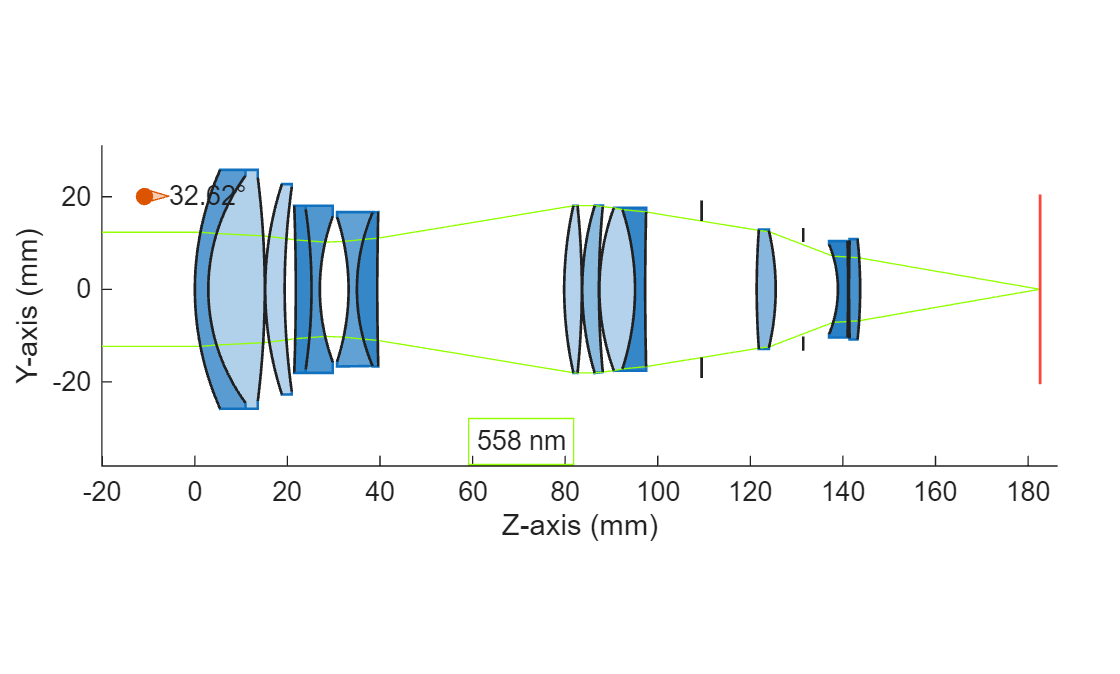
Display the back focal length, which is the distance between the final surface and the point at which rays converge.
disp("Back Focal Length = " + info.BackFocalLength)Back Focal Length = 39.0209
Inspect the distance between the final surface and the image plane using the SurfaceTable property of the opticalSystem object opsys.
st = opsys.SurfaceTable;
imagePlaneDist = st.Position(end,3) - st.Position(end-1,3);
disp("Distance between last surface and image plane = " + imagePlaneDist)
Distance between last surface and image plane = 38.9014
Trace marginal rays through the optical system using the traceMarginalRays object function.
mr = traceMarginalRays(opsys,Wavelengths=opsys.PrimaryWavelength);
Display a 2-D visualization of the optical system using the view2d object function. To verify convergence, visualize the traced rays through the optical system using the addRays object function.
hv = view2d(opsys);
addRays(hv,mr)
Input Arguments
Output Arguments
Limitations
For optical systems with a negative focal length, such as systems that produce a virtual image, the
paraxialInfofunction returnsInffor the entrance and exit pupil positions. Pupil positions are not physically defined for such systems.
Version History
Introduced in R2026a

