Discrete FIR Filter
R2026b构建 FIR 滤波器模型
Discrete FIR Filter block
To add a block to a model, double-click the canvas and start typing the block name. Then, select the block from the list.
库:
Simulink /
Discrete
DSP System Toolbox /
Filtering /
Filter Implementations
HDL Coder /
Discrete
HDL Coder /
HDL Floating Point Operations
描述
Discrete FIR Filter 模块使用指定的数字 FIR 滤波器单独对输入信号的每个通道进行滤波。该模块可以实现系数固定的静态滤波器以及系数随时间变化的时变滤波器。您可以在仿真期间调整静态滤波器的系数。
此模块随时间的推移单独对输入信号的每个通道进行滤波。输入处理参数用于指定该模块将输入的每个元素作为独立通道处理(基于采样的处理)还是将输入的每个列作为独立通道处理(基于帧的处理)。要执行基于帧的处理,您必须拥有 DSP System Toolbox™ 许可证。
输出维度等于输入维度,但为系数参数指定滤波器抽头矩阵时除外。当您执行此操作时,输出维度取决于您指定的不同滤波器抽头集的数量。
此模块支持自定义状态属性以更高效地自定义和生成代码。有关示例,请参阅Custom State Attributes in Discrete FIR Filter Block。在某些条件下,模块还支持 SIMD 代码生成。有关详细信息,请参阅代码生成。
此模块的输出在数值上与 DSP System Toolbox Digital Filter Design (DSP System Toolbox) 模块的输出相匹配。
此模块支持 Simulink® 状态记录功能。有关详细信息,请参阅 State。
滤波器结构支持
您可以更改通过 Discrete FIR Filter 模块实现的滤波器结构,方法是从滤波器结构参数中选择以下选项之一:
直接型
直接型对称
直接型反对称
直接型转置
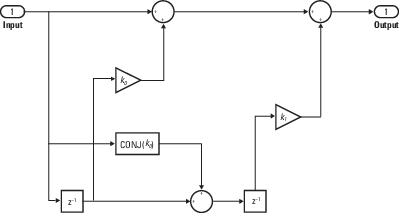
格型 MA
您必须拥有可用的 DSP System Toolbox 许可证才能运行具有上述任意滤波器结构(直接型除外)的模型。
有关滤波器结构的详细信息,请参阅算法。
指定初始状态
Discrete FIR Filter 模块默认将内部滤波器状态初始化为零,这等效于假定过去的输入和输出为零。您可以选择使用初始状态参数为滤波器延迟指定非零初始条件。
要确定您必须指定的初始状态数量以及如何指定这些状态,请参阅有关有效初始状态的表。初始状态参数可采用下表所述的形式之一。
有效初始状态
| 初始条件 | 描述 |
|---|---|
| 标量 | 模块将滤波器中的所有延迟元素初始化为标量值。 |
| 向量或矩阵 | 每个向量或矩阵元素均为相应通道中的相应延迟元素指定唯一的初始条件:
|
示例
Cochlear Implant Speech Processor
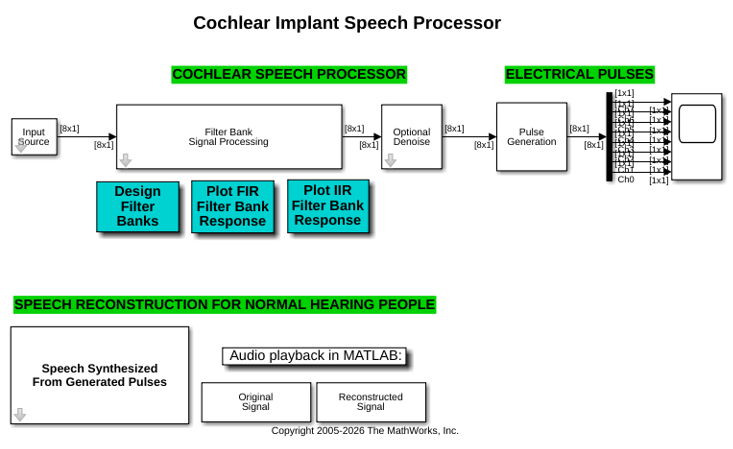
Simulate the design of a cochlear implant that can be placed in the inner ear of a profoundly deaf person to restore partial hearing. Signal processing is used in cochlear implant development to convert sound to electrical pulses. The pulses can bypass the damaged parts of a deaf person's ear and be transmitted to the brain to provide partial hearing.
Active Noise Control with Simulink Real-Time
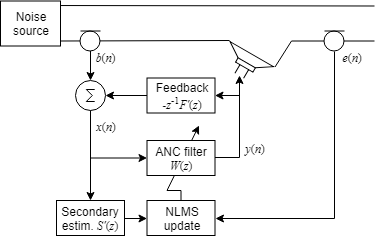
Design a real-time active noise control system using a Speedgoat® Simulink® Real-Time™ target.
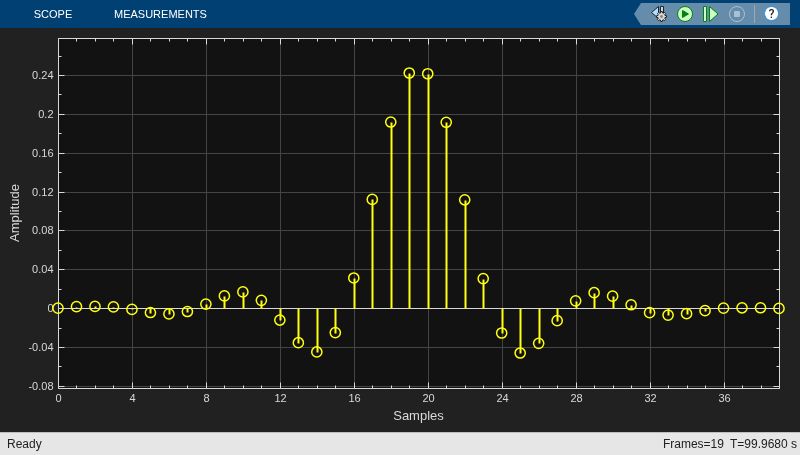
Acoustic Noise Cancellation (LMS)
Use the least mean square (LMS) algorithm to subtract noise from an input signal. The example uses a preconfigured Simulink® model. The LMS Filter block in the dspanc model models an adaptive filter that uses the reference signal at its Input port and the desired signal at the Desired port to automatically match the filter response. The LMS Filter block subtracts the filtered noise from the original signal. As the filter converges, the resultant error signal contains only the original signal.
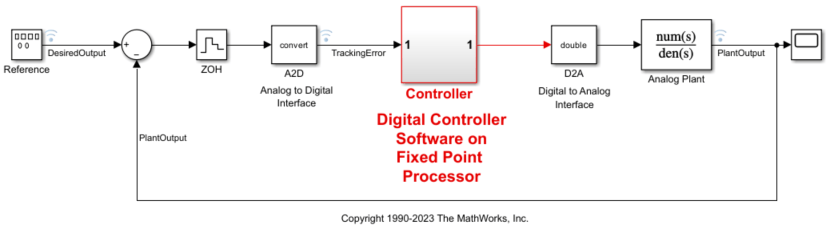
Use the Fixed-Point Tool to Rescale a Fixed-Point Model
Show you how to use the Fixed-Point Tool to refine the scaling of fixed-point data types associated with the feedback controller model fxpdemo_feedback. The Fixed-Point Tool enables multiple workflows for converting a model to use fixed-point data types.
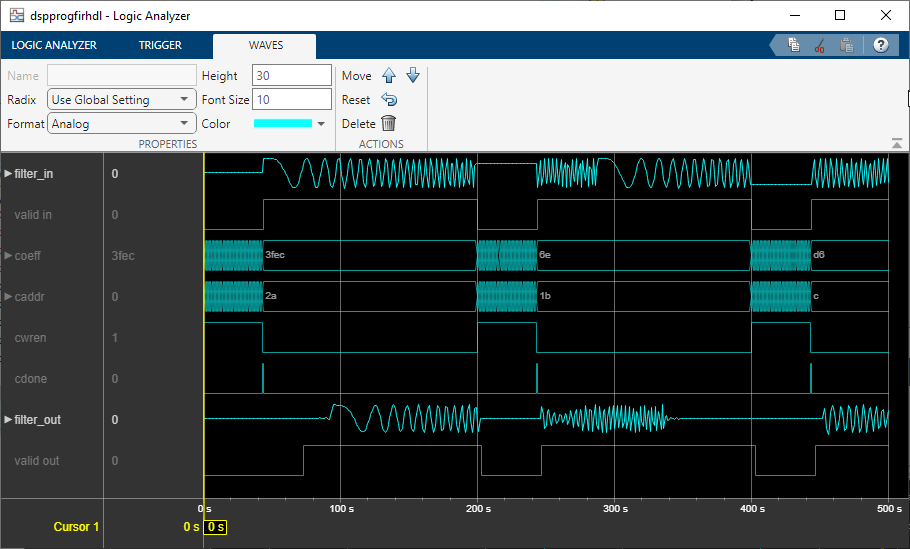
用于 FPGA 的可编程 FIR 滤波器
此示例说明如何实现用于硬件的可编程 FIR 滤波器,并通过使用内存式接口加载滤波器系数。
端口
输入
输出
参数
常设
选择以指定是使用可调参数对话框参数还是通过输入端口指定滤波器系数,这对于时变系数非常有用。
编程用法
要以编程方式设置模块参数值,请使用 set_param 函数。
| 参数: | CoefSource |
| 值: | 'Dialog parameters' (默认) | "Input port" |
| 数据类型: | char | string |
示例: set_param("myModel/Discrete FIR Filter",CoefSource="Input port")
选择您要模块实现的滤波器结构。有关详细信息,请参阅算法。
依赖关系
如果模型包含 Discrete FIR Filter 模块且该模块实现直接型以外的滤波器结构,则您必须有可用的 DSP System Toolbox 许可证才能运行该模型。
编程用法
要以编程方式设置模块参数值,请使用 set_param 函数。
| 参数: | FilterStructure |
| 值: | 'Direct form' (默认) | "Direct form symmetric" | "Direct form antisymmetric" | "Direct form transposed" | "Lattice MA" |
| 数据类型: | char | string |
示例: set_param("myModel/Discrete FIR Filter",FilterStructure="Direct form transposed")
将滤波器系数指定为标量、向量或矩阵。
当指定滤波器抽头的行向量时,模块会对输入应用单个滤波器。要为同一输入应用多个滤波器,请指定一介系数矩阵,其中每一行代表一组不同的滤波器抽头。要实现多个滤波器,必须满足以下条件:
将滤波器结构设置为直接型。
输入必须为标量。
将输入处理设置为元素作为通道(基于采样)。
依赖关系
要启用此参数,请将系数来源设置为对话框参数。
编程用法
要以编程方式设置模块参数值,请使用 set_param 函数。
| 参数: | Coefficients |
| 值: | '[0.5 0.5]' (默认) | vector |
| 数据类型: | char | string |
示例: set_param("myModel/Discrete FIR Filter",Coefficients="[0.25 0.5 0.25]")
指定模块是执行基于采样还是基于帧的处理。您可以选择以下选项之一:
元素作为通道(基于采样) - 将输入的每个元素作为独立通道处理(基于采样的处理)。
列作为通道(基于帧) - 将输入的每列作为独立通道处理(基于帧的处理)。
注意
基于帧的处理需要具有 DSP System Toolbox 许可证。
有关详细信息,请参阅Sample- and Frame-Based Concepts (DSP System Toolbox)。
编程用法
要以编程方式设置模块参数值,请使用 set_param 函数。
| 参数: | InputProcessing |
| 值: | 'Elements as channels (sample based)' (默认) | "Columns as channels (frame based)" |
| 数据类型: | char | string |
示例: set_param("myModel/Discrete FIR Filter",InputProcessing="Columns as channels (frame based)")
此选项使用使能端口来控制此模块的执行。当此端口的输入非零时,模块被视为启用;当输入为 0 时,模块被视为禁用。输入的值在执行模块的同一时间步进行检查。
编程用法
模块参数:ShowEnablePort
|
| 类型:字符向量 |
值:'off' | 'on' |
默认值:'off' |
指定用于将状态重置为初始条件的触发事件。
| 重置模式 | 行为 |
|---|---|
| 无 | 不重置。 |
| 上升沿 | 基于上升沿重置。 |
| 下降沿 | 基于下降沿重置。 |
| 任一沿 | 基于上升或下降沿重置。 |
| 电平 | 在下列任一情况下重置:
|
| 电平保持 | 当重置信号在当前时间步为非零值时重置 |
编程用法
模块参数:ExternalReset |
| 类型:字符向量 |
值:'None' | 'Rising' | 'Falling' | 'Either' | 'Level' | 'Level hold' |
默认值:'None' |
点击此按钮以打开滤波器可视化工具 (fvtool (DSP System Toolbox)),并显示在模块对话框中定义的滤波器的滤波器响应。
依赖关系
要启用此参数,请将系数来源参数设置为对话框参数。
仅当您有有效的 DSP System Toolbox 许可证时,此参数才会出现。
数据类型
指定直接型对称或直接型反对称滤波器的抽头加和数据类型。当滤波器在乘以系数之前对输入求和时,使用此数据类型。可以将其设置为:
继承数据类型的规则,例如继承: 从内部规则继承
内置整数,例如
int8数据类型对象,例如
Simulink.NumericType对象计算结果为数据类型的表达式,例如
fixdt(1,16,0)
数据类型助手可帮助您设置数据属性。要使用数据类型助手,请点击  。有关详细信息,请参阅使用数据类型助手指定数据类型。
依赖关系
仅当滤波器结构设置为直接型对称或直接型反对称时,此参数才可见。
编程用法
要以编程方式设置模块参数值,请使用 set_param 函数。
| 参数: | TapSumDataTypeStr |
| 值: | 'Inherit: Inherit via internal rule' (默认) | "Inherit: Same as input" | "int8" | "uint8" | "int16" | "uint16" | "int32" | "uint32" | "int64" | "uint64" | "fixdt(1,16,0)" | "<data type expression>" |
| 数据类型: | char | string |
示例: set_param("myModel/Discrete FIR Filter",TapSumDataTypeStr="Inherit: Same as input")
指定系数数据类型。可以将其设置为:
继承数据类型的规则,例如继承: 与输入的字长相同
内置整数,例如
int8数据类型对象,例如
Simulink.NumericType对象计算结果为数据类型的表达式,例如
fixdt(1,16,0)
数据类型助手可帮助您设置数据属性。要使用数据类型助手,请点击 。有关详细信息,请参阅使用数据类型助手指定数据类型。
编程用法
要以编程方式设置模块参数值,请使用 set_param 函数。
| 参数: | CoefDataTypeStr |
| 值: | 'Inherit: Same wordlength as input' (默认) | "int8" | "uint8" | "int16" | "uint16" | "int32" | "uint32" | "int64" | "uint64" | "fixdt(1,16)" | "fixdt(1,16,0)" | "<data type expression>" |
| 数据类型: | char | string |
示例: set_param("myModel/Discrete FIR Filter",CoefDataTypeStr="int16")
指定滤波器系数应具有的最小值。默认值为 [](未指定)。Simulink 软件使用此值执行:
参数范围检查(请参阅指定模块参数的最小值和最大值)
定点数据类型的自动定标
编程用法
要以编程方式设置模块参数值,请使用 set_param 函数。
| 参数: | CoefMin |
| 值: | '[]' (默认) | scalar |
| 数据类型: | char | string |
示例: set_param("myModel/Discrete FIR Filter",CoefMin="-1")
指定滤波器系数应具有的最大值。默认值为 [](未指定)。Simulink 软件使用此值执行:
参数范围检查(请参阅指定模块参数的最小值和最大值)
定点数据类型的自动定标
编程用法
要以编程方式设置模块参数值,请使用 set_param 函数。
| 参数: | CoefMax |
| 值: | '[]' (默认) | scalar |
| 数据类型: | char | string |
示例: set_param("myModel/Discrete FIR Filter",CoefMax="1")
指定乘积输出的数据类型。可以将其设置为:
继承数据类型的规则,例如继承: 从内部规则继承
内置数据类型,例如
int8数据类型对象,例如
Simulink.NumericType对象计算结果为数据类型的表达式,例如
fixdt(1,16,0)
数据类型助手可帮助您设置数据属性。要使用数据类型助手,请点击 。有关详细信息,请参阅使用数据类型助手指定数据类型。
编程用法
要以编程方式设置模块参数值,请使用 set_param 函数。
| 参数: | ProductDataTypeStr |
| 值: | 'Inherit: Inherit via internal rule' (默认) | "Inherit: Same as input" | "int8" | "uint8" | "int16" | "uint16" | "int32" | "uint32" | "int64" | "uint64" | "fixdt(1,16,0)" | "<data type expression>" |
| 数据类型: | char | string |
示例: set_param("myModel/Discrete FIR Filter",ProductDataTypeStr="Inherit: Same as input")
指定累加器数据类型。可以将其设置为:
继承数据类型的规则,例如继承: 从内部规则继承
内置数据类型,例如
int8数据类型对象,例如
Simulink.NumericType对象计算结果为数据类型的表达式,例如
fixdt(1,16,0)
数据类型助手可帮助您设置数据属性。要使用数据类型助手,请点击 。有关详细信息,请参阅使用数据类型助手指定数据类型。
编程用法
要以编程方式设置模块参数值,请使用 set_param 函数。
| 参数: | AccumDataTypeStr |
| 值: | 'Inherit: Inherit via internal rule' (默认) | "Inherit: Same as input" | "Inherit: Same as product output" | "int8" | "uint8" | "int16" | "uint16" | "int32" | "uint32" | "int64" | "uint64" | "fixdt(1,16,0)" | "<data type expression>" |
| 数据类型: | char | string |
示例: set_param("myModel/Discrete FIR Filter",AccumDataTypeStr="Inherit: Same as input")
指定状态数据类型。可以将其设置为:
继承数据类型的规则,例如继承: 与累加器相同
内置整数,例如
int8数据类型对象,例如
Simulink.NumericType对象计算结果为数据类型的表达式,例如
fixdt(1,16,0)
依赖关系
要启用此参数,请将滤波器结构设置为格型 MA。
编程用法
要以编程方式设置模块参数值,请使用 set_param 函数。
| 参数: | StateDataTypeStr |
| 值: | 'Inherit: Same as accumulator' (默认) | "Inherit: Same as input" | "int8" | "uint8" | "int16" | "uint16" | "int32" | "uint32" | "int64" | "uint64" | "fixdt(1,16,0)" | "<data type expression>" |
| 数据类型: | char | string |
示例: set_param("myModel/Discrete FIR Filter",StateDataTypeStr="Inherit: Same as input")
指定输出数据类型。可以将其设置为:
继承数据类型的规则,例如继承: 与输入相同
内置数据类型,例如
int8数据类型对象,例如
Simulink.NumericType对象计算结果为数据类型的表达式,例如
fixdt(1,16,0)
数据类型助手可帮助您设置数据属性。要使用数据类型助手,请点击 。有关详细信息,请参阅使用数据类型助手指定数据类型。
当模块的输入是浮点时,输出数据类型匹配输入数据类型,因为浮点继承优先于定点设置。
编程用法
要以编程方式设置模块参数值,请使用 set_param 函数。
| 参数: | OutDataTypeStr |
| 值: | 'Inherit: Same as accumulator' (默认) | "Inherit: Same as input" | "int8" | "uint8" | "int16" | "uint16" | "int32" | "uint32" | "int64" | "uint64" | "fixdt(1,16)" | "fixdt(1,16,0)" | "<data type expression>" |
| 数据类型: | char | string |
示例: set_param("myModel/Discrete FIR Filter",OutDataTypeStr="Inherit: Same as input")
软件检查的输出范围的下限值。
软件使用最小值执行下列操作:
某些模块的参数范围检查(请参阅指定模块参数的最小值和最大值)。
定点数据类型的自动定标。
从模型生成的代码的优化。此优化可删除算法代码,并影响某些仿真模式(如 SIL 或外部模式)的结果。有关详细信息,请参阅使用指定的最小值和值进行优化 (Embedded Coder)。
提示
输出最小值不会对实际输出信号进行饱和处理或截断。请改用 Saturation 模块。
编程用法
要以编程方式设置模块参数值,请使用 set_param 函数。
| 参数: | OutMin |
| 值: | '[]' (默认) | scalar in quotes |
软件检查的输出范围的上限值。
软件使用最大值执行下列操作:
某些模块的参数范围检查(请参阅指定模块参数的最小值和最大值)。
定点数据类型的自动定标。
从模型生成的代码的优化。此优化可删除算法代码,并影响某些仿真模式(如 SIL 或外部模式)的结果。有关详细信息,请参阅使用指定的最小值和值进行优化 (Embedded Coder)。
提示
输出最大值不会对实际输出信号进行饱和处理或截断。请改用 Saturation 模块。
编程用法
要以编程方式设置模块参数值,请使用 set_param 函数。
| 参数: | OutMax |
| 值: | '[]' (默认) | scalar in quotes |
选择此选项可锁定数据类型设置,防止使用定点工具和定点顾问进行更改。有关详细信息,请参阅Lock the Output Data Type Setting (Fixed-Point Designer)。
编程用法
要以编程方式设置模块参数值,请使用 set_param 函数。
| 参数: | LockScale |
| 值: | 'off' (默认) | "on" |
指定定点运算的舍入模式。有关详细信息,请参阅舍入模式 (Fixed-Point Designer)。
编程用法
模块参数:RndMeth |
| 类型:字符向量 |
值:'Ceiling' | 'Convergent' | 'Floor' | 'Nearest' | 'Round' | 'Simplest' | 'Zero' |
默认值:'Floor' |
指定对溢出是进行饱和处理还是绕回处理。
on- 将溢出饱和处理为数据类型能够表示的最小值或最大值。off- 溢出将绕回到数据类型可以表示的合适值。
例如,有符号 8 位整数 int8 可以表示的最大值是 127。任何大于此最大值的模块运算结果都会导致 8 位整数溢出。
选择此参数后,模块输出将在达到 127 时饱和。类似地,模块输出将在达到最小输出值 -128 时饱和。
清除此参数后,软件会将导致溢出的值解释为
int8,这可能产生意外结果。例如,以int8表示的模块结果 130(二进制 1000 0010)为 -126。
提示
如果您的模型存在可能的溢出,而您希望在生成的代码中进行显式饱和保护,请考虑选中此参数。
如果您希望优化生成的代码的效率,请考虑清除此参数。清除此参数还可以帮助您避免过度地指定信号超出范围时模块的处理方式。有关详细信息,请参阅信号范围错误故障排除。
如果选中此参数,饱和将应用于模块中的每个内部操作,而不仅仅应用于输出或结果。
一般情况下,代码生成进程可以检测到何时不可能发生溢出。在这种情况下,代码生成器不会生成饱和代码。
编程用法
要以编程方式设置模块参数值,请使用 set_param 函数。
| 参数: | SaturateOnIntegerOverflow |
| 值: | 'off' (默认) | 'on' |
模块特性
数据类型 |
|
直接馈通 |
|
多维信号 |
|
可变大小信号 |
|
过零检测 |
|
详细信息
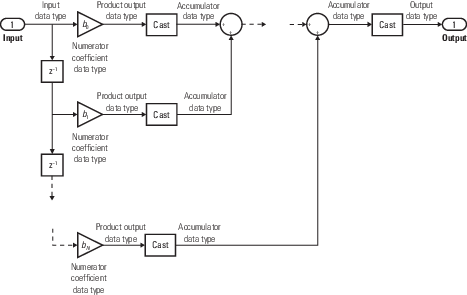
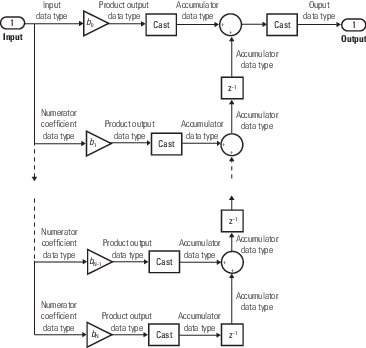
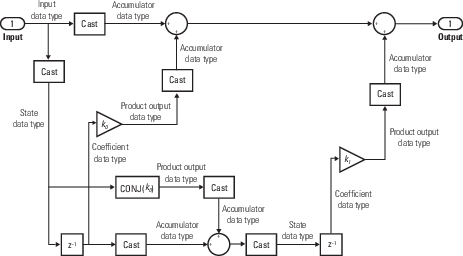
下图显示了 Discrete FIR Filter 模块内用于定点信号的滤波器结构和数据类型。
直接型
不能在此结构体的模块封装上指定状态数据类型,因为输入状态与输入具有相同的数据类型。
直接型对称
不能在此结构体的模块封装上指定状态数据类型,因为输入状态与输入具有相同的数据类型。
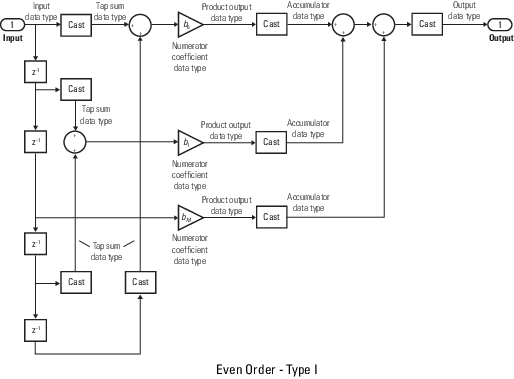
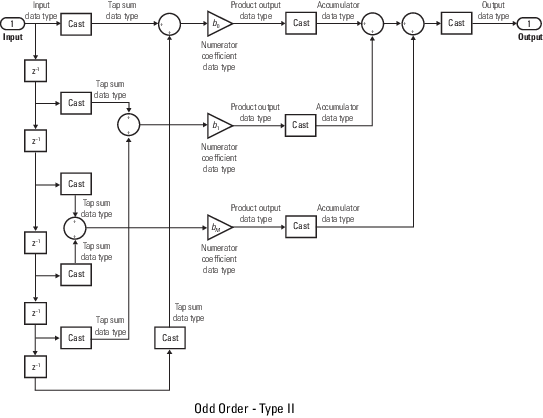
直接型反对称
不能在此结构体的模块封装上指定状态数据类型,因为输入状态与输入具有相同的数据类型。
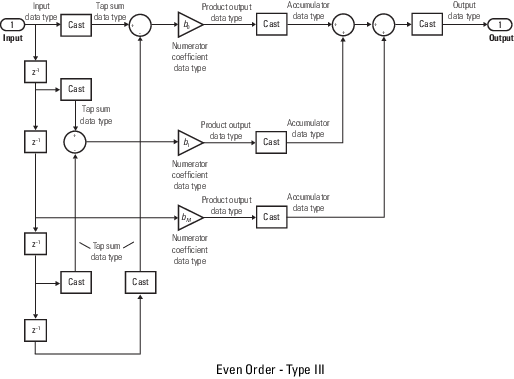
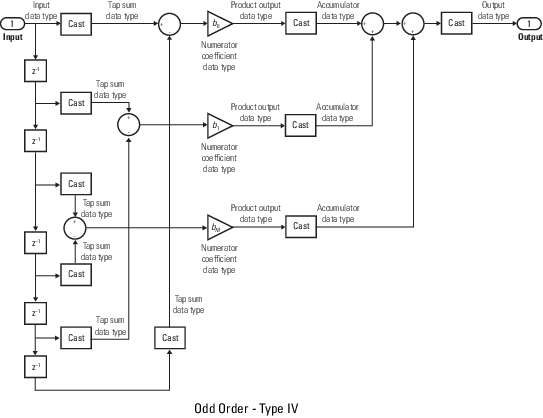
直接型转置
格型 MA
算法
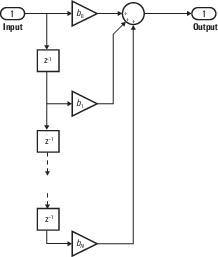
以下是 Discrete FIR Filter 模块中使用的结构图。
直接型
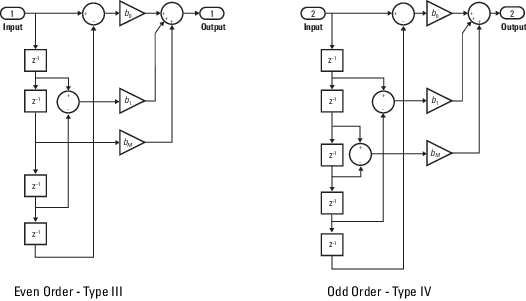
直接型对称
假定滤波器系数对称。该模块仅使用系数的前半部分进行滤波。
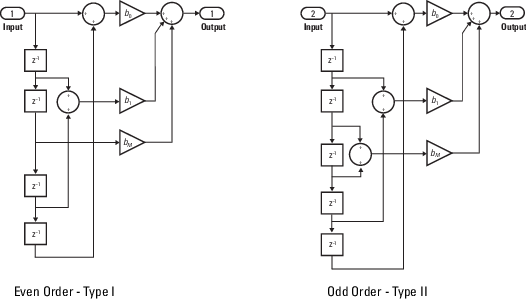
直接型反对称
假定滤波器系数反对称。该模块仅使用系数的前半部分进行滤波。
直接型转置
当输入或系数为复数时,状态为复数。
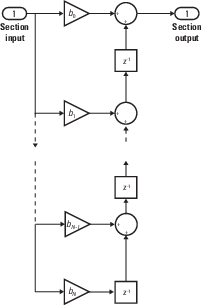
格型 MA