运行 Simulink Real-Time 应用程序
R2026b交互式执行,支持开发机与目标机
运行实时应用程序时,您可以启动和停止执行;观察信号并记录信号数据;以及调整实时应用程序参数。
您可以使用以下接口运行该应用程序:
Simulink® Real-Time™ 浏览器和 Simulink 外部模式。请参阅从 Simulink 模型创建并运行实时应用程序。
MATLAB® 语言。请参阅使用 MATLAB 语言创建并执行实时应用程序。
Simulink Real-Time 通过目标计算机命令行执行实时操作系统命令。请参阅在目标计算机命令行控制实时应用程序。
App
| Simulink Real-Time | 生成实时应用程序,用于在目标计算机上运行的仿真,并与目标计算机中的 I/O 设备进行交互。 |
| Simulink Real-Time Explorer | Interact with target computer and real-time application running on target computer |
| Simulink Real-Time TET Monitor | 观察在目标计算机上运行的实时应用程序的任务执行时间 |
| Simulink Real-Time App Generator | Generate instrument panel app to interact with target computer and real-time application running on target computer (自 R2022a 起) |
| Simulink Real-Time Application Property Inspector | 查看和修改应用程序属性 (自 R2023b 起) |
工具
| 仿真数据检查器 | 检查并比较数据与仿真结果,以验证和迭代模型设计 |
对象
Target | 实时呈现应用程序和目标计算机的状态 |
Application | 在开发计算机上映射应用程序文件 |
Instrument | 创建实时仪表对象 |
slrealtime.instrument.LineStyle | 创建实时仪表线型对象 (自 R2022b 起) |
属性
| Target Object 属性 | slrealtime 用于配置和状态的对象属性 |
函数
主题
从开发计算机
- 实时应用程序的执行模式
了解中断和轮询执行模式的行为。 - Define and Update Inport Data by Using Root Inport Mapper
Map root inports to source data. - 目标计算机 CPU 过载
消除实时应用程序执行期间的 CPU 过载。
从目标计算机
- 在目标计算机命令行控制实时应用程序
通过命令行界面在目标计算机上加载、启动、停止或检查实时应用程序的状态。 - 目标计算机命令行
从目标计算机命令行控制实时应用程序。 - 目标计算机命令行接口
通过目标计算机的命令行界面控制独立运行的实时应用程序。
疑难解答
在使用 Simulink Real-Time 产品时遇到的问题的故障排除
精选示例
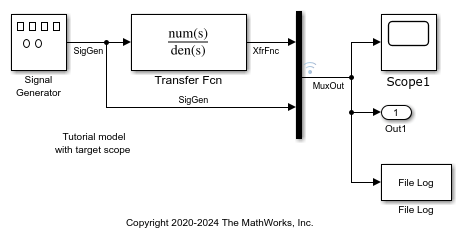
从 Simulink 模型创建并运行实时应用程序
将 Simulink 模型适配为可在目标计算机上运行的实时模型。
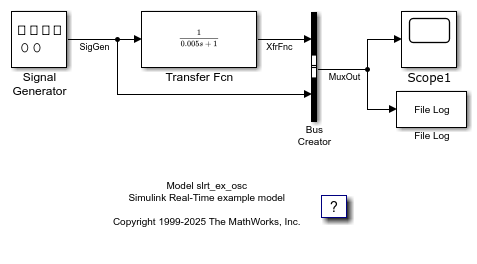
为目标计算机的事件创建监听器
创建监听器以监视目标计算机的事件。
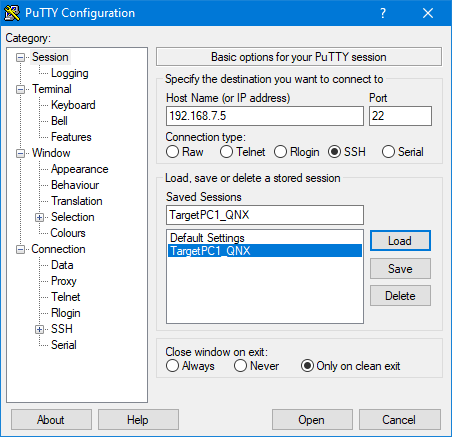
通过控制台或 SSH 执行目标计算机的命令行命令
使用 SSH 实用工具,从开发计算机上在目标计算机上执行系统命令。
Execute Target Computer Command-Line Commands Via HTTP or HTTPS
Run system commands on the target computer from the development computer by using the REST interface.

