generatePointCloud
R2026bGenerate dense, colored point cloud using trained Nerfacto Neural Radiance Field (NeRF) model
Since R2026a
Description
Add-On Required: This feature requires the Computer Vision Toolbox Interface for Nerfstudio Library add-on.
ptCloud = generatePointCloud(nerf)
Note
This feature requires the Computer Vision Toolbox Interface for Nerfstudio Library add-on, a Deep Learning Toolbox™ license, a Parallel Computing Toolbox™ license, and a CUDA® enabled NVIDIA® GPU with at least 16 GB of available GPU memory.
This feature is not supported to run on GPU architectures of the Blackwell family and newer. The Nerfstudio backend depends on CUDA 11.8, which does not support Blackwell or newer GPU architectures.
Examples
Download Pretrained NeRF Model
The tum_rgbd_nerfacto.zip file contains the trainedNerfactoTUMRGBD folder. The folder contains the saved-nerfacto-tum-rgbd.mat supporting file, which contains a nerfacto object that has been trained on a sequence of indoor images from the TUM RGB-D data set [1], and the nerfactoModelFolder folder, which contains the data and configuration files required for the Nerfstudio Library [2] to load and execute the trained NeRF model [3].
Download and extract tum_rgbd_nerfacto.zip.
if ~exist("tum_rgbd_nerfacto.zip","file")
    websave("tum_rgbd_nerfacto.zip","https://ssd.mathworks.com/supportfiles/3DReconstruction/tum_rgbd_nerfacto.zip");
    unzip("tum_rgbd_nerfacto.zip",pwd);
end
Specify the path to the folder containing the saved-nerfacto-tum-rgbd MAT file, and then load the pretrained nerfacto object into the workspace.
modelRoot = fullfile(pwd, "trainedNerfactoTUMRGBD");
load(fullfile(modelRoot, "saved-nerfacto-tum-rgbd.mat"))
Warning: The model folder for the nerfacto object could not be loaded. Update the model folder location using the <a href="matlab:doc('changePath')">changePath</a> method.
  '\\mathworks\devel\sandbox\user\Shared\EX_25b\EX_nerfacto_feature\train_nerfacto_small'
MATLAB® displays a warning when you first load the pretrained nerfacto object into the workspace because the path to the model folder associated with the object, nerfactoModelFolder, changes when you extract the nerfacto_saved_model.zip.
To resolve this issue, use the changePath function to update the ModelFolder property of the trained nerfacto object to the current path of nerfactoModelFolder. This process can take a few minutes.
nerf = changePath(nerf, fullfile(modelRoot, "nerfactoModelFolder"));Changing nerfacto object model folder path. nerfacto object model folder path change complete.
Display the nerfacto object properties to verify that the ModelFolder property is set to the current path of nerfactoModelFolder on your system.
disp(nerf)
  nerfacto with properties:

      ModelFolder: "/home/user/Documents/MATLAB/ExampleManager/user.Bdoc.EX_26a_v1/vision-ex90891477/trainedNerfactoTUMRGBD/nerfactoModelFolder"
    MaxIterations: 30000
       Intrinsics: [1×1 cameraIntrinsics]
Generate Point Cloud with Pretrained NeRF Model
Use the generatePointCloud function to generate a dense, colored point cloud of the scene. Set the maximum number of points in the point cloud to 100,000 by specifying the MaxNumPoints name-value argument. This value achieves a balance between the quality of the point cloud, the computing time, and storage space.
ptCloud = generatePointCloud(nerf, MaxNumPoints=100000);
Generating point cloud from nerfacto object.
Loading latest checkpoint from load_dir
Setting up the Nerfstudio pipeline...
[12:27:23 PM] Auto image downscale factor of 1                                              nerfstudio_dataparser.py:484
Setting up training dataset...
Caching all 104 images.
Loading latest checkpoint from load_dir
nerfacto object point cloud generation complete.
Visualize Point Cloud
Visualize the point cloud by using the pcshow (Point Cloud Toolbox) function, and specify the vertical axis and vertical axis direction to match the coordinate system of the TUM RGB-D data set used to train the nerfacto object. Modify the view of the point cloud visualization to focus on the scene region of interest by specifying the of low-level camera properties of the axes object. For more information on configuring these properties, see Low-Level Camera Properties.
figure
ax = pcshow(ptCloud, VerticalAxis="y",VerticalAxisDir="down");
ax.CameraPosition = [-1.5185 -6.5178 -11.9106];
ax.CameraUpVector = [0.0520 -0.8878 0.4572];
ax.CameraViewAngle = 15;
xlabel("X")
ylabel("Y")
zlabel("Z")
title("Point Cloud from NeRF")
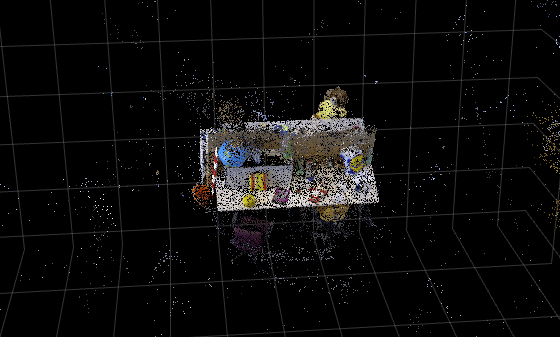
Tip: You can use the pcdenoise (Point Cloud Toolbox) function to clean up the outliers and noise in the point cloud.
References
[1] Sturm, Jürgen, Nikolas Engelhard, Felix Endres, Wolfram Burgard, and Daniel Cremers. “A Benchmark for the Evaluation of RGB-D SLAM Systems.” 2012 IEEE/RSJ International Conference on Intelligent Robots and Systems, October 2012, 573–80. https://doi.org/10.1109/IROS.2012.6385773.
[2] Tancik, Matthew, Ethan Weber, Evonne Ng, et al. “Nerfstudio: A Modular Framework for Neural Radiance Field Development.” Special Interest Group on Computer Graphics and Interactive Techniques Conference Proceedings, ACM, July 23, 2023, 1–12. https://doi.org/10.1145/3588432.3591516.
[3] Mildenhall, Ben, Pratul P. Srinivasan, Matthew Tancik, Jonathan T. Barron, Ravi Ramamoorthi, and Ren Ng. "NeRF: Representing Scenes as Neural Radiance Fields for View Synthesis." In Computer Vision - ECCV 2020, edited by Andrea Vedaldi, Horst Bischof, Thomas Brox, and Jan-Michael Frahm. Springer International Publishing, 2020. https://doi.org/10.1007/978-3-030-58452-8_24.
Input Arguments
Output Arguments
References
[1] Mildenhall, Ben, Pratul P. Srinivasan, Matthew Tancik, Jonathan T. Barron, Ravi Ramamoorthi, and Ren Ng. “NeRF: Representing Scenes as Neural Radiance Fields for View Synthesis.” In Computer Vision – ECCV 2020, edited by Andrea Vedaldi, Horst Bischof, Thomas Brox, and Jan-Michael Frahm. Springer International Publishing, 2020. https://doi.org/10.1007/978-3-030-58452-8_24.
[2] Tancik, Matthew, Ethan Weber, Evonne Ng, et al. “Nerfstudio: A Modular Framework for Neural Radiance Field Development.” Special Interest Group on Computer Graphics and Interactive Techniques Conference Proceedings, ACM, July 23, 2023, 1–12. https://doi.org/10.1145/3588432.3591516.
Version History
Introduced in R2026a
See Also
nerfacto | generateViews | writeViews | pointCloud (Point Cloud Toolbox) | monovslam

