imagePointsToWorldPlane
R2026bProject image points onto reference plane in world coordinate system
Since R2026b
Description
projects the image points worldPoints = imagePointsToWorldPlane(imgPoints,intrinsics,tform)imgPoints onto the Z=0
world plane using the camera intrinsic parameters intrinsics and
extrinsic rigid transform tform. The function removes lens distortion
from the image points, then maps them to world coordinates using a projective transformation
derived from the camera pose. The output coordinates are in the same units used during
camera calibration.
Examples
Create a set of calibration images. These images contain a checkerboard pattern captured from different camera views by an SLR camera.
images = imageDatastore(fullfile(toolboxdir("vision"),"visiondata","calibration","slr"));
Detect the checkerboard corners in all calibration images and estimate the camera intrinsic parameters. The checkerboard squares are 29 mm per side, so all world measurements are in millimeters.
[imagePoints,patternDims] = detectCheckerboardPoints(images.Files);
squareSize = 29;
worldPoints = patternWorldPoints("checkerboard",patternDims,squareSize);
I = readimage(images,1);
imageSize = [size(I,1) size(I,2)];
cameraParams = estimateCameraParameters(imagePoints,worldPoints,ImageSize=imageSize);
intrinsics = cameraParams.Intrinsics;
Load an image you want to rectify, and display it.
imOrig = readimage(images,9);
imshow(imOrig)
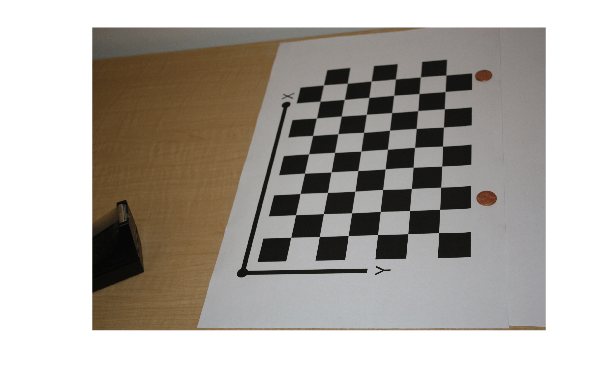
Detect the checkerboard in the image, and estimate the camera extrinsic pose relative to the checkerboard plane.
[imagePoints,patternDims] = detectCheckerboardPoints(imOrig);
camIntrinsics = cameraParams.Intrinsics;
camExtrinsics = estimateExtrinsics(imagePoints,worldPoints,camIntrinsics);
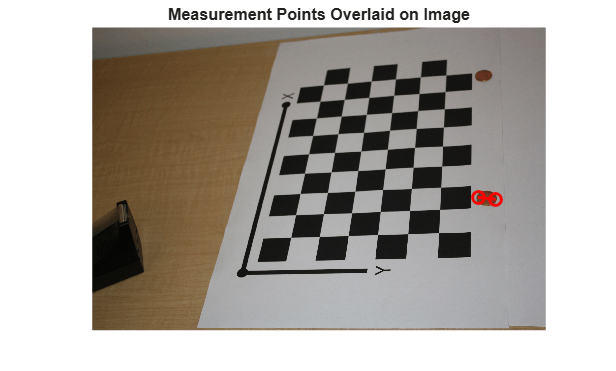
Specify the pixel coordinates of points on the opposite edges of objects visible in the image. These coordinates correspond to the edges of the bottom coin on the right side of the image. Use imagePointsToWorldPlane to transform the pixel coordinates into world coordinates on the Z=0 measurement plane. The function first undistorts the points to remove lens distortion, then applies the projective mapping derived from the camera pose.
objectEdgePoints = [2505 1068; 2396 1054];
worldCoords = imagePointsToWorldPlane(objectEdgePoints,camIntrinsics,camExtrinsics);
disp(worldCoords)
   39.6356  196.2585
   43.4462  179.8766
Calculate the Euclidean distance between the projected world points to obtain the diameter of the coin, in millimeters.
d = worldCoords(2,:) - worldCoords(1,:);
distanceMM = hypot(d(1),d(2));
disp("Measured distance: " + num2str(distanceMM,'%.2f') + " mm")
Measured distance: 16.82 mm
Overlay the measurement points and connecting line on the original image to confirm the measurement locations.
imshow(imOrig,InitialMagnification=25)
hold on
plot(objectEdgePoints(:,1),objectEdgePoints(:,2),"r-o",LineWidth=2,MarkerSize=8)
hold off
title("Measurement Points Overlaid on Image")
Input Arguments
Output Arguments
Tips
Use
imagePointsToWorldPlanewhen you need world coordinates for a small number of specific points, such as feature locations or centroids. This is more efficient than rectifying the entire image with theimageToWorldPlanefunction.For dense measurements, or when you intend to use visual measurement tools such as
caliperorregionprops, useimageToWorldPlaneto rectify the full image instead.
Extended Capabilities
Version History
Introduced in R2026b
See Also
imageToWorldPlane | imageToWorldPlaneMapping | cameraIntrinsics | cameraIntrinsicsKB | rigidtform3d | imref2d | caliper | uicaliper | regionprops

