estimateCameraParameters
R2026bCalibrate a single or stereo camera
Syntax
Description
[
returns an object cameraParams,imagesUsed,estimationErrors]
= estimateCameraParameters(imagePoints,worldPoints)cameraParams, containing estimates for
the intrinsic and extrinsic parameters and the distortion coefficients of a
single and stereo camera. The function also returns the images you used to
estimate the camera parameters and the standard estimation errors for the single
camera calibration. The estimateCameraParameters function
estimates extrinsic and intrinsic parameters.
[
returns stereoParams,pairsUsed,estimationErrors]
= estimateCameraParameters(imagePoints,worldPoints)stereoParams, a stereoParameters object
containing the parameters of the stereo camera. The function also returns the
images you used to estimate the stereo parameters and the standard estimation
errors for the stereo camera calibration.
cameraParams = estimateCameraParameters(___,Name=Value)WorldUnits="mm" sets the world units to
millimeters.
Examples
Create a set of calibration images.
imds = imageDatastore(fullfile(toolboxdir("vision"),"visiondata",...
            "calibration","mono"));
imageFileNames = imds.Files;
Detect the calibration pattern.
[imagePoints,patternDims] = detectCheckerboardPoints(imageFileNames);
Generate the world coordinates of the corners of the squares.
squareSizeInMM = 29; % millimeters
worldPoints = patternWorldPoints("checkerboard",patternDims,squareSizeInMM);
Calibrate the camera.
I = preview(imds);
imageSize = size(I,1:2);
params = estimateCameraParameters(imagePoints,worldPoints,ImageSize=imageSize);
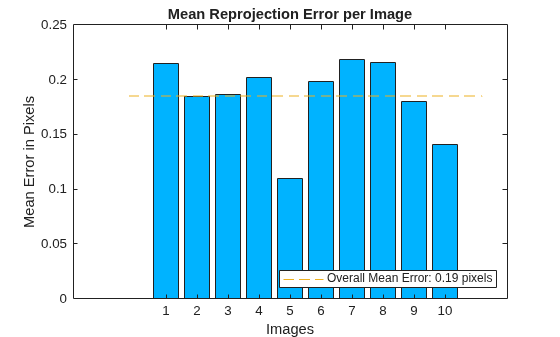
Visualize the calibration accuracy.
showReprojectionErrors(params);
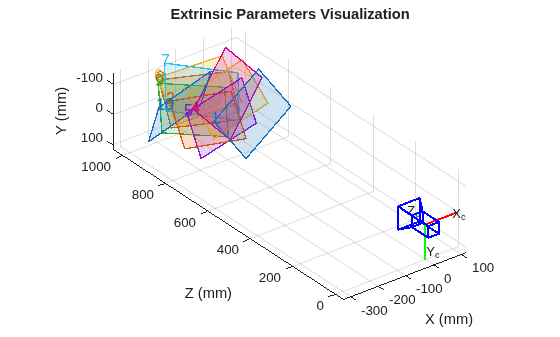
Visualize camera extrinsics.
figure;
showExtrinsics(params);
drawnow;
Plot detected and reprojected points.
figure;
imshow(imageFileNames{1});
hold on;
plot(imagePoints(:,1,1), imagePoints(:,2,1),"go");
plot(params.ReprojectedPoints(:,1,1),params.ReprojectedPoints(:,2,1),"r+");
legend("Detected Points","ReprojectedPoints");
hold off;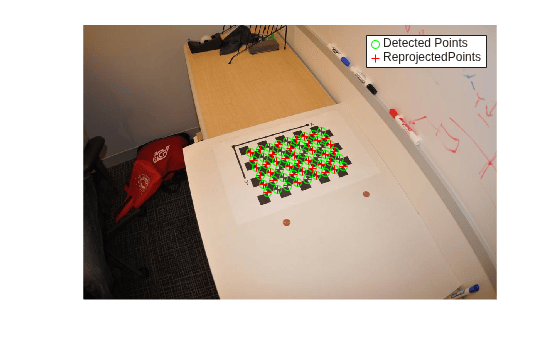
Specify calibration images.
leftImages = imageDatastore(fullfile(toolboxdir("vision"),"visiondata", ...
    "calibration","stereo","left"));
rightImages = imageDatastore(fullfile(toolboxdir("vision"),"visiondata", ...
    "calibration","stereo","right"));
Detect the checkerboards.
[imagePoints,patternDims] = ...
  detectCheckerboardPoints(leftImages.Files,rightImages.Files);
Specify the world coordinates of the checkerboard keypoints. Square size is in millimeters.
squareSize = 108; % millimeters
worldPoints = patternWorldPoints("checkerboard",patternDims,squareSize);
Calibrate the stereo camera system. Both cameras have the same resolution.
I = readimage(leftImages,1);
imageSize = size(I,1:2);
params = estimateCameraParameters(imagePoints,worldPoints,ImageSize=imageSize);
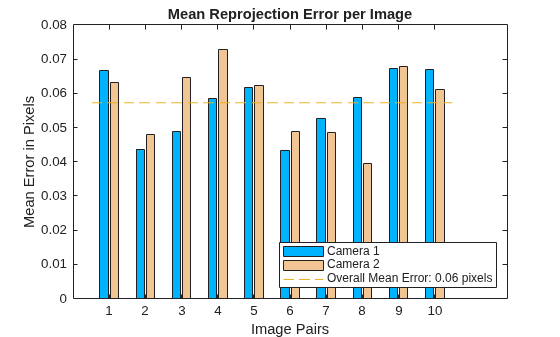
Visualize the calibration accuracy.
showReprojectionErrors(params)
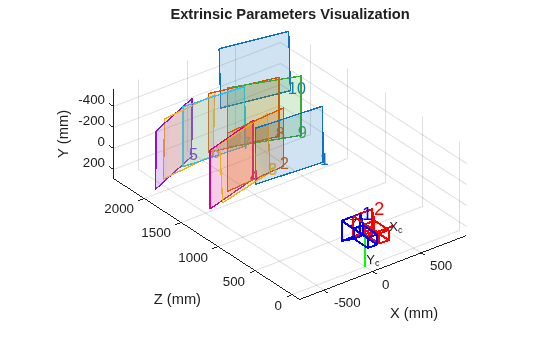
Visualize camera extrinsics.
figure
showExtrinsics(params)
Convert to structure.
paramsStruct = toStruct(params)
paramsStruct = struct with fields:
       CameraParameters1: [1×1 struct]
       CameraParameters2: [1×1 struct]
       RotationOfCamera2: [3×3 double]
    TranslationOfCamera2: [-119.8720 -0.4005 -0.0258]
                 Version: [1×1 struct]
     RectificationParams: [1×1 struct]
Create a set of calibration images.
imds = imageDatastore(fullfile(toolboxdir("vision"),"visiondata",...
                        "calibration","circleGrid","mono"));
calibrationImages = readall(imds);
calibrationImages = cat(4,calibrationImages{:});
Define the circle grid pattern dimensions.
patternDims = [8 11];
Detect the pattern in the calibration images.
imagePoints = detectCircleGridPoints(calibrationImages, patternDims,...
                        PatternType="symmetric");
Specify the world coordinates for the circle grid keypoints. Center distance is in millimeters.
centerDistance = 18; % millimeters
worldPoints = patternWorldPoints("circle-grid-symmetric",patternDims,centerDistance);
Calibrate the camera using the calibration images.
imageSize = size(calibrationImages,1:2);
params = estimateCameraParameters(imagePoints,worldPoints,ImageSize=imageSize);
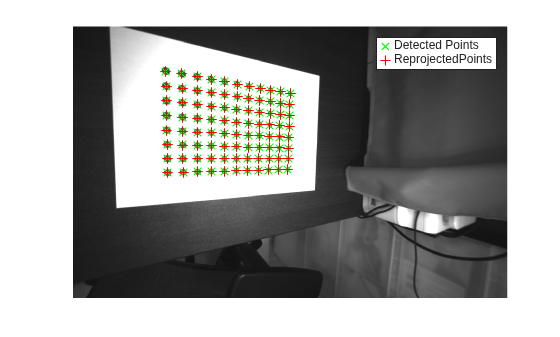
Plot the detected pattern grid and the reprojected points.
figure
imshow(calibrationImages(:,:,:,1))
hold on
plot(imagePoints(:,1,1), imagePoints(:,2,1),"gx",MarkerSize=8)
plot(params.ReprojectedPoints(:,1,1),params.ReprojectedPoints(:,2,1),"r+",MarkerSize=8)
legend("Detected Points","ReprojectedPoints")
hold off
Input Arguments
Name-Value Arguments
Specify optional pairs of arguments as
Name1=Value1,...,NameN=ValueN, where Name is
the argument name and Value is the corresponding value.
Name-value arguments must appear after other arguments, but the order of the
pairs does not matter.
Before R2021a, use commas to separate each name and value, and enclose
Name in quotes.
Example: "WorldUnits","mm" sets the world point units to
millimeters.
World points units, specified as a character vector or string scalar.
Estimate skew, specified as a logical scalar. When you set this property to
true, the function estimates the image axes skew.
When set to false, the image axes are exactly
perpendicular and the function sets the skew to zero.
Number of radial distortion coefficients to estimate, specified as the value
2 or 3.
Radial distortion is the displacement of image points along radial lines extending from the principal point.
As image points move away from the principal point (positive radial displacement), image magnification decreases and a pincushion-shaped distortion occurs on the image.
As image points move toward the principal point (negative radial displacement), image magnification increases and a barrel-shaped distortion occurs on the image.

The radial distortion coefficients model this type of distortion. The distorted points are denoted as (xdistorted, ydistorted):
xdistorted = x(1 + k1*r2 + k2*r4 + k3*r6)
ydistorted= y(1 + k1*r2 + k2*r4 + k3*r6)
x, y — Undistorted pixel locations. x and y are in normalized image coordinates. Normalized image coordinates are calculated from pixel coordinates by translating to the optical center and dividing by the focal length in pixels. Thus, x and y are dimensionless.
k1, k2, and k3 — Radial distortion coefficients of the lens.
r2 = x2 + y2
Typically, two coefficients are sufficient for calibration. For severe distortion, such as in wide-angle lenses, you can select three coefficients to include k3.
Tangential distortion flag, specified as a logical scalar. When you set this property to
true, the function estimates the tangential
distortion. When you set it to false, the tangential
distortion is negligible.
Tangential distortion occurs when the lens and the image plane are not parallel. The tangential distortion coefficients model this type of distortion.

The distorted points are denoted as (xdistorted, ydistorted):
xdistorted = x + [2 * p1 * x * y + p2 * (r2 + 2 * x2)]
ydistorted = y + [p1 * (r2 + 2 *y2) + 2 * p2 * x * y]
x, y — Undistorted pixel locations. x and y are in normalized image coordinates. Normalized image coordinates are calculated from pixel coordinates by translating to the optical center and dividing by the focal length in pixels. Thus, x and y are dimensionless.
p1 and p2 — Tangential distortion coefficients of the lens.
r2 = x2 + y2
Output Arguments
Algorithms
References
[1]
[2]
[3] Bouguet, J.Y. “Camera Calibration Toolbox for Matlab”, Computational Vision at the California Institute of Technology.
[4] Bradski, G., and A. Kaehler. Learning OpenCV : Computer Vision with the OpenCV Library. Sebastopol, CA: O'Reilly, 2008.
Version History
Introduced in R2014bSee Also
Apps
Objects
Functions
showReprojectionErrors|showExtrinsics|undistortImage|undistortPoints|detectCheckerboardPoints|generateCheckerboardPoints|patternWorldPoints|reconstructScene|rectifyStereoImages|disparityBM|disparitySGM|estimateStereoRectification|estimateFundamentalMatrix|estimateStereoBaseline

