detectCheckerboardPoints
R2026bDetect checkerboard pattern in image
Syntax
Description
Single Image Checkerboard Detection
[ detects the keypoints
of a checkerboard calibration pattern in a single image, a set of images, or
stereo image pairs. The function returns the detected points
imagePoints,patternDims]
= detectCheckerboardPoints(I)imagePoints, and dimensions of the checkerboard
patternDims.
[ detects a
checkerboard pattern in a set of input images, provided as an array of file
names.imagePoints,patternDims,imagesUsed]
= detectCheckerboardPoints(imageFileNames)
[ detects a
checkerboard pattern in a set of input images, provided as an array of grayscale
or truecolor images.imagePoints,patternDims,imagesUsed]
= detectCheckerboardPoints(images)
Stereo Pair Checkerboard Detection
[
detects a checkerboard pattern in stereo pairs of images, provided as cell
arrays of file names.imagePoints,patternDims,pairsUsed]
= detectCheckerboardPoints(imageFileNames1,imageFileNames2)
[
detects a checkerboard pattern in stereo pairs of images, provided as arrays of
grayscale or truecolor images.imagePoints,patternDims,pairsUsed]
= detectCheckerboardPoints(images1,images2)
Optional Arguments
[
uses additional options specified by one or more imagePoints,patternDims,pairsUsed]
= detectCheckerboardPoints(___,Name,Value)Name,Value
pair arguments. Unspecified properties have default values.
Examples
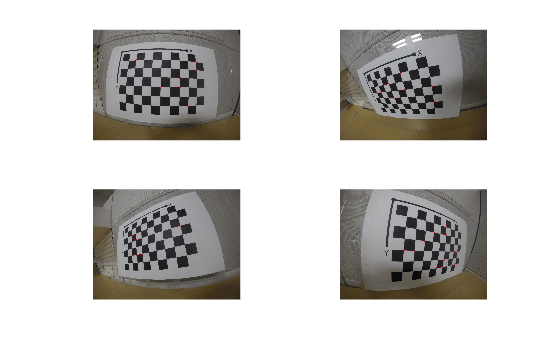
Create an imageDatastore containing calibration images from a GoPro camera.
imds = imageDatastore(fullfile(toolboxdir("vision"),"visiondata","calibration","gopro"));
Detect calibration pattern using the HighDistortion option, which is good to use with fisheye lens images.
[imagePoints,patternDims,imagesUsed] = detectCheckerboardPoints(imds.Files(1:4),HighDistortion=true);
Display detected points.
for i = 1:4 % Read image I = readimage(imds,i); % Insert markers at detected point locations I = insertMarker(I,imagePoints(:,:,i),"o",MarkerColor="red",Size=10); % Display image subplot(2,2,i); imshow(I); end
Load an image containing a checkerboard pattern.
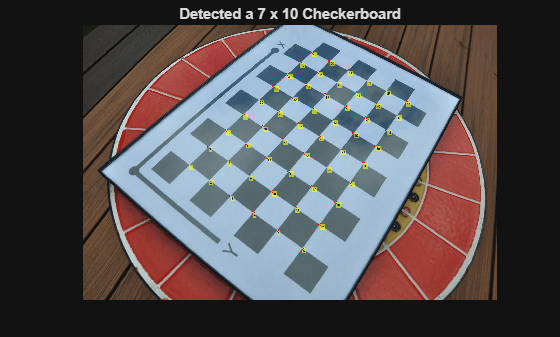
imageFileName = fullfile(toolboxdir("vision"),"visiondata","calibration","dslr","image01.jpg"); I = imread(imageFileName);
Detect the checkerboard points.
[imagePoints,patternDims] = detectCheckerboardPoints(I);
Display detected points.
J = insertText(I,imagePoints,1:size(imagePoints,1));
J = insertMarker(J,imagePoints,"o",MarkerColor="red",Size=5);
imshow(J);
title(sprintf("Detected a %d x %d Checkerboard",patternDims));
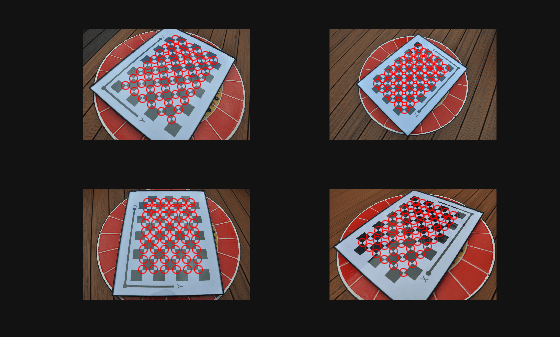
Create a cell array of file names of calibration images.
images = imageDatastore(fullfile(toolboxdir("vision"),"visiondata",...
    "calibration","dslr"));
imageFileNames = images.Files;
Detect calibration pattern in the images.
[imagePoints,patternDims,imagesUsed] = detectCheckerboardPoints(imageFileNames,PartialDetections=false);
Display the detected points.
imageFileNames = imageFileNames(imagesUsed);
for i = 1:4
  I = imread(imageFileNames{i});
subplot(2, 2, i);
  imshow(I);
  hold on;
  plot(imagePoints(:,1,i),imagePoints(:,2,i),"ro");
end
Read in stereo images.
numImages = 4;
images1 = cell(1,numImages);
images2 = cell(1,numImages);
for i = 1:numImages
    images1{i} = fullfile(matlabroot,'toolbox','vision',...
        'visiondata','calibration','stereo','left',sprintf('left%02d.png',i));
    images2{i} = fullfile(matlabroot,'toolbox','vision',...
        'visiondata','calibration','stereo','right',sprintf('right%02d.png',i));
end
Detect the checkerboards in the images.
[imagePoints,patternDims,pairsUsed] = ...
    detectCheckerboardPoints(images1,images2);
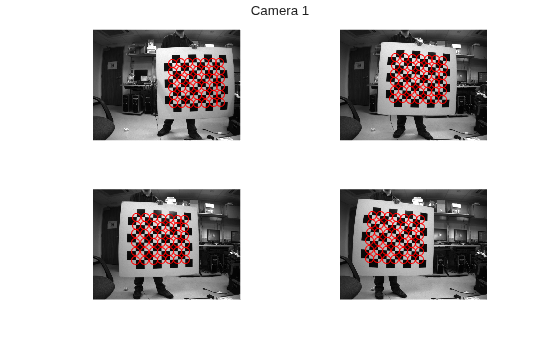
Display points from images1.
images1 = images1(pairsUsed);
figure;
for i = 1:numel(images1)
      I = imread(images1{i});
      subplot(2,2,i);
      imshow(I);
      hold on;
      plot(imagePoints(:,1,i,1),imagePoints(:,2,i,1),'ro');
end
annotation('textbox',[0 0.9 1 0.1],'String','Camera 1',...
    'EdgeColor','none','HorizontalAlignment','center')
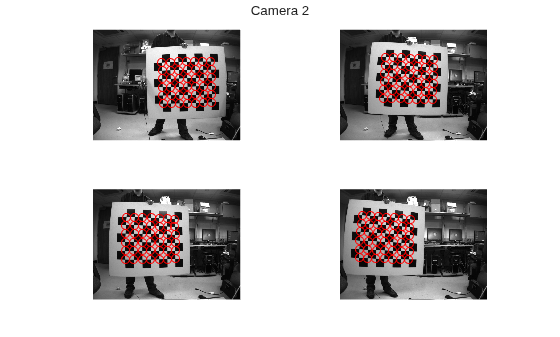
Display points from images2.
images2 = images2(pairsUsed);
figure;
for i = 1:numel(images2)
      I = imread(images2{i});
      subplot(2, 2, i);
      imshow(I);
      hold on;
      plot(imagePoints(:,1,i,2),imagePoints(:,2,i,2),'ro');
end
annotation('textbox',[0 0.9 1 0.1],'String','Camera 2',...
    'EdgeColor','none','HorizontalAlignment','center')
Input Arguments
Name-Value Arguments
Output Arguments
Detected checkerboard corner coordinates, returned as an M-by-2 matrix for one image. For multiple images, points are returned as an M-by-2-by-number of images array, and for stereo pairs of images, the function returns points as an M-by-2-by-number of pairs-by-number of cameras array.
For stereo pairs, imagePoints(:,:,:,1) are the points
from the first set of images, and imagePoints(:,:,:,2)
are the points from the second set of images. The output contains
M number of [x
y] coordinates. Each coordinate represents a point where
square corners are detected on the checkerboard. The number of points the
function returns depends on the value of patternDims,
which indicates the number of squares detected. The function detects the
points with sub-pixel accuracy.
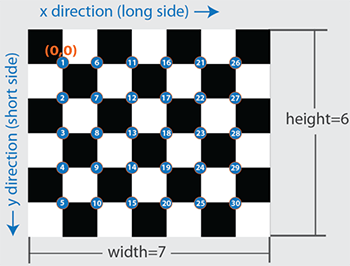
The function calculates the number of points, M, as follows:
M = prod(patternDims-1). |
If the checkerboard cannot be detected:
imagePoints =
[] |
patternDims =
[0,0] |
When you specify the imageFileNames input, the
function can return imagePoints as an
M-by-2-by-N array. In this array,
N represents the number of images in which a
checkerboard is detected. If a checkerboard cannot be detected, the function
returns imagePoints as one of these two options:
For single camera images only:
If the complete checkerboard cannot be detected, the function returns a partially detected checkerboard with [
NaN,NaN] as the x-y coordinates for missing corners inimagePoints. This default behavior can be modified using the'PartialDetections'name-value argument.When possible, the function orients the partially detected checkerboard such that the location of the origin and the arrangement of the corners is consistent with the completely visible checkerboard. If the function cannot detect a complete checkerboard in any of the input images, the largest detected checkerboard is used as the reference checkerboard and the dimensions of this board is returned in
patternDims.
Pattern dimensions, returned as a 2-element [height, width] vector. The dimensions of the pattern are expressed in terms of the number of squares.
If a checkerboard cannot be detected, the function sets
patternDims to [0,0].
Pattern detection, returned as an N-by-1 logical
vector, where N is the number of images. The function
returns 1 (true) if corners are successfully detected in
an image, and 0 (false) if no corners are
detected.
The function estimates the checkerboard corners based on a successful detection of the keypoints. If any step in the detection process fails, the function does not return corners for that image, and the corresponding value in the logical vector is false.
Stereo pair pattern detection, returned as an N-by-1
logical vector, where N is the number of images. The
function returns 1 (true) if corners are successfully
detected in a stereo image pair, and 0 (false) if no
corners are detected.
For stereo pair pattern detection, the checkerboard needs to be fully visible in both images for it to be detected. Unlike single camera calibration, partially detected checkerboards are rejected for stereo image pairs.
References
[1] Geiger, A., F. Moosmann, O. Car, and B. Schuster. "Automatic Camera and Range Sensor Calibration using a Single Shot," International Conference on Robotics and Automation (ICRA), St. Paul, USA, May 2012.
Extended Capabilities
Version History
Introduced in R2014a

