fzero
R2026b非线性函数的根
描述
示例
通过求正弦函数在 3 附近的零点计算 。
fun = @sin; % function
x0 = 3; % initial point
x = fzero(fun,x0)
x =
3.1416
求余弦函数在 1 和 2 之间的零点。
fun = @cos; % function
x0 = [1 2]; % initial interval
x = fzero(fun,x0)
x =
1.5708
请注意, 和 的符号不同。
创建一个函数和一个单精度标量起点 x0。使用 fzero 从 x0 开始求该函数的根。
f = @(x)cosh(x)-2*sinh(x);
x0 = single(1);
[x,fval,exitflag,output] = fzero(f,x0)
x = single

0.5493
fval = single

1.1921e-07
exitflag = single

1
output = struct with fields:
    intervaliterations: 9
            iterations: 3
             funcCount: 21
             algorithm: 'bisection, interpolation'
               message: 'Zero found in the interval [0.547452, 1.32]'
创建一个二元素单精度向量作为围捕根的起点,并比较解和求解过程。
x0 = single([-1,1]);
[x2,fval2,exitflag2,output2] = fzero(f,x0)
x2 = single

0.5493
fval2 = single

1.1921e-07
exitflag2 = single

1
output2 = struct with fields:
    intervaliterations: 0
            iterations: 5
             funcCount: 7
             algorithm: 'bisection, interpolation'
               message: 'Zero found in the interval [-1, 1]'
结果相同。这次,fzero 使用的函数计算次数少得多。
将单精度结果与使用标准双精度数据的相同计算进行比较。
x0 = [-1,1];
[x3,fval3,exitflag3,output3] = fzero(f,x0)
x3 =
0.5493
fval3 =
-2.2204e-16
exitflag3 =
1
output3 = struct with fields:
    intervaliterations: 0
            iterations: 7
             funcCount: 9
             algorithm: 'bisection, interpolation'
               message: 'Zero found in the interval [-1, 1]'
使用双精度数据导致 fzero 需要多进行几次函数计算。但结果的精度要高得多,函数值的数量级为 2e–16,而单精度值的函数值数量级为 1e–7。
求函数 f(x) = x3 – 2x – 5. 的零值
首先,编写一个名为 f.m 的文件。
function y = f(x)
y = x.^3 - 2*x - 5;
将 f.m 保存到 MATLAB® 路径中。
求 f(x) 在 2 附近的零点。
fun = @f; % function
x0 = 2; % initial point
z = fzero(fun,x0)
z =
    2.0946
因为 f(x) 是一个多项式,所以可以使用 roots 命令求出相同的实数零点和一对复共轭零点。
roots([1 0 -2 -5])
   ans =
   2.0946
  -1.0473 + 1.1359i
  -1.0473 - 1.1359i
求具有额外参数的函数的根。
myfun = @(x,c) cos(c*x);  % parameterized function
c = 2;                    % parameter
fun = @(x) myfun(x,c);    % function of x alone
x = fzero(fun,0.1)
x =
0.7854
通过设置一些绘图函数绘制求解过程。
定义函数和初始点。
fun = @(x)sin(cosh(x));
x0 = 1;
通过设置包括绘图函数的选项检查求解过程。
options = optimset(PlotFcns={@optimplotx,@optimplotfval});运行 fzero,且含带 options 参数。
x = fzero(fun,x0,options)
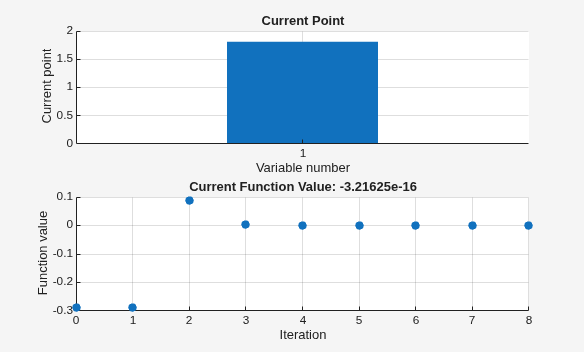
x =
1.8115
对问题结构体定义的问题求解。
定义对求根问题编码的结构体。
problem.objective = @(x)sin(cosh(x));
problem.x0 = 1;
problem.solver = 'fzero'; % a required part of the structure
problem.options = optimset(@fzero); % default options
求解。
x = fzero(problem)
x =
1.8115
求出 exp(-exp(-x)) = x 处的点,并显示有关求解过程的信息。
fun = @(x) exp(-exp(-x)) - x; % function
x0 = [0 1]; % initial interval
options = optimset(Display="iter"); % show iterations
[x fval exitflag output] = fzero(fun,x0,options)
 Func-count    x          f(x)             Procedure
    2               1     -0.307799        initial
    3        0.544459     0.0153522        interpolation
    4        0.566101    0.00070708        interpolation
    5        0.567143  -1.40255e-08        interpolation
    6        0.567143   1.50013e-12        interpolation
    7        0.567143             0        interpolation

Zero found in the interval [0, 1]
x =
0.5671
fval =
0
exitflag =
1
output = struct with fields:
    intervaliterations: 0
            iterations: 5
             funcCount: 7
             algorithm: 'bisection, interpolation'
               message: 'Zero found in the interval [0, 1]'
正如所期望的那样,fval = 0 表示 fun(x) = 0。
输入参数
输出参量
算法
fzero 命令是一个函数文件。此算法由 T. Dekker 创建,它结合使用了二分法、正割法和逆二次插值方法。[1] 中给出了 Algol 60 版及一些改进。[2] 中给出了 fzero 所基于的 Fortran 版本。
替代功能
App
优化实时编辑器任务为 fzero 提供可视化界面。
参考
[1] Brent, R., Algorithms for Minimization Without Derivatives, Prentice-Hall, 1973.
[2] Forsythe, G. E., M. A. Malcolm, and C. B. Moler, Computer Methods for Mathematical Computations, Prentice-Hall, 1976.

