loadvehicle
R2026bSyntax
Description
Add-On Required: This feature requires the Robotics System Toolbox Offroad Autonomy Library add-on.
This function loads a predefined offroad vehicle model from the Offroad Vehicle Library as a rigidBodyTree object with attached visual and collision meshes. It also
returns vehicle parameters such as wheel base, track width, turning radius, and a kinematic
motion model. Use this function to get started with visualizing, simulating, and virtually
testing offroad vehicles.
loads an offroad vehicle model from the Offroad Vehicle Library as a
vehicle = loadvehicle(vehicleType)rigidBodyTree object specified by the vehicle type.
[
also returns additional information about the vehicle as a structure containing
kinematic parameters, performance limits, and a motion model.vehicle,vehicleData] = loadvehicle(vehicleType)
[
specifies additional options using one or more name-value arguments. For example,
vehicle,vehicleData] = loadvehicle(vehicleType,Name=Value)DataFormat="row" sets the data format for kinematics and
dynamics functions of the rigid body tree model.
Examples
Load the dump truck vehicle model and its associated data.
[truck,truckData] = loadvehicle("dumptruck");
disp(truckData)
VehicleName: "DumpTruck"
Version: 1
WheelBase: 6.4700
RearAxleWheelBase: 7.1200
TrackWidth: 2.2000
WheelRadius: 0.6000
MinTurningRadius: 9.2401
MaxForwardSpeed: 14
MaxReverseSpeed: 2.8000
MotionModel: [1×1 bicycleKinematics]
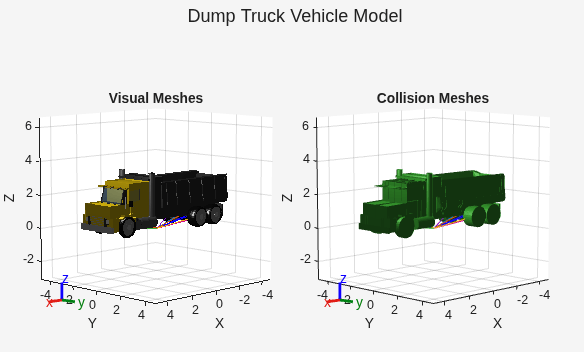
Visualize the visual and collision meshes of the dump truck.
tiledlayout(1,2,TileSpacing="compact",Padding="compact")
sgtitle("Dump Truck Vehicle Model")
nexttile
show(truck);
title("Visual Meshes")
axis auto
nexttile
show(truck,Collisions="on",Visuals="off");
title("Collision Meshes")
axis auto
Load the agricultural tractor from the Offroad Vehicle Library, and create a reference path and a binary occupancy map.
[tractor,data] = loadvehicle("agriculturaltractor",DataFormat="row");
q = homeConfiguration(tractor);
refPath = [0 0; 10 0; 20 0];
map = binaryOccupancyMap(50,50,1);
Create and configure an offroadControllerMPPI controller using the motion model and dimensions of the tractor. Note that if you need more precise dimensions, you can find vehicle diagrams on the corresponding vehicle page or by computing the bounding box from the vehicle mesh data.
mppi = offroadControllerMPPI(refPath,Map=map,VehicleModel=data.MotionModel);
mppi.Parameter.VehicleCollisionInformation.Dimension = [data.WheelBase data.RearTrackWidth];
mppi.Parameter.VehicleCollisionInformation.Offset = tform2trvec(getTransform(tractor,q,"rear_axle_center"));
See the offroadControllerMPPI page for more information about using the configured controller.
Load the haul truck from the Offroad Vehicle Library, and create a reference path and binary occupancy map.
[truck,data] = loadvehicle("haultruck");
refPath = [0 0 0; 10 0 0; 20 0 0];
map = binaryOccupancyMap(50,50,1);
Create a controllerTEB controller and configure it using the vehicle data. Compute the angular velocity limit from the linear speed and minimum turning radius. Set the approximate vehicle dimensions using the wheel base and rear track width. Note that if you need more precise dimensions, you can find vehicle diagrams on the corresponding vehicle page or by computing the bounding box from the vehicle mesh data.
teb = controllerTEB(refPath,map, ...
MinTurningRadius=data.MinTurningRadius, ...
MaxVelocity=[data.MaxForwardSpeed,data.MaxForwardSpeed/data.MinTurningRadius], ...
MaxReverseVelocity=data.MaxReverseSpeed);
teb.RobotInformation.Dimension = [data.WheelBase data.RearTrackWidth];
See the controllerTEB (Navigation Toolbox) page for more information about using the configured controller.
Input Arguments
Type of offroad vehicle to load, specified as one of these valid vehicle model names:
| Vehicle Model | Mesh Visualization | Description |
|---|---|---|
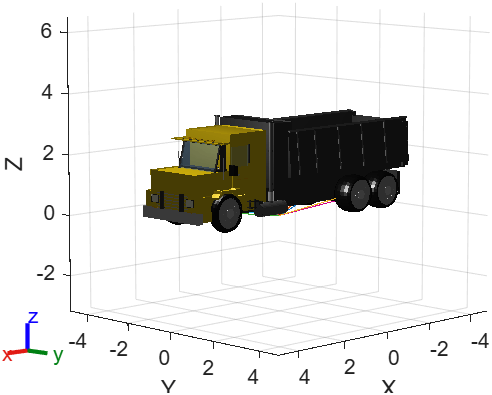
"dumptruck" |
| Standard construction dump truck with front-wheel steering and tandem rear axles. For more information, see Dump Truck. |
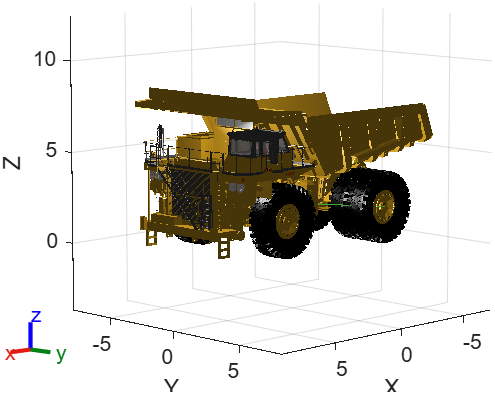
"haultruck" |
| Mining haul truck with front-wheel steering. For more information, see Haul Truck. |
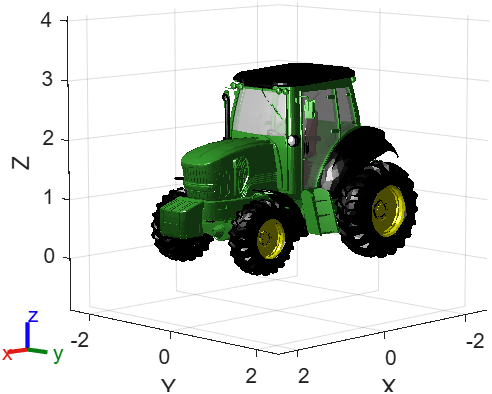
"agriculturaltractor" |
| Agricultural tractor with front-wheel steering and different front and rear wheel sizes. For more information, see Agricultural Tractor. |
Name-Value Arguments
Output Arguments
Tips
If you customize the vehicle
rigidBodyTree, you can simulate the modified vehicle in Unreal Engine® using the corresponding Simulation 3D Offroad Vehicle block with the Simulation 3D Four-Wheel Ground Following block. Set the parameters of the Simulation 3D Four-Wheel Ground Following block using the fields invehicleDataand thevehiclerigid body tree.
Version History
Introduced in R2026b

