主要内容

timeFrequencyMask

Convert and plot time-frequency labels and regions of interest

Since R2026a

    Description

    Use timeFrequencyMask to store the locations of regions of interest (ROI) of a signal representation in time-frequency domain together with the label or category values for each region. You can use the timeFrequencyMask object to plot spectrograms with either overlaid ROI or categorical array representations next to the spectrogram.

    Creation

    Description

    msk = timeFrequencyMask(lblTable,tfOpts) creates a time-frequency mask, msk, from the table of time-frequency ROIs and labels, lblTable, and the object tfOpts that stores options to compute the time-frequency map for an input signal. A time-frequency mask defines the locations of time-frequency ROIs of a signal representation in the time-frequency domain, together with the label or category values for each ROI.

    msk = timeFrequencyMask(src,PropertyName=Value) sets properties using name-value arguments. You can specify multiple name-value arguments.

    example

    Input Arguments

    expand all

    Time-frequency ROIs and labels, specified as a three-variable table.

    • The first variable is a two-column matrix. Each row of the matrix contains the beginning and end time limits of the time-frequency ROI.

      • If you specify SampleRate, timeFrequencyMask interprets the time limits in seconds

      • If you do not specify SampleRate, timeFrequencyMask interprets the time limits as sample indices. If the matrix elements are not integers, timeFrequencyMask rounds their values to the nearest integer greater than zero.

    • The second variable is a two-column matrix. Each row of the matrix contains the beginning and end frequency limits of the time-frequency ROI.

      • If you specify SampleRate, timeFrequencyMask interprets the frequency limits in Hz.

      • If you do not specify SampleRate, timeFrequencyMask interprets the frequency limits as normalized frequencies in radians per sample.

    • The third variable contains region labels, specified as a logical array, numeric array, categorical array, or string array.

    Example: lblTable = table([0.1 0.2],[160 180],true) specifies a time-frequency mask with a true time-frequency region that spans from 0.1 to 0.2 seconds and from 160 to 180 Hz. To specify lblTable when creating the timeFrequencyMask object, also specify a sample rate.

    Example: lblTable = table([10 20;120 150;160 190],[0.16 0.18;0.08 0.14;0.2 0.22],categorical(["whale1";"whale2";"whale1"])) specifies a time-frequency mask with two whale1 time-frequency regions and a whale2 time-frequency region. The time limits are in samples and the frequency limits are in radians/sample.

    Time-frequency options, specified as a labelSpectrogramOptions object. The object specified in this argument contains options to compute the time-frequency map for an input signal.

    Example: tfOpts = labelSpectrogramOptions("rbw",Overlap=90,Window="kaiser",WindowAttenuationKaiser=50) specifies label spectrogram options to compute the time-frequency map of a signal, using Kaiser windows with automatically chosen length, 50 dB sidelobe attenuation, and 90% overlap between adjoining segments.

    Properties

    expand all

    This property is read-only.

    Options to compute the time-frequency map for an input signal, returned as a labelSpectrogramOptions object. To set this property, specify tfOpts.

    This property is read-only after object creation.

    Sample rate, specified as a positive scalar. If you specify this property, timeFrequencyMask assumes that lblTable contains ROI time limits expressed in seconds. If you omit this property, the object treats all time limits in lblTable as sample indices.

    Data Types: single | double

    Mask format, specified as "pixel", "boundingbox", or "table". This property enables you to represent the input time-frequency labels lblTable as a categorical array, axis-aligned rectangular bounding boxes, or table.

    When you use an object function, the MaskFormat property of the specified timeFrequencyMask object determines the type of output returned in the object function.

    MaskFormat ValueObject-Function Behavior
    "pixel"
    • getMask returns time-frequency mask as a matrix or 3-D array.

    • plotMask displays the time-frequency map and label array in two subplots.

    • This format is suitable to solve semantic segmentation problems.

    "boundingbox"
    • getMask returns time-frequency mask as a cell array with ROI time and frequency limits (bounding box) and label values.

    • plotMask displays the time-frequency map and labeled ROIs in a single plot.

    • This format is suitable to solve object detection problems.

    "table"
    • getMask returns time-frequency mask as a table with time-frequency ROIs and labels as specified in lblTable.

    • plotMask displays only the time-frequency map.

    • This format is suitable to retrieve the table of time-frequency ROI labels.

    Data Types: char | string

    Option to specify the size of the time-frequency map and label array, specified as a logical value. If you set this property to false or leave it unspecified, then timeFrequencyMask automatically sets the size using the getTFMapSize function of the labelSpectrogramOptions object specified in tfOpts.

    Data Types: logical

    Size of time-frequency map and label array, specified as a two-element vector. This vector contains the number of rows and columns of the time-frequency map and label array.

    To specify this property, set SpecifyMaskSize to true.

    Data Types: single | double | char | string

    This property is read-only.

    Category names, returned as a cell array of character vectors. This property applies only when the time-frequency ROI labels form a categorical array, which occurs if class(lblTable(:,3)) is "categorical". In this case, timeFrequencyMask infers category names directly from lblTable and this property is read-only. The array has a number of elements equal to the number of categories of lblTable(:,3).

    Example: Given a time-frequency mask msk = timeFrequencyMask(table([1 2;5 6;8 9],[60 80;40 70;100 120],categorical(["whale1";"whale2";"whale1"])),labelSpectrogramOptions), the Categories property is returned as a cell array which elements are 'whale1' and 'whale2'.

    Option to select a subset of categories, specified as a logical value. Setting this property to false after creating the mask selects all categories in the Categories property.

    Data Types: logical

    Indices of selected categories, specified as a vector of incrementing integer index values pointing to category elements in Categories. Categories not listed in this property are filtered out from the mask input when calling the object functions of timeFrequencyMask. The category indices must be sorted in ascending order. This property applies only when SpecifySelectedCategories is true.

    Example: Given a set of categories ["woman" "girl" "man" "boy"], specifying SelectedCategories as [1 2 4] selects ["woman" "girl" "boy"] and filters out the rest.

    Data Types: single | double | int8 | int16 | int32 | int64 | uint8 | uint16 | uint32 | uint64

    Minimum time duration to include labels in the time-frequency mask, specified as a nonnegative integer.

    • If you specify SampleRate, then timeFrequencyMask assumes that MinTimeDuration is in seconds.

    • If you do not specify SampleRate, then timeFrequencyMask assumes that MinTimeDuration is in samples.

    When you specify this property, timeFrequencyMask sets a time duration constraint and uses it to exclude the labels for which time-frequency regions do not satisfy such constraint.

    Data Types: single | double | int8 | int16 | int32 | int64 | uint8 | uint16 | uint32 | uint64

    Maximum time duration to include labels in the time-frequency mask, specified as a nonnegative integer.

    • If you specify SampleRate, then timeFrequencyMask assumes that MaxTimeDuration is in seconds.

    • If you do not specify SampleRate, then timeFrequencyMask assumes that MaxTimeDuration is in samples.

    When you specify this property, timeFrequencyMask sets a time duration constraint and uses it to exclude the labels for which time-frequency regions do not satisfy such constraint.

    Data Types: single | double | int8 | int16 | int32 | int64 | uint8 | uint16 | uint32 | uint64

    Minimum bandwidth to include labels in the time-frequency mask, specified as a nonnegative integer.

    • If you specify SampleRate, then timeFrequencyMask assumes that MinFrequencyBandwidth is in Hz.

    • If you do not specify SampleRate, then timeFrequencyMask assumes that MinFrequencyBandwidth is in radians/sample.

    When you specify this property, timeFrequencyMask sets a frequency bandwidth constraint and uses it to exclude the labels for which time-frequency regions do not satisfy such constraint.

    Data Types: single | double | int8 | int16 | int32 | int64 | uint8 | uint16 | uint32 | uint64

    Maximum bandwidth to include labels in the time-frequency mask, specified as a nonnegative integer.

    • If you specify SampleRate, then timeFrequencyMask assumes that MaxFrequencyBandwidth is in Hz.

    • If you do not specify SampleRate, then timeFrequencyMask assumes that MaxFrequencyBandwidth is in radians/sample.

    When you specify this property, timeFrequencyMask sets a frequency bandwidth constraint and uses it to exclude the labels for which time-frequency regions do not satisfy such constraint.

    Data Types: single | double | int8 | int16 | int32 | int64 | uint8 | uint16 | uint32 | uint64

    Action when different time-frequency labels overlap, specified as "error" or "prioritizeByList".

    When you use the getMask or plotMask object functions and these functions identify different labels with overlapping time-frequency ROIs, the OverlapAction property of the specified timeFrequencyMask object determines the consequent action:

    • "error" — The object functions error out.

    • "prioritizeByList" — The object functions process the labels with overlapping time-frequency ROIs by choosing the label with the highest priority from the value specified in the MaskPriority property.

    To specify this property, set MaskFormat to "pixel".

    Data Types: char | string

    Mask priority when different time-frequency labels overlap, specified as one of these values:

    • true or false, when you specify a logical array as labels in lblTable.

      • If MaskPriority is true, labels with a value of true will have priority over the labels with the value false.

      • If MaskPriority is false, labels with a value of false will have priority over the labels with a value of true.

      • The default value of this property is true.

    • "ascending" or "descending", when you specify a numeric array or string array as labels in lblTable.

      • If MaskPriority is "ascending", lower numeric values or lower alphabetical ordering have priority over higher numeric values or higher alphabetical ordering.

      • If MaskPriority is "descending", higher numeric values or higher alphabetical ordering have priority over lower numeric values or lower alphabetical ordering.

      • The default value of this property is "ascending".

    • Vector of strings or cell array of character vectors, when you specify a categorical array as labels in lblTable.

      • This vector of strings or cell array of character vectors specifies the order of priority with the first category having highest priority.

      • To specify this property, you must list all the categories specified in lblTable. If you specify SelectedCategories, you can list a subset of the categories specified in lblTable, but you must list all the categories specified in SelectedCategories.

      • The default value of this property is a lexicographically ordered list from the label values of lblTable.

    When you use the getMask or plotMask object functions and these functions identify different labels with overlapping time-frequency ROIs in the specified timeFrequencyMask, the object functions process these overlapping labels by choosing the one with the highest priority from the value specified in the MaskPriority property.

    To specify this property, set MaskFormat to "pixel" and OverlapAction to "prioritizeByList".

    Data Types: char | string | logical

    Option to include label regions that do not span an entire time bin or an entire frequency bin, specified as a logical value. This property enables you to control whether timeFrequencyMask selects a pixel in the time-frequency map be part of a label or not, where the label does not entirely cover a time bin or a frequency bin.

    • If you set this property to false, then timeFrequencyMask ensures that each pixel with a given label must include an entire time bin and an entire frequency bin to include that pixel as part of the label.

    • If you set this property to true, then timeFrequencyMask accepts any part of a pixel that includes a part of any label and includes that pixel as part of that label.

    Data Types: logical

    Frequency location in the time-frequency map when you use an object function, specified as one of these values:

    • "yaxis" — The object sets the frequency in the y-axis and the time in the x-axis.

    • "xaxis" — The object sets the frequency in the x-axis and the time in the y-axis.

    Data Types: char | string

    Object Functions

    getMaskGet labels and time-frequency map based on time-frequency mask
    plotMaskPlot labels and time-frequency map based on time-frequency mask

    Examples

    collapse all

    Create a signal with a duration of 1 second so that its spectrogram shows rectangular time-frequency regions. The sample rate is 1000 Hz.

    Fs = 1000;
    t = (0:1/Fs:1-1/Fs);
    x = 3*sinc(600*(t-0.15)).*(t>0.1).*(t<0.2) + ...
        cos(2*pi*400*t).*sinc(40*(t-0.55)).*(t>0.5).*(t<0.6) + ...
        cos(2*pi*200*t).*sinc(100*(t-0.85)).*(t>0.8).*(t<0.9);
    pspectrum(x,Fs,"spectrogram",Leakage=0.98, ...
        TimeResolution=0.1,OverlapPercent=0,MinThreshold=-50)
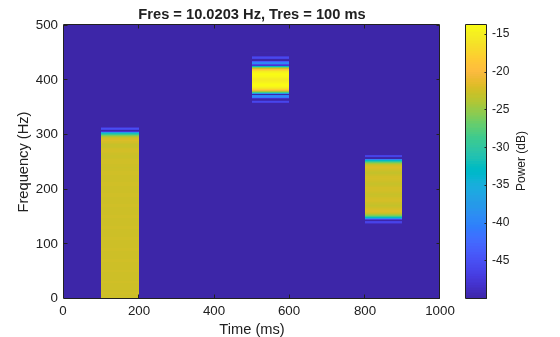
    Figure contains an axes object. The axes object with title Fres = 10.0203 Hz, Tres = 100 ms, xlabel Time (ms), ylabel Frequency (Hz) contains an object of type image.

    The spectrogram shows three time-frequency regions of interest (ROIs) with different time and frequency ranges. Since these regions have different frequency bandwidths, the regions can have string labels such as "narrowBand", "wideBand", and "ultraWideBand". Then, the region specifications are as follows:

    • "narrowBand" ROI — Time ranges within [0.5, 0.6] seconds and frequency ranges within [380, 420] Hz.

    • "wideBand" ROI — Time ranges within [0.8, 0.9] seconds and frequency ranges within [150, 250] Hz.

    • "ultraWideBand" ROI — Time ranges within [0.1, 0.2] seconds and frequency ranges within [0, 300] Hz.

    Create a table that lists all time-frequency ROIs and labels.

    timeLimits = [0.5 0.6;0.8 0.9;0.1 0.2];
    freqLimits = [380 420;150 250;0 300];
    tfLabels = ["narrowBand" "wideBand" "ultraWideBand"]';
    lblTable = table(timeLimits,freqLimits,tfLabels)
    lblTable=3×3 table
        timeLimits    freqLimits       tfLabels    
        __________    __________    _______________
    
        0.5    0.6    380    420    "narrowBand"   
        0.8    0.9    150    250    "wideBand"     
        0.1    0.2      0    300    "ultraWideBand"


    Create a labelSpectrogramOptions object to store the options to compute the time-frequency map for an input signal.

    opts = labelSpectrogramOptions("leakage", ...
        Leakage=40*(1-0.98),Overlap=0, ...
        TimeResolutionMode="specify",TimeResolution=0.1, ...
        MinimumThresholdMode="specify",MinimumThreshold=-50)
    opts = 
      labelSpectrogramOptions with properties:
    
              ResolutionType: "leakage"
                     Overlap: 0
                     Leakage: 0.8000
          TimeResolutionMode: "specify"
              TimeResolution: 0.1000
                    Reassign: 0
        MinimumThresholdMode: "specify"
            MinimumThreshold: -50
                 UseDecibels: 1


    Create a time-frequency mask with the table of time-frequency ROIs and labels, and time-frequency options.

    msk = timeFrequencyMask(lblTable,opts, ...
        MaskFormat="boundingbox",SampleRate=Fs)
    msk = 
      timeFrequencyMask with properties:
    
                 FreqLocation: "yaxis"
           IncludePartialBins: 0
                   MaskFormat: "boundingbox"
        MaxFrequencyBandwidth: Inf
              MaxTimeDuration: Inf
        MinFrequencyBandwidth: 0
              MinTimeDuration: 0
                   SampleRate: 1000
              SpecifyMaskSize: 0
         TimeFrequencyOptions: [1×1 labelSpectrogramOptions]


    Read the time-frequency mask and display it above the time-frequency image. The plot displays the labeled time-frequency ROIs.

    plotMask(msk,x)
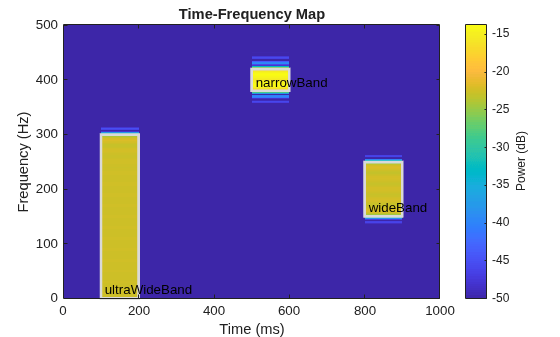
    Figure contains an axes object. The axes object with title Time-Frequency Map, xlabel Time (ms), ylabel Frequency (Hz) contains 7 objects of type image, rectangle, text.

    Label Gaussian atoms in the time-frequency domain using a time-frequency region-of-interest (ROI) label definition and spectrogram options. Create, get, and plot mask from labeled signal in the time-frequency domain.

    Generate Signal and Visualize Spectrogram

    Generate a signal that consists of a voltage-controlled oscillator and five Gaussian atoms. The signal is sampled at 14 kHz for two seconds. Plot the spectrogram of the signal.

    Fs = 14000;
    t = (0:1/Fs:2)';
    st = 0.01;
    gaussFun = @(A,x,mu,f) exp(-(x-mu).^2/(2*st^2)).*sin(2*pi*f.*x)*A';
    atomTimeCenters = [0.2 0.5 1 1.3 1.8];
    atomFreqCenters = [2 6 2 5 1]*1000;
    atomAmplitudes = [1 1 1 1 1]/10;
    s = gaussFun(atomAmplitudes,t,atomTimeCenters,atomFreqCenters) ...
        + vco(chirp(t+0.1,0,t(end),3).*exp(-2*(t-1).^2),[0.1 0.4]*Fs,Fs);
    
    bt = 0.2;
    tr = 0.05;
    op = 99;
    pspectrum(s,Fs,"spectrogram", ...
        Leakage=bt,TimeResolution=tr,OverlapPercent=op)
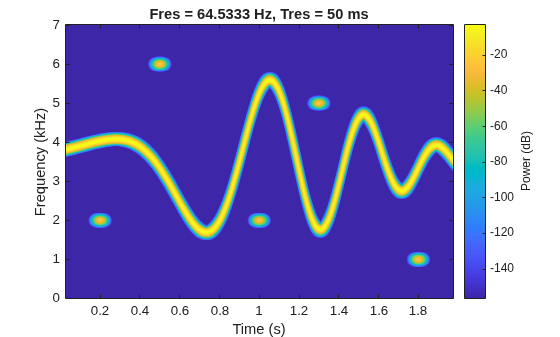
    Figure contains an axes object. The axes object with title Fres = 64.5333 Hz, Tres = 50 ms, xlabel Time (s), ylabel Frequency (kHz) contains an object of type image.

    The spectrogram shows four patches in time-frequency domain that correspond with the Gaussian atoms. Define the times and frequencies for all the atoms.

    atomTimes = atomTimeCenters'+[-st st]*5.5;
    atomFreqs = atomFreqCenters'+[-1 1]*200;

    Label Signal in Time-Frequency Domain

    Create a numeric time-frequency ROI label definition to label the Gaussian atoms. Specify spectrogram options with leakage properties.

    opts = labelSpectrogramOptions("leakage", ...
        Leakage=40*(1-bt),Overlap=op, ...
        TimeResolutionMode="specify",TimeResolution=tr);
    
    lblDef = signalLabelDefinition("Atom", ...
        LabelDataType="numeric", ...
        LabelType="roiTimeFrequency",TimeFrequencyOptions=opts);

    Create a labeled signal set from the signal and time-frequency ROI label definition.

    lss = labeledSignalSet(s,lblDef,SampleRate=Fs);

    Label the atoms in time-frequency domain. Set the label values to 1 through 5.

    setLabelValue(lss,1,"Atom",atomTimes,atomFreqs,1:5)

    Display the label table. Each label has its time-frequency ROI limits and a logical value.

    lblTable = lss.Labels.Atom{1};
    lblTable.Value = cell2mat(lblTable.Value)
    lblTable=5×3 table
        TimeROILimits     FrequencyROILimits    Value
        ______________    __________________    _____
    
        0.145    0.255       1800    2200         1  
        0.445    0.555       5800    6200         2  
        0.945    1.055       1800    2200         3  
        1.245    1.355       4800    5200         4  
        1.745    1.855        800    1200         5  


    Visualize Labeled Signal in Time-Frequency Domain

    Create a time-frequency mask with the label table and spectrogram options. Specify the signal sample rate and mask format.

    msk = timeFrequencyMask(lblTable,opts, ...
        SampleRate=Fs,MaskFormat="pixel",OverlapAction="prioritizeByList");

    Read the time-frequency mask and display it above the time-frequency image.

    plotMask(msk,s)
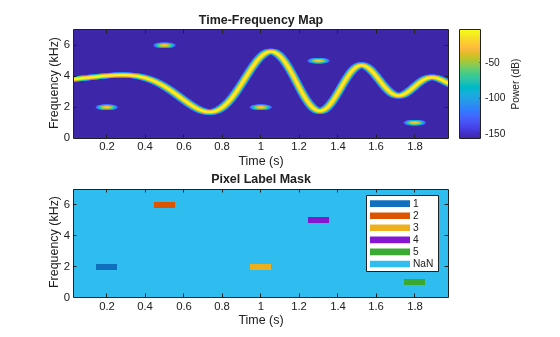
    Figure contains 2 axes objects. Axes object 1 with title Time-Frequency Map, xlabel Time (s), ylabel Frequency (kHz) contains an object of type image. Axes object 2 with title Pixel Label Mask, xlabel Time (s), ylabel Frequency (kHz) contains 7 objects of type image, line. These objects represent 1, 2, 3, 4, 5, NaN.

    Get and Visualize Array of Label Masks

    Read the time-frequency mask and get the array of label regions as a per-pixel matrix and as a 3-D binary array.

    lblPerPixel = getMask(msk,s,PixelType="perpixel");
    lblBinaries = getMask(msk,s,PixelType="binary");

    Plot the array of labels in per-pixel format. The white rectangular patches represent time-frequency regions where a label exists.

    figure
    tiledlayout("flow")
    nexttile
    imshow(~isnan(lblPerPixel))
    title("2-D per-pixel mask (grayscale image)")

    Plot the first three pages of the array of labels in binary format. Each page consists of pixels marked with true (1) or false (0), where true (1) represents a labeled time-frequency ROI. The three-page 3-D array forms an image with colored rectangular patches that depict the labeled ROIs:

    • Red patch (first page of array of labels), represents the first time-frequency ROI, labeled as 1.

    • Green patch (second page of array of labels), represents the second time-frequency ROI, labeled as 2.

    • Blue patch (third page of array of labels), represents the third time-frequency ROI, labeled as 3.

    nexttile
    imshow(double(lblBinaries(:,:,1:3)))
    title("3-D binary mask (RGB image)")
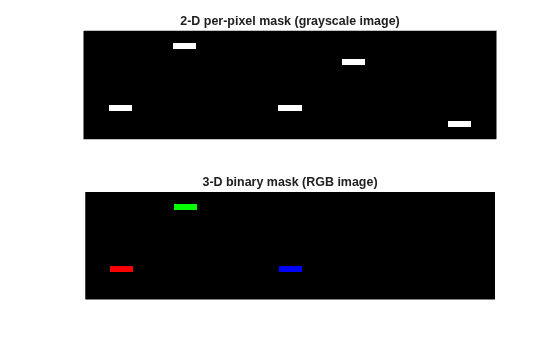
    Figure contains 2 axes objects. Hidden axes object 1 with title 2-D per-pixel mask (grayscale image) contains an object of type image. Hidden axes object 2 with title 3-D binary mask (RGB image) contains an object of type image.

    Version History

    Introduced in R2026a