sfm
R2026bDescription
Use the sfm object to manage the data and operations required to
perform structure-from-motion with a set of ordered or unordered images captured by a single
calibrated monocular camera. The object stores the image source, camera intrinsic parameters, an
appearance based and geometrically verified view graph, estimated camera poses, reconstructed
3-D world points, the current state of the SfM process, and all other relevant data required to
perform 3-D reconstruction. Use the object functions to incrementally estimate camera poses
and a sparse 3-D point cloud for the scene.
To perform incremental structure from motion step-by-step, use these object functions in
this order after creating an sfm object:
connectImagePairs— Create a view graph by connecting visually similar images using a bag of words vocabulary.verifyImagePairs— Refine the view graph using geometric epipolar constraints.triangulateInitialViews— Initialize structure-from-motion by selecting a robust initial view pair and triangulating the first 3-D points.reconstruct— Incrementally process all camera views after initialization, and reconstruct the 3-D scene using structure-from-motion.
At any stage of the SfM process, use the poses and
pointCloud object
functions to retrieve the estimated camera poses and the reconstructed 3-D point cloud of the
scene, respectively. You can also visualize the poses and the point cloud using the plot object
function.
SfM provides a high‑accuracy 3‑D reconstruction from an image collection, but is
computationally demanding as a result. Use it when reconstruction quality is your priority,
such as when you intend to create a dense 3‑D reconstruction from the results using the
nerfacto object or
optical flow. If your application prioritizes speed over accuracy, consider performing visual
SLAM using the monovslam object
instead.
Creation
Description
sfmObj = sfm(imds,intrinsics)sfmObj from the images in the
image datastore imds and the camera intrinsic parameters
intrinsics. To perform the full SfM pipeline after creating the
object, use the connectImagePairs,
verifyImagePairs, triangulateInitialViews, and
reconstruct object functions in sequence.
The sfm object does not account for lens distortion. You can use the
undistortImage function to
undistort images before adding them to the object.
The object represents 3-D map points and camera poses in world coordinates, and
assumes the camera pose of the first key frame is an identity rigidtform3d transform.
Input Arguments
Properties
Object Functions
Examples
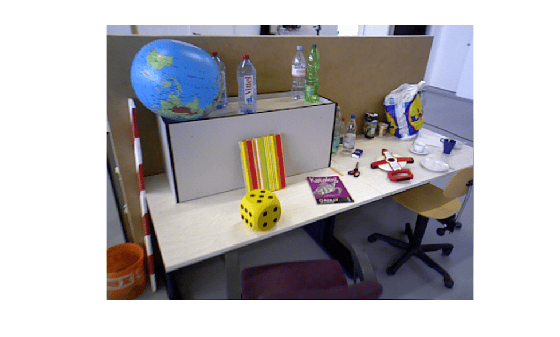
Use the sfm object to recover camera poses and a sparse 3-D point cloud from images of an indoor scene.
Create Image Datastore and Define Camera Intrinsics
Create an ImageDatastore from the image sequence. Specify the camera intrinsic parameters.
unzip("sfm_images.zip")
imageFolder = fullfile(pwd,"images");
imds = imageDatastore(imageFolder);
intrinsics = cameraIntrinsics([535.1307 532.1860],[323.3722 239.7986],[480 640]);
Visualize the indoor scene.
imshow(preview(imds))
Create SfM Object and Run Pipeline
Create an sfm object and execute each stage of the incremental SfM pipeline sequentially.
sfmObj = sfm(imds,intrinsics);
Connect image pairs based on visual similarity.
sfmObj = connectImagePairs(sfmObj);
Visualize the similarity matrix for the connected image pairs using the imagesc function.
imagesc(sfmObj.SimilarityMatrix)
title("Similarity Matrix for Connected Image Pairs")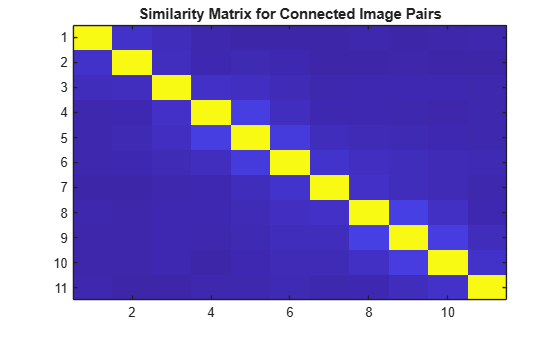
Verify that the view graph was created successfully before proceeding to geometric verification.
if isConnected(sfmObj)
    sfmObj = verifyImagePairs(sfmObj);
end
Visualize the similarity matrix for the refined image pair connections using the imagesc function.
imagesc(sfmObj.SimilarityMatrix)
title("Similarity Matrix after Refining Connected Image Pairs")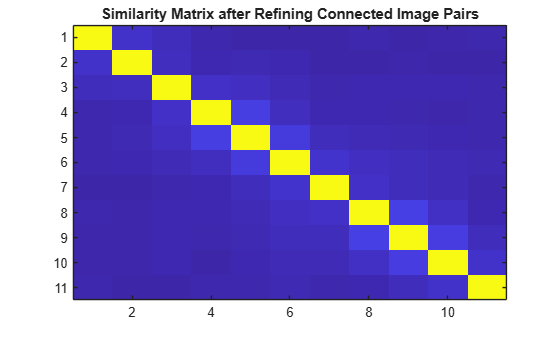
Confirm that geometric verification completed successfully before initializing the reconstruction. Specify a minimum median angle of 5 degrees and a maximum triangulation error of 4 pixels. Display the initialization metrics.
if isVerified(sfmObj)
    [sfmObj,info] = triangulateInitialViews(sfmObj,MinMedianAngle=5,MaxTriangulationError=4);
    disp(info)
end
                     ViewId1: 9
                     ViewId2: 10
                RelativePose: [1×1 rigidtform3d]
                     Matches: [380×2 uint32]
    MedianTriangulationAngle: 8.6016
       MeanReprojectionError: 0.2799
Confirm that initialization succeeded before running incremental reconstruction.
if isInitialized(sfmObj)
    sfmObj = reconstruct(sfmObj);
end
Retrieve Results
Retrieve the estimated camera poses and the sparse 3-D point cloud.
camPoses = poses(sfmObj);
sparsePoints = pointCloud(sfmObj);
Visualize Reconstruction
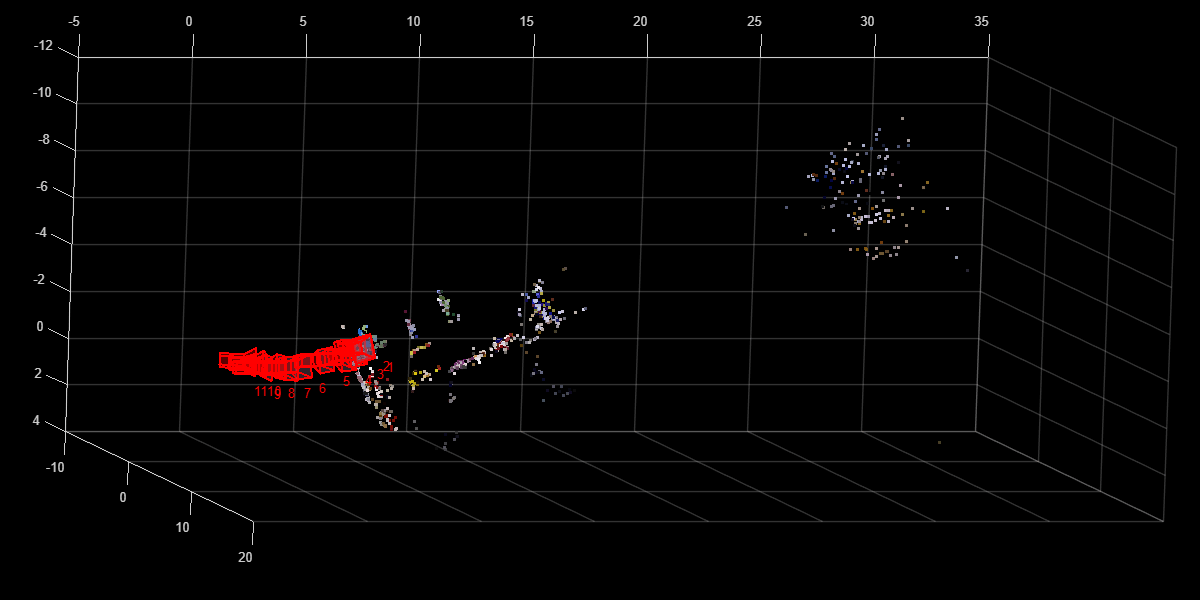
Display the reconstructed scene showing the camera trajectory and sparse point cloud. Adjust the view orientation and zoom for better visualization.
plot(sfmObj,CameraSize=0.5,MarkerSize=25)
view(82.69,-15.53)
camroll(-90)
camva(4.52)
Tips
For more information, see Best Practices for 3-D Reconstruction Using Structure from Motion.
Version History
Introduced in R2026b
See Also
connectImagePairs | verifyImagePairs | triangulateInitialViews | reconstruct

