主要内容

remove

Remove component from optical system

Since R2026a

    Description

    Add-On Required: This feature requires the Optical Design and Simulation Library for Image Processing Toolbox add-on.

    remove(opsys) removes an incomplete surface from the optical system. If an incomplete surface does not exist, the function removes the last component. The positions of other components in the optical system remain unchanged.

    example

    remove(opsys,cInd) removes the component specified by the index cInd.

    example

    Examples

    collapse all

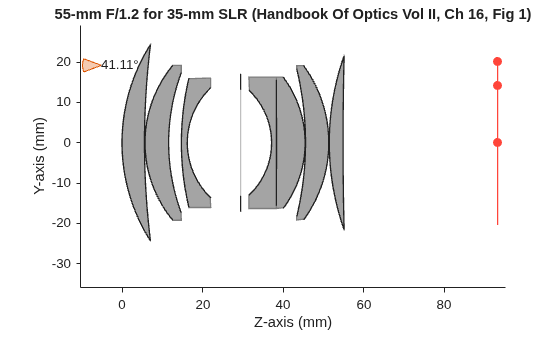
    Create an optical system that contains a double Gauss lens using the createDoubleGauss helper function. The function is attached to this example as a supporting file. Display a 2-D visualization of the optical system using the view2d object function.

    opsys = createDoubleGauss;            
    view2d(opsys)

    Figure contains an object of type optics.ui.opticalsystemviewer2d. The chart of type optics.ui.opticalsystemviewer2d has title 55-mm F/1.2 for 35-mm SLR.

    ans = 
      OpticalSystemViewer2D with properties:
    
                Title: ""
        OpticalSystem: [1×1 opticalSystem]
               Labels: "none"
          FieldPoints: "on"
                 Rays: [0×0 optics.ui.Rays2D]
               Parent: [1×1 Figure]
    
      Show all properties


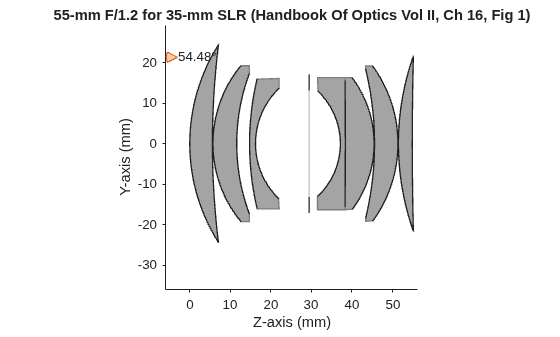
    Remove the last component from the optical system using the removeNewPositionCallback object function. This removes the image plane from the optical system.

    remove(opsys)          

    Display a 2-D visualization of the optical system using the view2d object function, and trace marginal rays through the optical system using the traceMarginalRays object function.

    hv = view2d(opsys);
    mr = traceMarginalRays(opsys,Wavelengths=587.5618);

    Visualize the traced rays through the system using the addRays object function.

    addRays(hv,mr)

    Figure contains an object of type optics.ui.opticalsystemviewer2d. The chart of type optics.ui.opticalsystemviewer2d has title 55-mm F/1.2 for 35-mm SLR.

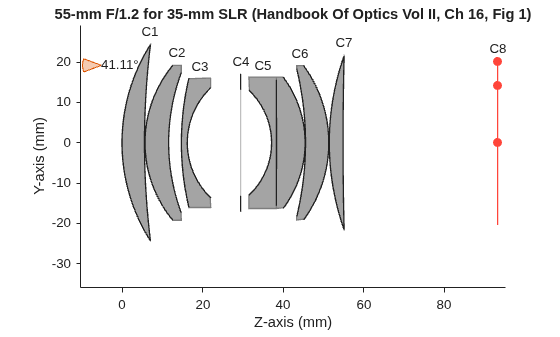
    Create an optical system that contains a double Gauss lens using the createDoubleGauss helper function. The function is attached to this example as a supporting file. Display a 2-D visualization of the optical system using the view2d object function.

    opsys = createDoubleGauss;
    view2d(opsys,Labels="component")

    Figure contains an object of type optics.ui.opticalsystemviewer2d. The chart of type optics.ui.opticalsystemviewer2d has title 55-mm F/1.2 for 35-mm SLR.

    ans = 
      OpticalSystemViewer2D with properties:
    
                Title: ""
        OpticalSystem: [1×1 opticalSystem]
               Labels: "component"
          FieldPoints: "on"
                 Rays: [0×0 optics.ui.Rays2D]
               Parent: [1×1 Figure]
    
      Show all properties


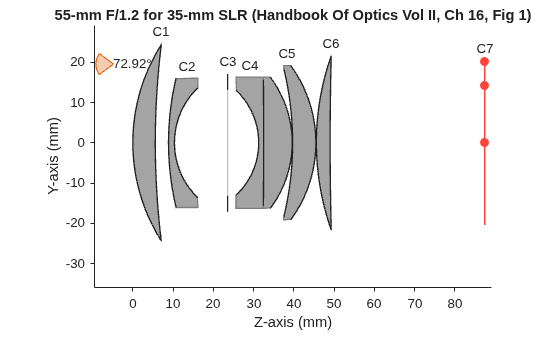
    To remove a specific optical component from the system, use the removeNewPositionCallback function, and soecify an index. The index specifies the position of the optical component to remove from the optical system. Remove the first doublet.

    remove(opsys,2)

    Display a 2-D visualization of the modified optical system using the view2d object function.

    view2d(opsys,Labels="component")

    Figure contains an object of type optics.ui.opticalsystemviewer2d. The chart of type optics.ui.opticalsystemviewer2d has title 55-mm F/1.2 for 35-mm SLR.

    ans = 
      OpticalSystemViewer2D with properties:
    
                Title: ""
        OpticalSystem: [1×1 opticalSystem]
               Labels: "component"
          FieldPoints: "on"
                 Rays: [0×0 optics.ui.Rays2D]
               Parent: [1×1 Figure]
    
      Show all properties


    Input Arguments

    collapse all

    Optical system, specified as an opticalSystem object.

    Component index, specified as a positive scalar. The index is the location of an optical component in Components property of the opticalSystem object opsys. The order of the components in Components is with respect to the ray propagation along the optical axis, beginning with the light source.

    Version History

    Introduced in R2026a