trainNerfacto
R2026bSyntax
Description
Add-On Required: This feature requires the Computer Vision Toolbox Interface for Nerfstudio Library add-on.
nerf = trainNerfacto(trainingData,cameraPoses,intrinsics,outputFolder)outputFolder
argument.
Note
This feature requires the Computer Vision Toolbox Interface for Nerfstudio Library add-on, a Deep Learning Toolbox™ license, a Parallel Computing Toolbox™ license, and a CUDA® enabled NVIDIA® GPU with at least 16 GB of available GPU memory.
This feature is not supported to run on GPU architectures of the Blackwell family and newer. The Nerfstudio backend depends on CUDA 11.8, which does not support Blackwell or newer GPU architectures.
nerf = trainNerfacto(pretrainedModelFolder)
nerf = trainNerfacto(___,Name=Value)MaxIterations=1000 specifies to perform a maximum of 1000 training
iterations on the NeRF model.
Examples
Training Data Requirements
To train a NeRF model [1] from the Nerfstudio Library [2] on a scene, your training set must contain:
At least 100 images of the scene from multiple overlapping views of the region of interest.
Camera poses associated with each image.
Intrinsic parameters of camera used to capture the images.
To calculate the intrinsic parameters of camera through calibration, use the Camera Calibrator app. For information on estimating camera poses and related geometric information, see the Structure from Motion from Multiple Views example.
Download Training Data
The training data is located in the sfmTrainingDataTUMRGBD folder, which is stored in the tum_rgbd_nerfacto.zip file. Download and extract the tum_rgbd_nerfacto.zip file in the current directory by running this code.
The tum_rgbd_nerfacto.zip file contains the sfmTrainingDataTUMRGBD folder. The folder contains the cameraInfo.mat file which contains the camera poses associated with each image and the intrinsic parameter of camera, and the images folder which contains indoor images from the TUM RGB-D dataset [3].
Download and extract tum_rgbd_nerfacto.zip.
if ~exist("tum_rgbd_data.zip","file")
    websave("tum_rgbd_data.zip","https://ssd.mathworks.com/supportfiles/3DReconstruction/tum_rgbd_data.zip");
    unzip(fullfile("tum_rgbd_data.zip"), pwd);
end
Set Up Training Data
Specify the path to the images folder, and then create an imageDatastore object using the path.
trainingImageFolder = fullfile("sfmTrainingDataTUMRGBD","images");
imds = imageDatastore(trainingImageFolder);
disp("Number of images: " + length(imds.Files))
Number of images: 104
Show the first training image.
figure
sampleTrainingImage = preview(imds);
imshow(sampleTrainingImage)
title("Sample Training Image")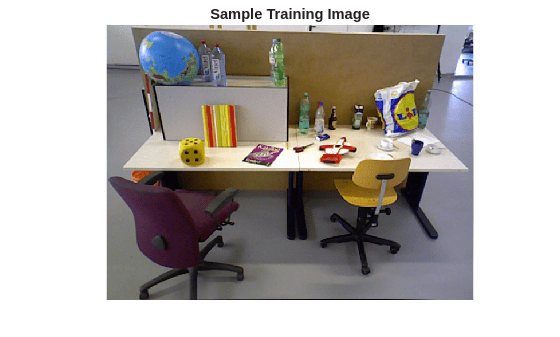
Load the camera poses corresponding to the training images, and the intrinsic parameters of the camera used to capture the images.
camInfo = load(fullfile("sfmTrainingDataTUMRGBD","cameraInfo.mat"));
trainIntrinsics = camInfo.intrinsics;
trainPoses = camInfo.cameraPoses;
Display the camera poses. Observe that there are 104 camera poses, which corresponds to the 104 training images in the image datastore imds.
disp(trainPoses)
  1×10⁴ rigidtform3d array with properties:

    Dimensionality
    Translation
    R
    A
Display the camera intrinsics. The trainNerfacto function assumes that all images were taken by a single camera, thus sharing the same intrinsics parameters for all training images.
disp(trainIntrinsics)
  cameraIntrinsics with properties:

             FocalLength: [535.1307 532.1860]
          PrincipalPoint: [323.3722 239.7986]
               ImageSize: [480 640]
        RadialDistortion: [-0.0032 0.0192]
    TangentialDistortion: [-0.0029 -0.0023]
                    Skew: 0
                       K: [3×3 double]
Train NeRF Model
Use the trainNerfacto function to create and train a NeRF model on the training images across up to 1000 iterations. Store intermediate model checkpoints and configurations in the nerfTUMTrainingOutput folder. Training requires about 30 minutes on a Linux machine with an NVIDIA GeForce RTX 3090 GPU that has 24 GB of memory.
outputFolder = fullfile(pwd,"nerfTUMTrainingOutput");
nerf = trainNerfacto(imds,trainPoses,trainIntrinsics,outputFolder,MaxIterations = 1000);
Write Novel Views from Trained NeRF Model to Image Files
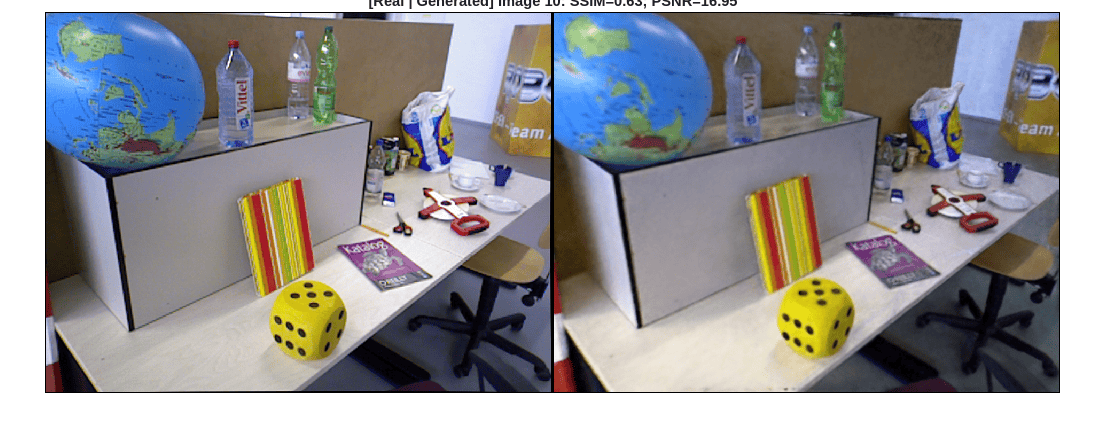
Write the views captured by the first 20 camera poses to a local folder, generatedTrainingViewsTUM, by using the writeViews function.
imdsGen = writeViews(nerf,trainPoses(1:20),"generatedTrainingViewsTUM");Display a side-by-side comparison between the training images and the generated images of the scene at a camera pose. Each comparison includes these metrics that quantify the similarity between the training images and the generated images:
Structural Similarity Index Metrics (SSIM) — Value in the range [0,1], where a value of 1 indicates the perfect similarity.
Peak Signal-to-Noise Ratio (PSNR) — Values are in decibels, where higher values indicate better similarity.
imageIdx selects the camera pose to compare.
numImg = numel(imdsGen.Files); imageIdx =10; % Load image generated by the trained NeRF imageGen = readimage(imdsGen, imageIdx); % Load the corresponding real image used in training imageReal = readimage(imds,imageIdx); % Compute image similarity metrics - SSIM and PSNR ssimVal = ssim(rgb2gray(imageGen), rgb2gray(imageReal)); psnrVal = psnr(imageGen, imageReal); % Visualize the images and their similarity maps figure montage({imageReal,imageGen}, BorderSize=[2 2]) title("[Real | Generated] Image " + imageIdx + ": SSIM="+num2str(ssimVal,2) + "; PSNR="+num2str(psnrVal,4)) truesize;
Tips to Improve Training Results
Although the generated images are photorealistic, there are minor differences in the image texture and high-frequency details between the generated images and the training images. To achieve better quality results:
Capture a larger set of high resolution images.
Ensure the image set has good lighting.
Ensure the image set has no motion blur or moving objects.
Train the
nerfactoobject with a higher number of maximum training iterations (at the cost of longer computation time).
References
[1] Mildenhall, Ben, Pratul P. Srinivasan, Matthew Tancik, Jonathan T. Barron, Ravi Ramamoorthi, and Ren Ng. "NeRF: Representing Scenes as Neural Radiance Fields for View Synthesis." In Computer Vision - ECCV 2020, edited by Andrea Vedaldi, Horst Bischof, Thomas Brox, and Jan-Michael Frahm. Springer International Publishing, 2020. https://doi.org/10.1007/978-3-030-58452-8_24.
[2] Tancik, Matthew, Ethan Weber, Evonne Ng, et al. “Nerfstudio: A Modular Framework for Neural Radiance Field Development.” Special Interest Group on Computer Graphics and Interactive Techniques Conference Proceedings, ACM, July 23, 2023, 1–12. https://doi.org/10.1145/3588432.3591516.
[3] Sturm, Jürgen, Nikolas Engelhard, Felix Endres, Wolfram Burgard, and Daniel Cremers. “A Benchmark for the Evaluation of RGB-D SLAM Systems.” 2012 IEEE/RSJ International Conference on Intelligent Robots and Systems, October 2012, 573–80. https://doi.org/10.1109/IROS.2012.6385773.
Input Arguments
Name-Value Arguments
Output Arguments
Tips
Training a Nerfacto NeRF model using high-resolution training images can cause
out-of-memory errors. To resolve this, reduce the size of your training images using the
imresize
function, then obtain the camera poses and camera intrinsic parameters of the resized images.
Algorithms
By training a NeRF model on a set of sparse input images and camera poses, you can create an internal representation of a 3D scene. You can use a trained NeRF model to generate a dense, colored point cloud, and render images from novel viewpoints.
A NeRF model represents a scene as a continuous 5D vector-valued function instantiated as a neural network with weights Ω. The function accepts the position and direction of a light ray and returns the color and density of 3D points along the ray.
When generating a novel view, the NeRF model first uses the neural network to calculate the color and density of 3D points along each ray from a virtual camera. The ray is defined as r(t) = o + td, where o is the origin coordinates of the ray, and d is the unit vector in the ray direction defined by the camera angles θ and ϕ. The neural network return the color c(t) if the ray r(t) hits a particle at distance t along the ray. The model then uses volumetric rendering to project the output colors and densities into an image.
During training, a NeRF model first samples a batch of rays that consist of multiple spatial locations and viewing directions. The neural network FΩ then predicts the color and density at 3D points along each ray, and the NeRF model uses volumetric rendering to project the output colors and densities onto an image. The model calculates the training loss by matching the image pixels of the rendered image against the captured images in the training data.
References
[1] Mildenhall, Ben, Pratul P. Srinivasan, Matthew Tancik, Jonathan T. Barron, Ravi Ramamoorthi, and Ren Ng. “NeRF: Representing Scenes as Neural Radiance Fields for View Synthesis.” In Computer Vision – ECCV 2020, edited by Andrea Vedaldi, Horst Bischof, Thomas Brox, and Jan-Michael Frahm. Springer International Publishing, 2020. https://doi.org/10.1007/978-3-030-58452-8_24.
[2] Tancik, Matthew, Ethan Weber, Evonne Ng, et al. “Nerfstudio: A Modular Framework for Neural Radiance Field Development.” Special Interest Group on Computer Graphics and Interactive Techniques Conference Proceedings, ACM, July 23, 2023, 1–12. https://doi.org/10.1145/3588432.3591516.
Version History
Introduced in R2026a

