digitalFilter
Digital filter
Description
Use a digitalFilter object to store digital filter coefficients
and, if available, filter design specifications. You can use the object to analyze the filter
response and to filter signals.
Use
filterin the formdataOut = filter(d,dataIn)to filter a signal with adigitalFilterobjectd. You can also use thefiltfiltandfftfiltfunctions withdigitalFilterobjects. For a complete list of functions that you can use withdigitalFilterobjects, see Object Functions.Use Filter Analyzer to visualize a
digitalFilterobject.Use Filter Designer to import and modify a
digitalFilterobject.
Creation
Create digitalFilter objects that
contain coefficients representing Cascaded Transfer Functions (CTF). (since R2026a)
Note
To create a digitalFilter object with design specifications, use
designfilt or the Filter Designer app.
Use the syntax
d = designfilt(response,Name=Value)to design a digital filterdwith response typeresponseand design specifications listed as name-value arguments.Use the syntax
designfilt(d)or Filter Designer to edit an existing filter,d. The filter properties are otherwise read-only.
Description
creates a digital filter d = digitalFilter(B,A)d with CTF numerator coefficients
B and CTF denominator coefficients A. The
filter uses normalized frequencies.
Input Arguments
Cascaded transfer function (CTF) coefficients, specified as scalars, vectors, or
matrices. B and A list the numerator and
denominator coefficients of the cascaded transfer function, respectively.
B must be of size
L-by-(m + 1) and A must
be of size L-by-(n + 1), where:
L represents the number of filter sections.
m represents the order of the filter numerators.
n represents the order of the filter denominators.
For more information about the cascaded transfer function format and coefficient matrices, see Specify Digital Filters in CTF Format.
Note
If any element of A(:,1) is not equal to
1, then digitalFilter normalizes the
filter coefficients by A(:,1). In this case,
A(:,1) must be nonzero.
Data Types: double
Complex Number Support: Yes
Scale values, specified as a real-valued scalar or as a real-valued vector with L + 1 elements, where L is the number of CTF sections. The scale values represent the distribution of the filter gain across the sections of the cascaded filter representation.
The digitalFilter function applies a gain to the filter
sections using the scaleFilterSections function depending on how you specify
g:
Scalar — The function distributes the gain uniformly across all filter sections.
Vector — The function applies the first L gain values to the corresponding filter sections and distributes the last gain value uniformly across all filter sections.
Data Types: double
Sample rate of the digital filter, specified as one of these:
"normalized"—digitalFiltersets the digital filterdto use normalized frequency.Positive scalar —
digitalFiltersets the sample rate of the digital filterdtoFsHz.
Data Types: char | string | single | double
Properties
A digitalFilter object can have sets of properties that depend on how you
create the object and whether the object represents a single-stage digital filter or a cascade
of digital filters (digital filter
cascade). All properties are read-only.
If the
digitalFilterobject represents a single-stage digital filter, including coefficients in CTF format, then the object has Coefficients properties.If the
digitalFilterobject represents a digital filter cascade, then the object has Stages properties. (since R2026a)If the
digitalFilterobject has design specifications, then the object has Specifications properties.
Coefficients
Numerator coefficients, returned as a row vector or as an L-by-(m + 1) matrix, where L is the number of CTF sections and m is the numerator order. See Return Digital Filters in CTF Format for more information.
Denominator coefficients, returned as 1, a row vector, or an
L-by-(n + 1) matrix, where L is the number of CTF sections and
n is the denominator order. See Return Digital Filters in CTF Format for more information.
Stages
Since R2026a
Filter stages, returned as digitalFilter objects. Each
digitalFilter object represents a stage of a digital filter cascade.
A stage can consist of one or more substages.
Specifications
The Specification properties returned in a digitalFilter object depend on
the filter response and design specified when creating the object using designfilt. All properties are read-only.
Filter response type, returned as one of the values listed in the table.
| Value | Description | Requires DSP System Toolbox™ License |
|---|---|---|
'lowpass' | Lowpass filter | |
'highpass' | Highpass filter | |
'bandpass' | Bandpass filter | |
'bandstop' | Bandstop filter | |
'differentiator' | FIR differentiator filter | |
'hilbert' | FIR Hilbert transformer filter | |
'arbmag' | Filter of arbitrary-magnitude response | |
'arbmagnphase' | Filter of arbitrary magnitude and phase responses | ✓ |
'arbgrpdelay' | IIR filter of arbitrary group delay | ✓ |
'fracdelay' | FIR filter of fractional delay | ✓ |
'isinclp' | Inverse sinc lowpass FIR filter | ✓ |
'isinchp' | Inverse sinc highpass FIR filter | ✓ |
'notch' | Multi-notch IIR filter | ✓ |
'peak' | Multi-peak IIR filter | ✓ |
'complexlowpass' | Complex FIR lowpass filter | |
'complexhighpass' | Complex FIR highpass filter |
Impulse response type, returned as 'fir' or
'iir'.
Since R2026a
Frequency normalization status, returned as one of these:
1(true) — ThedigitalFilterobject works with normalized frequencies.0(false) — ThedigitalFilterobject uses a sample rate in Hz, which is returned in theSampleRateproperty.
Sample rate, returned as a positive scalar expressed in hertz.
This property is visible only if
NormalizedFrequency is false. (since R2026a)
A digitalFilter object can have more properties that describe its filter
design. For more information about filter design properties, see Frequency Constraints,
Filter Order, Magnitude Constraints, and Design Method.
Object Functions
freqz | Frequency response of digital filter |
grpdelay | Average filter delay (group delay) |
impz | Impulse response of digital filter |
impzlength | Impulse response length |
phasedelay | Phase delay of digital filter |
phasez | Phase response of digital filter |
stepz | Step response of digital filter |
zerophase | Zero-phase response of digital filter |
zplane | Zero-pole plot for discrete-time systems |
filtord | Filter order |
firtype | Type of linear phase FIR filter |
getNumStages | Get number of stages in digital filter cascade |
info | Information about digital filter |
isallpass | Determine whether filter is allpass |
isdouble | Determine if digital filter coefficients are double precision |
isfir | Determine if digital filter has finite impulse response |
islinphase | Determine whether filter has linear phase |
ismaxphase | Determine whether filter is maximum phase |
isminphase | Determine whether filter is minimum phase |
issingle | Determine if digital filter coefficients are single precision |
isstable | Determine whether filter is stable |
double | Cast coefficients of digital filter to double precision |
single | Cast coefficients of digital filter to single precision |
cascade | Cascade of filter system objects |
ctf | Convert digital filter to coefficients in cascaded transfer function format |
ss | Convert digital filter to state-space representation |
tf | Convert digital filter to transfer function |
zpk | Convert digital filter to zero-pole-gain representation |
filt2block | Generate Simulink filter block |
setSampleRate | Set sample rate of digital filter |
toMultirate | Create multirate filter System object from digital FIR filter object |
Examples
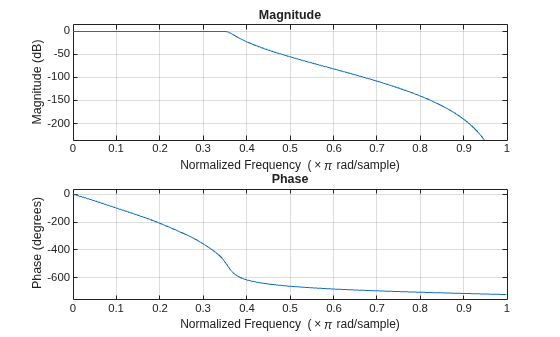
Design a lowpass IIR filter with order 8, passband frequency 35 kHz, and passband ripple 0.2 dB. Specify a sample rate of 200 kHz. Visualize the frequency response of the filter.
lpFilt = designfilt("lowpassiir",FilterOrder=8, ... PassbandFrequency=35e3,PassbandRipple=0.2, ... SampleRate=200e3); freqz(lpFilt)
Use the filter you designed to filter a 1000-sample random signal.
dataIn = randn(1000,1); dataOut = filter(lpFilt,dataIn);
Output the filter coefficients, expressed as cascaded transfer functions.
ctfNum = lpFilt.Numerator
ctfNum = 4×3
0.2666 0.5333 0.2666
0.1943 0.3886 0.1943
0.1012 0.2023 0.1012
0.0318 0.0636 0.0318
ctfDen = lpFilt.Denominator
ctfDen = 4×3
1.0000 -0.8346 0.9073
1.0000 -0.9586 0.7403
1.0000 -1.1912 0.5983
1.0000 -1.3810 0.5090
Since R2026a
Design bandpass IIR digital filters and filter a sinusoidal signal with harmonics.
Design a 10th-order bandpass IIR elliptic filter with passband edge frequencies of [0.3, 0.5] radians/sample, passband ripple of 0.1 dB, and stopband attenuation of 50 dB. Obtain the filter coefficients in CTF format.
N = 10; Rp = 0.1; Rs = 50; Wp = [0.3 0.5]; [B,A] = ellip(N/2,Rp,Rs,Wp,"bandpass","ctf");
Create a digital filter object from the filter coefficients. Set the sample rate to 1000 Hz.
Fs = 1000; dCoeff = digitalFilter(B,A,SampleRate=Fs);
Create a digital filter object from the filter specifications.
dSpecs = designfilt("bandpassiir",SampleRate=Fs, ... FilterOrder=N,DesignMethod="ellip", ... PassbandFrequency1=Wp(1)*Fs/2,PassbandFrequency2=Wp(2)*Fs/2, ... StopbandAttenuation1=Rs,PassbandRipple=Rp,StopbandAttenuation2=Rs);
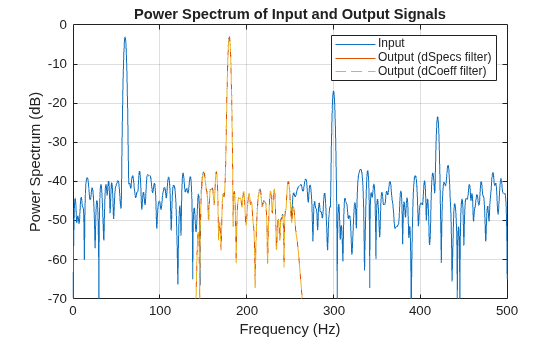
Generate a sinusoidal signal with an amplitude of 1 V and a frequency of 60 Hz, and add third-, fifth-, and seventh-order harmonics. The harmonic amplitudes are 1 V, 0.2 V, and 0.1 V, respectively. Sample the signal for 1 second.
rng("default")
a = [1 1 0.2 0.1];
f = 60*[1 3 5 7];
t = (0:1/Fs:1)';
x = cos(2*pi*f.*t)*a' + 0.1*randn(size(t));Filter the signal using the digitalFilter objects created from specifications and from CTF coefficients. Compare the input and output signals.
ySpecs = filtfilt(dSpecs,x); yCoeff = filtfilt(dCoeff,x); pspectrum([x ySpecs yCoeff],Fs) title("Power Spectrum of Input and Output Signals") legend(["Input" "Output (dSpecs filter)" "Output (dCoeff filter)"]) set(gca().Children(1),LineStyle="--") ylim([-70 0])
More About
A digital filter can be represented as a
single stage or as a cascade of multiple stages. Accordingly, a
digitalFilter object can represent either a single-stage digital filter
or a cascade of digital filters (digital filter cascade).
Assume these filters: a bandstop FIR filter
d1, bandpass IIR filter d2, and a Hilbert
transformer FIR filter d3. The following block diagram represents the
digital filter cascade d, which has three stages: d1,
d2, and d3.
To create a digital filter cascade, use the cascade
function. For example, the following code creates a digital filter cascade with stages
d1, d2, and d3 from their
corresponding digitalFilter
objects.
d = cascade(d1,d2,d3);
You can cascade filters in multiple
hierarchy levels. That way, you can get a multi-level digital filter cascade. In a
multi-level digital filter cascade, each stage can have multiple substages. For example, the
bandpass IIR filter d2 can be represented as a cascade of a lowpass IIR
filter d21 and a highpass IIR filter d22. The
following code creates a two-level cascaded filter with stages d1,
d2, and d3, where d2 is a
digital filter cascade with stages d21 and d22. All
the inputs are digitalFilter
objects.
d2 = cascade(d21,d22); d = cascade(d1,d2,d3);
Partitioning an IIR digital filter into cascaded sections improves its numerical stability and reduces its susceptibility to coefficient quantization errors. The cascaded form of a transfer function H(z) in terms of the L transfer functions H1(z), H2(z), …, HL(z) is
You can specify digital filters in the CTF format for analysis, visualization, and signal
filtering. Specify a filter by listing its coefficients B and
A. You can also include the filter scaling gain across sections by
specifying a scalar or vector g.
When you specify the coefficients as L-row matrices,
it is assumed that you have specified the filter as a sequence of L cascaded transfer functions, such that the full transfer function of the filter is
where m ≥ 0 is the numerator order of the filter and n ≥ 0 is the denominator order.
If you specify both B and A as vectors, it is assumed that the underlying system is a one-section IIR filter (L = 1), with B representing the numerator of the transfer function and A representing its denominator.
If B is scalar, it is assumed that the filter is a cascade of all-pole IIR filters with each section having an overall system gain equal to B.
If A is scalar, it is assumed that the filter is a cascade of FIR filters with each section having an overall system gain equal to 1/A.
Note
If you have an overall scaling gain or multiple scaling gains factored out from the
coefficient values, you can specify the coefficients and gain as a cell array of the form {B,A,g}. Scaling filter sections is especially important when you work with
fixed-point arithmetic to ensure that the output of each filter section has similar
amplitude levels, which helps avoid inaccuracies in the filter response due to limited
numeric precision.
The gain can be a scalar overall gain or a vector of section gains.
If the gain is scalar, the value applies uniformly to all the cascade filter sections.
If the gain is a vector, it must have one more element than the number of filter sections L in the cascade. Each of the first L scale values applies to the corresponding filter section, and the last value applies uniformly to all the cascade filter sections.
If you specify the coefficient matrices and gain vector as
it is assumed that the transfer function of the filter system is
Get the filter coefficients by specifying to return B =
d.Numerator and A = d.Denominator from a
digitalFilter object d. That way, you can have digital
filters in CTF format for analysis, visualization and signal filtering.
When you specify to return the numerator and denominator coefficients in the CTF format, the L-row matrices B and A are returned as
such that the full transfer function of the filter is
where m ≥ 0 is the numerator order of the filter and n ≥ 0 is the denominator order.
References
[1] Lyons, Richard G. Understanding Digital Signal Processing. Upper Saddle River, NJ: Prentice Hall, 2004.
Version History
Introduced in R2014aYou can create digital filters represented as coefficients of cascaded transfer functions.
A digitalFilter object can represent a single-stage digital filter or a
digital filter cascade.
The
NormalizedFrequencyproperty indicates if thedigitalFilterobject uses normalized frequency instead of a sample rate. IfNormalizedFrequencyis0(false), then the object shows theSampleRateproperty.For a digital filter cascade, the
Stage1,Stage2, …,StageNproperties of adigitalFiltercascade object represent the stages of the filter.
These new object functions enables you to create, analyze, and modify a digital filter cascade.
cascade— Cascade two or more digital filter objects.ctf— Return filter coefficients in cascaded-transfer-function (CTF) format. If the filter is a cascade of digital filters, it returns the coefficients of all the stages in CTF format.getNumStages— Get the number of stages of a digital filter or digital filter cascade.setSampleRate—Set the sample rate of a digital filter or digital filter cascade.
Obtain the numerator and denominator coefficients of digital filters designed with Cascaded Transfer Functions. Starting in R2024b, the
Numerator and Denominator properties replace the
Coefficients property.
For a digitalFilter object filt, you must update
your code to get the filter coefficients B (numerator) and
A (denominator).
| Impulse Response Type | Original Code in R2024a or Earlier | Updated Code in R2024b |
|---|---|---|
| IIR |
B = filt.Coefficients(:,1:3); A = filt.Coefficients(:,4:6); |
B = filt.Numerator; A = filt.Denominator; |
| FIR |
B = filt.Coefficients; |
B = filt.Numerator; |
See Also
Live Editor Tasks
Apps
Objects
Functions
MATLAB Command
You clicked a link that corresponds to this MATLAB command:
Run the command by entering it in the MATLAB Command Window. Web browsers do not support MATLAB commands.
选择网站
选择网站以获取翻译的可用内容,以及查看当地活动和优惠。根据您的位置,我们建议您选择:。
您也可以从以下列表中选择网站:
如何获得最佳网站性能
选择中国网站(中文或英文)以获得最佳网站性能。其他 MathWorks 国家/地区网站并未针对您所在位置的访问进行优化。
美洲
- América Latina (Español)
- Canada (English)
- United States (English)
欧洲
- Belgium (English)
- Denmark (English)
- Deutschland (Deutsch)
- España (Español)
- Finland (English)
- France (Français)
- Ireland (English)
- Italia (Italiano)
- Luxembourg (English)
- Netherlands (English)
- Norway (English)
- Österreich (Deutsch)
- Portugal (English)
- Sweden (English)
- Switzerland
- United Kingdom (English)