实体
R2026b对铰接式机械装配体中的实体进行建模。实体可以是刚性的,也可以是柔性的,柔性体在受到力或扭矩的作用时可以自由变形。所有实体都由其物理属性(包括几何形状、惯量和颜色)进行表征。柔性体还具有刚度、阻尼和离散化级别等附加属性。
刚体基于各种实体模块、File Solid 模块,或者在特殊情况下,基于它们具有可变质量和几何形状的等效模块。您可以在 Body Elements > Variable Mass 库中找到这些等效模块。可使用 File Solid 模块从三维部件文件中导入实体。柔性体基于 Body Elements > Flexible Bodies 库中的模块。这些模块包括 Flexible Beam 模块(表示具有指定横截面的细长实体)以及 Reduced Order Flexible Solid 模块(通过降价模型捕获可变形实体的机械行为)。
单个 Brick Solid、File Solid 或 General Flexible Beam 模块可能足以对一个实体进行完整建模。但更多情况下,需要多个这样的模块。此时,实体是由相互固定的更简单实体元件组成的复合体。模块之间的坐标系连接线建立了实体元件之间所需的刚性连接。Rigid Transform 模块通常插入在连接线中,提供了正确装配所需的相对位置和方向。
App
| 柔性体模型构建器 | Generate reduced-order model data for flexible bodies (自 R2023a 起) |
类
Simscape 模块
 | Brick Solid | Solid brick element with geometry, inertia, and color |
 | Cylindrical Solid | Solid cylindrical element with geometry, inertia, and color |
 | Ellipsoidal Solid | Solid ellipsoidal element with geometry, inertia, and color |
 | Extruded Solid | Solid extruded element with geometry, inertia, and color |
 | File Solid | Solid with properties derived from CAD file |
 | General Variable Mass | Mass element with variable inertial properties |
 | Geometry Bundle | Group multiple geometries into geometry bundle (自 R2026b 起) |
 | Graphic | Marker with graphic properties |
 | Inertia | Mass element with fixed inertial properties |
 | Reduced Order Flexible Solid | Create flexible body using reduced-order model data |
 | Revolved Solid | Solid revolved element with geometry, inertia, and color |
 | Spherical Solid | Solid spherical element with geometry, inertia, and color |
 | Variable Brick Solid | Solid brick with variable dimensions and mass properties |
 | Variable Cylindrical Solid | Solid cylinder with variable dimensions and mass properties |
 | Variable Spherical Solid | Solid sphere with variable dimensions and mass properties |
 | General Flexible Plate | Thin plate with elastic properties for deformation |
 | Flexible Angle Beam | Angle beam with elastic properties for deformation |
 | Flexible Channel Beam | Channel beam with elastic properties for deformation |
 | Flexible Cylindrical Beam | Cylindrical beam with elastic properties for deformation |
 | Flexible I Beam | I-beam with elastic properties for deformation |
 | Flexible Rectangular Beam | Rectangular beam with elastic properties for deformation |
 | Flexible T Beam | T-beam with elastic properties for deformation |
 | General Flexible Beam | Slender extrusion with elastic properties for deformation |
 | Disk | Disk for contact modeling (自 R2022a 起) |
 | Grid Surface | Grid surface for contact modeling |
 | Infinite Plane | Infinite plane for contact modeling |
 | Line Segment | Line segment geometry (自 R2023b 起) |
 | Point | Point geometry for contact modeling |
 | Point Cloud | Point cloud geometry |
 | Spline | Cubic interpolating plane curve or space curve |
 | Reference Frame | Non-inertial reference frame |
 | Rigid Transform | Fixed spatial relationship between frames |
 | World Frame | Inertial reference frame |
主题
实体
- Bodies Workflow
Bodies, the core constituents of a multibody model, comprise body elements, each in turn comprising frames and attributes. Modeling a body is more than adding a block to a model. Here are some general steps to keep in mind when modeling one. - Overview of Flexible Beams
Flexible beams are slender bodies with constant cross-sections that can have linear elastic deformations. Use them when the rigid-body approximation is not valid. Here are some background information to keep in mind when modeling flexible beams. - Compounding Body Elements
A typical body is a collection of solids and other body elements. In this sense, it is a compound unit. Learn how you can use compounding to create complex geometries and inertias from simpler ones. - Model an Excavator Dipper Arm as a Flexible Body
Use the Reduced Order Flexible Solid block to model a deformable body of arbitrary geometry. Start with the CAD geometry of the body, produce a finite-element mesh, and generate reduced-order data to use with the block. - Modeling Bodies
Bodies are representations that you create of physical parts—gears, pistons, levers—for later assembly into multibody systems, a piston engine serving as an example. Here is an introduction to bodies as well as the blocks and tools commonly used to represent one in a model.
几何形状
- Modeling Extrusions and Revolutions
General Extruded Solid and Revolved Solid blocks are the most versatile of the preset solid shapes. Their cross-sections are custom and set by coordinate matrices that you specify. Here is an introduction to both the shapes and the cross-sections that define them. - Representing Solid Geometry
Geometry is a key attribute of solids and of the bodies they comprise. You can specify the shape and size of a solid using the Solid block. Here is an introduction to the types of shapes that you can specify (or import) using this block.
惯量
- Representing Solid Inertia
Inertia quantifies the resistance of a body to changes in motion and is among the most important attributes in a model. Here is an introduction to the types of inertias that you can represent in a model as well as the blocks and parameterizations that you can use to do so. - Specifying Custom Inertias
"Inertia" is a general term often used to mean mass, center of mass, the moments of inertia, and the products of inertia. Learn more about these inertia parameters and how they are defined in the Simscape™ Multibody™ environment. - Specifying Variable Inertias
Not all inertias remain constant during simulation. Some can vary and it is often their changing parameters that most matter in a model. Learn more about variable inertias and how you can specify their parameters in a model.
坐标系
- Creating Connection Frames
Often, you must create new frames for use in joint and constraint connections. Learn how you can create such frames and how joints and constraints affect their placements in a body. - Creating Custom Solid Frames
All solids have a local reference frame but you can create other, custom, frames, for connection in a model. Learn how you can perform this task using the frame creation panel of the Solid block. - Working with Frames
Frames are axis triads that encode the position and orientation of body elements in a body. Learn about frames as a means to connect body elements and about rigid transforms as a means to offset those elements.
可视化
- Manipulate the Color of a Solid
Color helps to differentiate bodies and contributes to the effectiveness of a multibody visualization. Learn about the color parameters that you can specify and their impact on the appearance of your bodies. - Visualize a Model and Its Components
Visualization is not only a central part of a multibody simulation, but also an essential tool in modeling bodies and verifying their shapes, sizes, frame placements, and colors. Here is an overview of the visualization utilities available in the Simscape Multibody environment and the roles they play in your modeling workflow.
精选示例
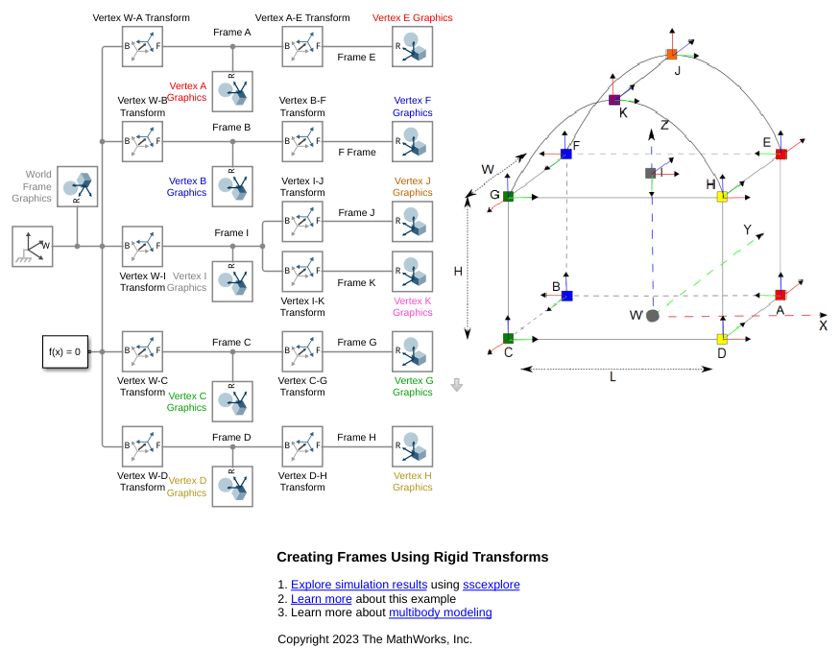
Creating Frames Using Rigid Transforms
The correspondence of coordinate frames to connection lines and frame ports. It highlights the Rigid Transform block as the fundamental method to rigidly relate nonidentical frames. The network reference frame is the world frame, located at the center of the bottom face of the cube. The other frames are the frames at the eight vertices of the cube, one at the center of the top face, and two on the upper curved section.
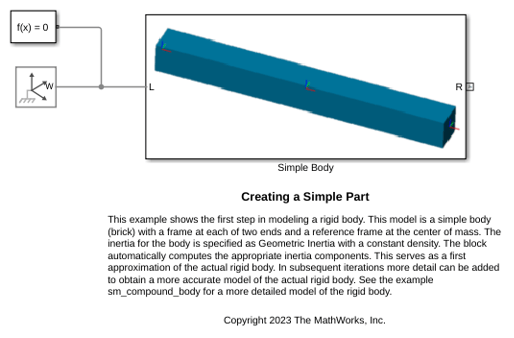
Creating a Simple Body
The first step in modeling a rigid body. This model is a simple body (brick) with a frame at each of two ends and a reference frame at the center of mass. The inertia for the body is specified as Geometric Inertia with a constant density. The block automatically computes the appropriate inertia components. This serves as a first approximation of the actual rigid body. In subsequent iterations more detail can be added to obtain a more accurate model of the actual rigid body.
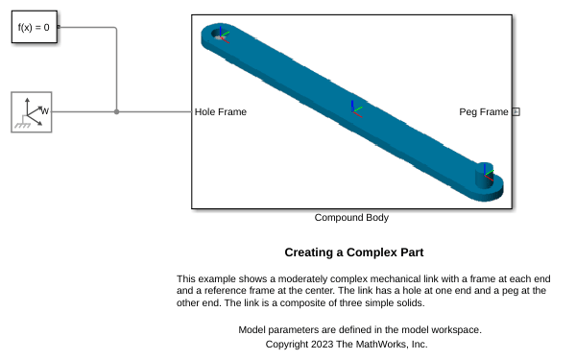
Creating a Complex Part
A moderately complex mechanical link with a frame at each end and a reference frame at the center. The link has a hole at one end and a peg at the other end. The link is a composite of three simple solids.
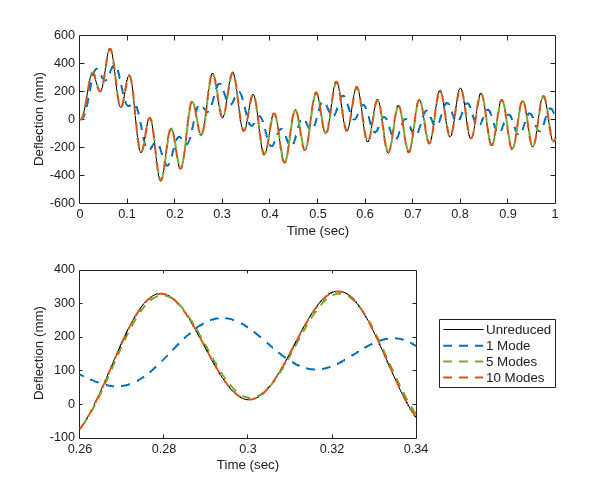
Using Modal Reduction in Flexible Bodies to Improve Simulation Performance
Use modal reduction for performance acceleration in models with flexible bodies. The model in this example uses a rectangular beam for simplicity, but you can apply modal reduction to all flexible body blocks. By only retaining the lowest-frequency modes of vibration of flexible bodies in your multibody system, you can speed up simulation while maintaining sufficient fidelity.
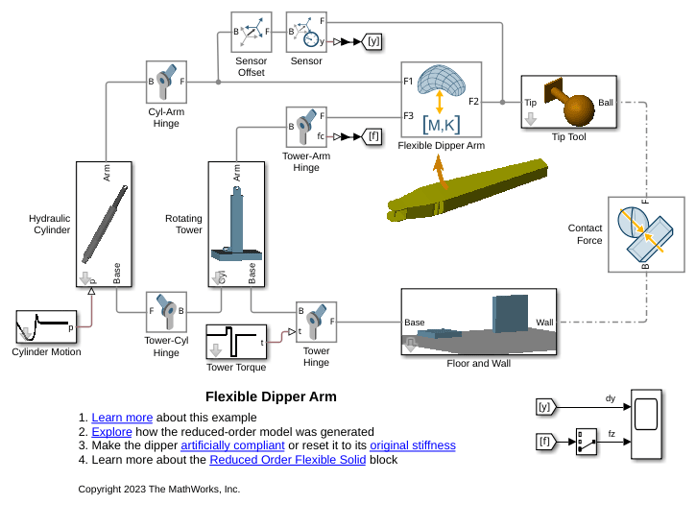
Using the Reduced Order Flexible Solid Block - Flexible Dipper Arm
Model a flexible dipper arm, such as the arm for an excavator or a backhoe, by using the Reduced Order Flexible Solid block. This block captures the mechanical behavior of a deformable body through reduced-order stiffness and mass matrices that are associated with interface frame locations. In this example, the Partial Differential Equation Toolbox™ is used to create the reduced-order model.
Create a Simple Pendulum in MATLAB
Constructs a simple pendulum in MATLAB®. It demonstrates various classes under the simscape.multibody.* namespace to build a simple multibody system in MATLAB.

