Work with Sparse Arrays on a GPU
R2026bSparse arrays provide efficient storage of double or
single data that has a large percentage of zeros. While full (or dense) matrices
store every single element in memory regardless of value, sparse matrices store only the nonzero elements and their locations. For
this reason, using sparse matrices can significantly reduce the amount of memory
required for data storage.
Create Sparse GPU Arrays
You can create a sparse gpuArray either by calling sparse with a gpuArray input, or by calling
gpuArray with a sparse
input.
Create a sparse gpuArray, G.
X = [0 1 0 0 0; 0 0 0 0 1]
X = 2×5
     0     1     0     0     0
     0     0     0     0     1
S = sparse(X)
S = 2×5 sparse double matrix (2 nonzeros)
   (1,2)        1
   (2,5)        1
G = gpuArray(S);
You can also create a sparse gpuArray directly using the
following functions. For more information, see the Extended Capabilities section of
the function reference page.
Indexing Sparse GPU Arrays
Sparse GPU arrays support referencing contiguous submatrices only, that is, rectangular blocks of adjacent elements. (since R2026b)
To access submatrix of a sparse gpuArray, index into the array
using consecutive row and column indices. For example, access the central 3-by-3
submatrix of a 10-by-10 sparse gpuArray.
A = gpuArray.speye(10);
A(4:6,4:6)
  3×3 sparse gpuArray double matrix (3 nonzeros)

   (1,1)        1
   (2,2)        1
   (3,3)        1
full(A(4:6,4:6))
     1     0     0
     0     1     0
     0     0     1
Before R2026b: Sparse GPU arrays only support referencing
whole rows or columns by index. For example, to access the fifth row of sparse
matrix A, call A(5,:) or
A(5,1:end).
To locate nonzero elements of a sparse GPU array, use the find function.
[row,col,val] = find(A);
[row,col,val]
     1     1     1
     2     2     1
     3     3     1
     4     4     1
     5     5     1
     6     6     1
     7     7     1
     8     8     1
     9     9     1
    10    10     1
To replace values or add new nonzero elements, you must construct a new sparse
gpuArray, as assigning values to sparse GPU arrays by index is
not supported. For example, use the outputs of the find
function replace the fifth nonzero element, add a new nonzero element at position
(1,7), and construct a new sparse
gpuArray.
val(5) = 0;

val(end+1) = 1;
row(end+1) = 1;
col(end+1) = 7;

A = sparse(row,col,val);
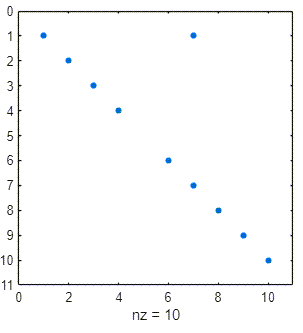
Adding or removing elements from a sparse array affects the sparsity pattern,
which changes the size of the array in memory. To plot the new sparsity pattern, use
the spy function.
spy(A)
To see the size of the array in memory, use the whos function.
whos AName Size Bytes Class Attributes A 10x10 176 gpuArray sparse
Functions That Support Sparse GPU Arrays
These tables lists functions that support sparse gpuArray input. For
limitations and usage notes for specific functions, see the Extended Capabilities section of
the function reference page.
Sparse Matrix Functions
Matrix and Array Operations
Elementary Math
Trigonometric Functions
Linear Algebra
Creator Functions
These creator functions support sparse gpuArray input. All of these
functions support generating sparse gpuArray objects by using an
existing sparse gpuArray
p with the like=p syntax.

